Train, Read, and Fine-Tune Runs
Launch a budgeted cloud run, judge a run from its per-epoch curves, and fine-tune without the default optimizer ignoring your learning rate.
A cloud GPU bills for every minute a doomed run keeps going, and the most common fine-tuning mistake costs nothing but quietly wastes the run: the default optimizer ignores the learning rate you set. This lesson trains a real model on the medical pills dataset, reads its curves with a decision rule, and fine-tunes it so your settings actually apply.
Hands-on
Launch a Run#
Click New Model on a project or dataset page. The Cloud Training tab walks through these settings:
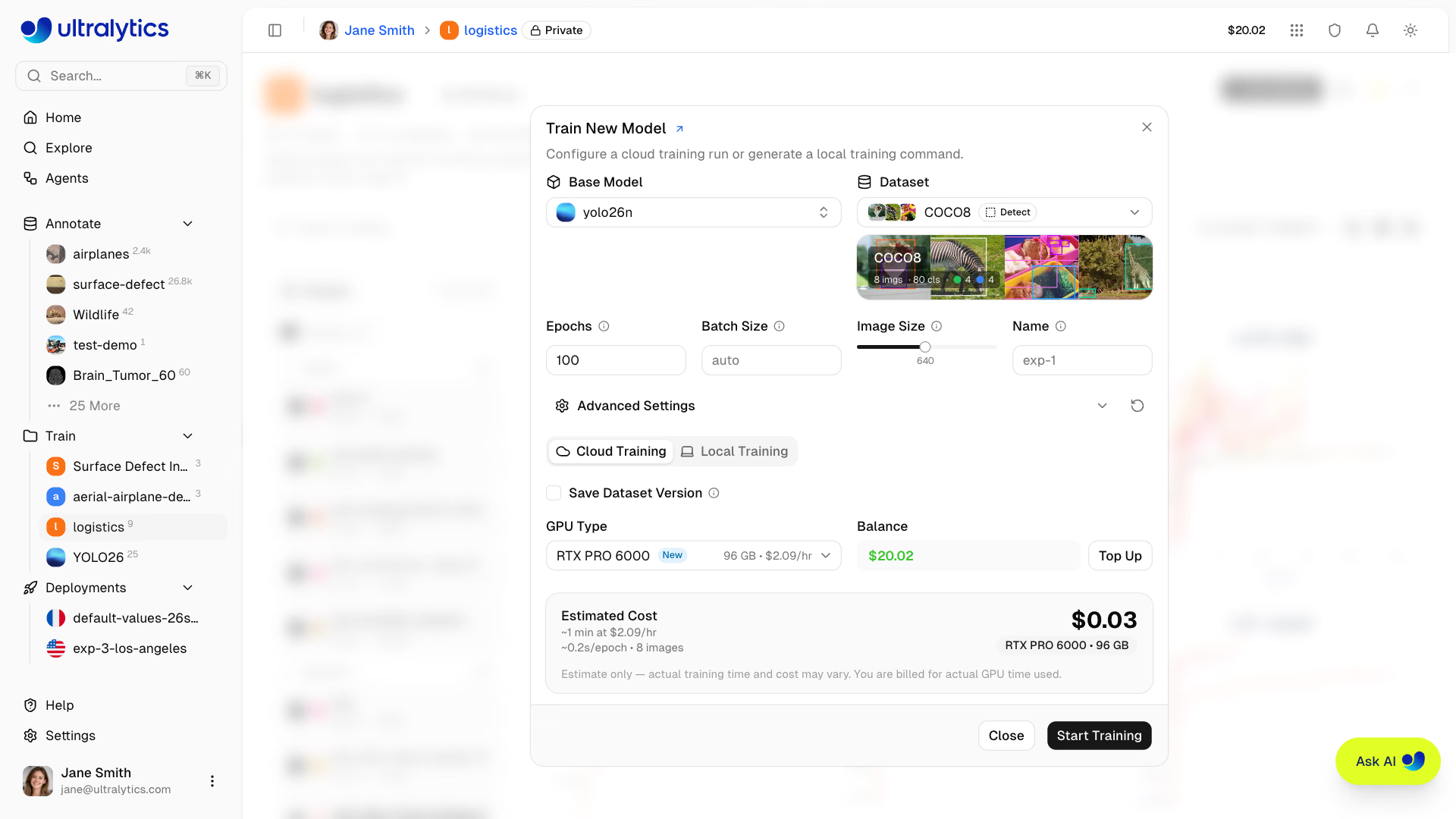
| Setting | Default | Change it when |
|---|---|---|
| Base model | Pick under Official (YOLO26 recommended) | You fine-tune: pick your earlier run under My Models |
| Dataset | — | Always turn on Save Dataset Version so the run is pinned to its data |
| Epochs | 100 | Smoke test (10–20) or very large datasets |
| Batch size | -1 (auto-fits GPU memory) | You need two runs to be exactly comparable |
| Image size | 640 | Objects are small: raise it (the slider stops at 1280; the YAML editor accepts up to 4096) |
| Advanced Settings | Defaults | 50+ model.train() arguments in YAML, including optimizer, learning rate, and augmentation |
The arguments are the same ones model.train(...) takes locally, and the model page later shows a copyable yolo train command with the non-default values.
Pick the GPU and Budget the Run#
| Tier | Examples (VRAM, price per hour) | Good for |
|---|---|---|
| Budget | RTX 2000 Ada (16 GB, $0.24), RTX A5000 (24 GB, $0.27), RTX 4090 (24 GB, $0.69) | Smoke tests, nano and small models |
| Mid | L40S (48 GB, $0.86), RTX 5090 (32 GB, $0.99), A100 SXM (80 GB, $1.49) | Medium models, larger batches |
| Default | RTX PRO 6000 (96 GB, $2.09) | Most jobs |
| High end | H100 SXM (80 GB, $3.29), H200 SXM (141 GB, $4.39) | Large datasets when time matters |
| Pro and Enterprise | B200 (180 GB, $5.89), B300 (288 GB, $7.39) | The largest jobs |
The cost card estimates duration and price before you start: about $0.23 for 1,000 images × YOLO26n × 100 epochs on the default RTX PRO 6000, and about $1.56 for 5,000 images × YOLO26s × 100 epochs on an H100 SXM, which trains roughly 3.4× faster than an RTX 4090. Billing follows actual GPU time: completed, canceled, and failed runs are charged once a GPU has started, a run needs a balance covering its estimate (at least 15 minutes of GPU time), and active runs stop if the balance goes negative, so turn on auto top-up in Settings > Billing for long jobs. Selecting a GPU cheaper than the RTX PRO 6000 can earn a free upgrade to it when Ultralytics-managed capacity is idle, still billed at your selected rate.
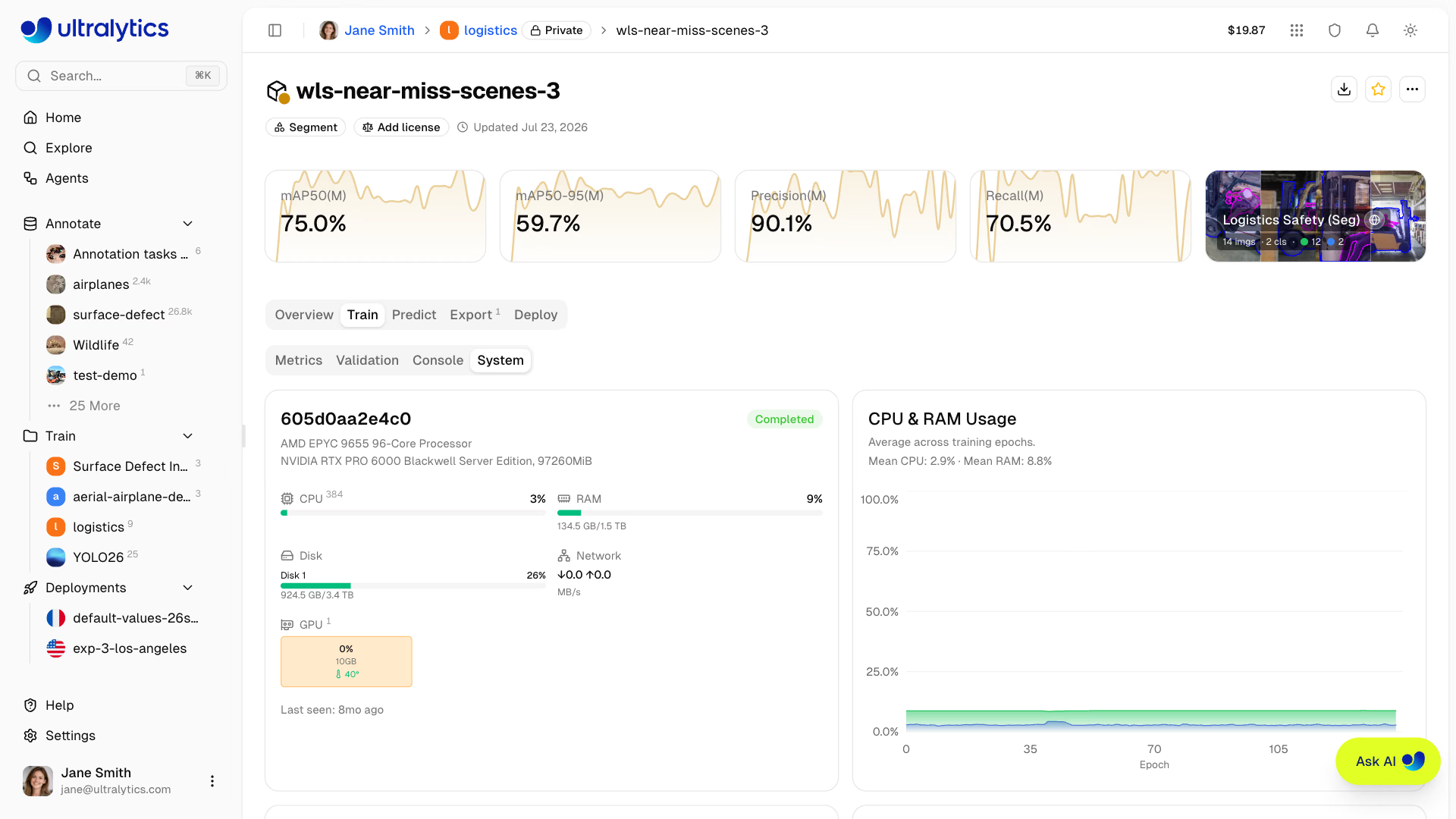
Decision rules: smoke-test a new dataset with 10–20 epochs on the default GPU first. Move to an H100 or H200 when a run takes hours and someone is waiting on it. Pick a cheaper GPU, not a faster one, when GPU utilization stays low.
Watch the Run#
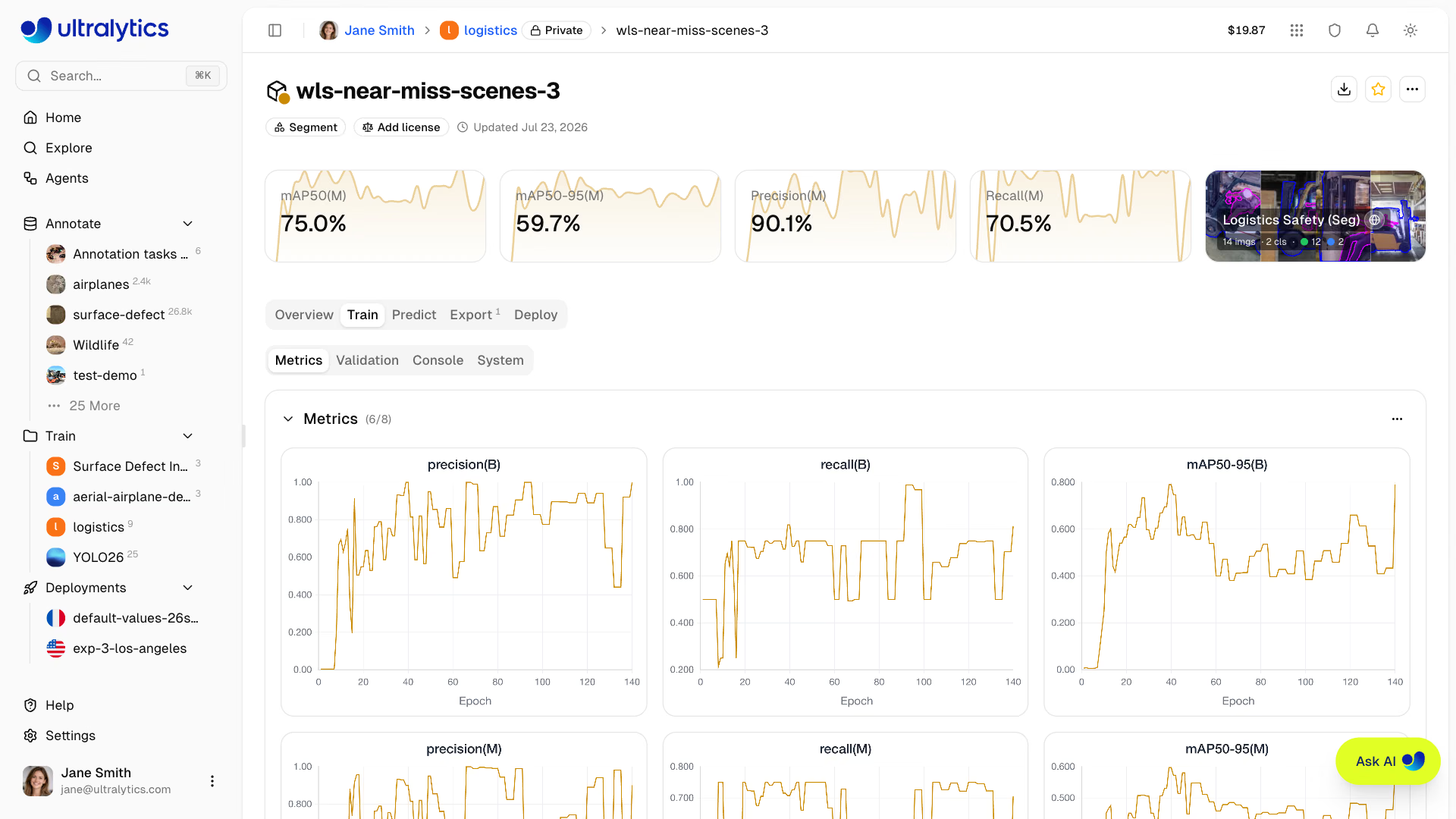
The model page's Train tab includes Metrics, Console, and System subtabs, plus Validation when validation results are available. Metrics plots task metrics, train and validation losses, and learning rate per epoch; Console keeps the last 2,000 lines and stops the run at once on a traceback or CUDA out-of-memory error; System shows GPU utilization, memory, and temperature:
A run that reports nothing for 4 hours is marked failed. The best checkpoint uploads periodically, so a canceled run keeps its best epoch so far, and Slack alerts can tell you when runs complete or fail.
Worked Example: Train, Stream, and Read a Run#
You can train anywhere and still track the run in Platform. With an API key from Settings > API Keys exported as ULTRALYTICS_API_KEY, a project of the form username/project streams charts, console, and the best checkpoint into that project:
from ultralytics import YOLO

# export ULTRALYTICS_API_KEY="..." first to stream this run into your Platform project
model = YOLO("yolo26n.pt")
results = model.train(data="medical-pills.yaml", epochs=10, imgsz=320, project="username/pill-inspection", name="v1-baseline")
print(f"mAP50-95 {results.box.map:.3f}, best checkpoint: {model.trainer.best}")
Class Images Instances Box(P R mAP50 mAP50-95)
all 23 399 0.97 0.957 0.977 0.659
mAP50-95 0.659, best checkpoint: .../runs/detect/username/pill-inspection/v1-baseline/weights/best.ptThe same command runs on Platform's GPUs when you click New Model; locally it took under two minutes on a laptop CPU at imgsz=320. The run's results.csv holds the per-epoch series the Metrics subtab plots, so a few lines turn "watch the curves" into a rule:
import pandas as pd

df = pd.read_csv("results.csv")  # the per-epoch metrics behind the Metrics subtab
df.columns = df.columns.str.strip()
m = df["metrics/mAP50-95(B)"]
best_epoch = int(df.loc[m.idxmax(), "epoch"])
recent_gain = m.iloc[-1] - m.iloc[-4]  # change over the last 3 epochs
val_loss = df["val/box_loss"]
print(f"epochs={len(df)} best mAP50-95={m.max():.3f} at epoch {best_epoch}")
print(f"gain over last 3 epochs: {recent_gain:+.3f}")
print(f"val box loss: {val_loss.iloc[0]:.3f} -> {val_loss.iloc[-1]:.3f}")
if recent_gain < 0.005 and val_loss.iloc[-1] >= val_loss.iloc[-4]:
    print("verdict: plateaued - stop, and fix the data before training longer")
elif best_epoch == len(df):
    print("verdict: still improving at the last epoch - more epochs should help")
else:
    print("verdict: converged - keep best.pt")
epochs=10 best mAP50-95=0.659 at epoch 10
gain over last 3 epochs: +0.028
val box loss: 1.367 -> 1.045
verdict: still improving at the last epoch - more epochs should helpThe best epoch is the last one, mAP50-95 rose 2.8 points over the last three epochs, and validation loss is still falling: this 10-epoch run stopped early, and a longer run or a fine-tune will help. Use the same three signals on any Platform run's Metrics subtab: where the best epoch sits, the recent gain, and the direction of validation loss.
Fine-Tune From an Earlier Model#
Pick your previous model under My Models as the base model; Platform creates a new model that starts from that checkpoint and leaves the old one unchanged. The usual advice is a lower learning rate, but with the default optimizer: auto training picks its own optimizer and learning rate and ignores lr0. The console says so in the first lines:
optimizer: 'optimizer=auto' found, ignoring 'lr0=0.01' and determining best 'optimizer' and 'lr0' automatically...
optimizer: AdamW(lr=0.002, momentum=0.9) with parameter groups 114 weight(decay=0.0), 126 weight(decay=0.0005), 126 bias(decay=0.0)
Set optimizer explicitly in Advanced Settings and the value sticks. Fine-tuning the pill model for 5 more epochs with optimizer: SGD and lr0: 0.001 logs:
optimizer: SGD(lr=0.001, momentum=0.937) with parameter groups 114 weight(decay=0.0), 126 weight(decay=0.0005), 126 bias(decay=0.0)
                   all         23        399      0.969      0.962      0.983      0.687
mAP50-95 rose from 0.659 to 0.687. You'll put that candidate through a promotion gate in the next lesson.
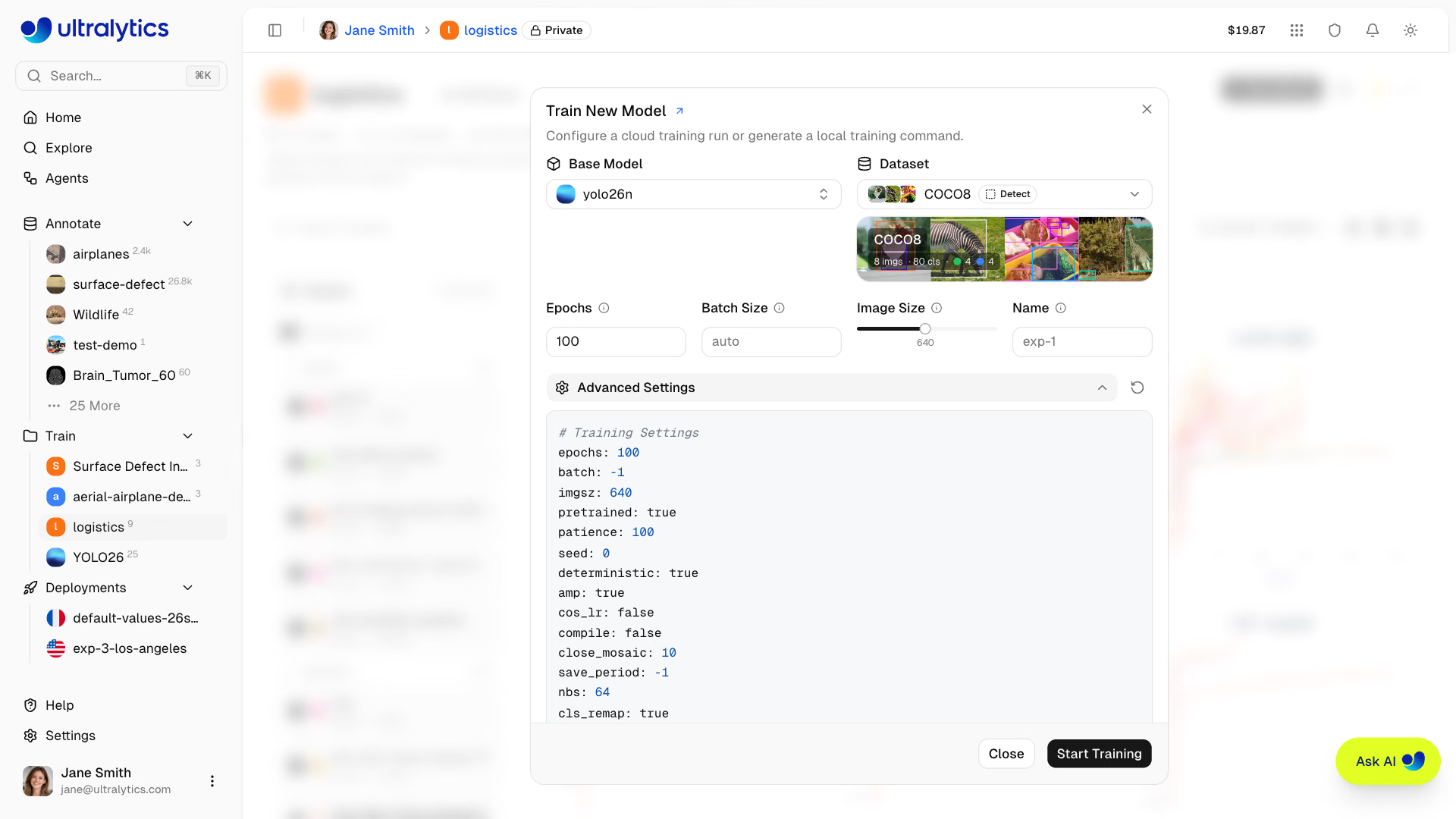
To reproduce an earlier run, open its Training Configuration table on the model page, choose Copy JSON, and paste it into Advanced Settings. The fine-tuning guide covers layer freezing, and the hyperparameter tuning guide covers systematic sweeps.
Pitfalls#
Symptom: you set lr0: 0.001, and the console shows ignoring 'lr0=...'. Fix: with optimizer: auto, training chooses the optimizer and learning rate itself. Set optimizer to SGD or AdamW alongside lr0, then confirm the optimizer: line in the console.
Symptom: the System subtab shows GPU utilization well below 80% for the whole run. Fix: data loading, not the GPU, is the bottleneck, so a faster GPU only costs more. Pick a cheaper GPU, or raise the batch size if memory allows.
Symptom: validation mAP50-95 has been flat for 10 epochs while validation loss creeps up. Fix: cancel. The best checkpoint so far is kept, and the next gain comes from the data (lessons 3 and 4), not from more epochs.
Show solution
Worked answer on medical pills: the 10-epoch baseline peaks at epoch 10 with mAP50-95 0.659, +0.028 over the last three epochs and validation box loss falling from 1.367 to 1.045, so the verdict is 'continue'. Rather than retrain from scratch, fine-tune: base model v1-baseline under My Models, 5 epochs, Advanced Settings optimizer: SGD and lr0: 0.001. The console confirms SGD(lr=0.001, momentum=0.937), and mAP50-95 reaches 0.687. Cost on the default GPU is a few cents; the cost card shows the estimate before you click Start Training, and Settings > Billing shows the actual charge after.