Curate, Dedup, and Split
Find cross-split duplicates and class gaps with two short scripts, split by the unit that matters, and freeze an audited dataset version.
A validation score is only as honest as its split. COCO128, a popular demo dataset, uses the same 128 images for train and val by design, and an accidental version of that in your own data gives you a 'great' model that fails at the next camera. This lesson runs two audits on real data, a duplicate check and a class-per-split audit, then splits by camera and freezes a version that has passed both.
Hands-on
Worked Example: Find Images Shared Between Splits#
Platform keeps one copy of an image per split and asks how to handle collisions on upload, but nothing stops the same image or scene landing in both train and val. Check before you upload, and again after merging datasets:
import hashlib
from pathlib import Path

from ultralytics.data.utils import check_det_dataset

data = check_det_dataset("coco128.yaml")  # any local YOLO dataset YAML before you upload it

def hashes(split_dir):
    return {hashlib.md5(p.read_bytes()).hexdigest(): p.name for p in Path(split_dir).rglob("*.jpg")}

train, val = hashes(data["train"]), hashes(data["val"])
shared = train.keys() & val.keys()
print(f"train {len(train)} images, val {len(val)} images, identical in both: {len(shared)}")
print("examples:", sorted(val[h] for h in shared)[:3])
train 128 images, val 128 images, identical in both: 128
examples: ['000000000009.jpg', '000000000025.jpg', '000000000030.jpg']Every COCO128 validation image is also a training image. That's intentional for a smoke-test dataset, and it's exactly why its validation mAP says nothing about generalization. In your data, any non-zero count is a leak: move or delete one copy of each before training.
Catch Near-Duplicates With Clustering#
Hashes only catch identical bytes. Consecutive video frames, burst photos, and re-encoded copies differ by a few pixels. Open the scatter-chart icon in the gallery toolbar and click Analyze Dataset (20 to 200,000 images, uploaded datasets only):
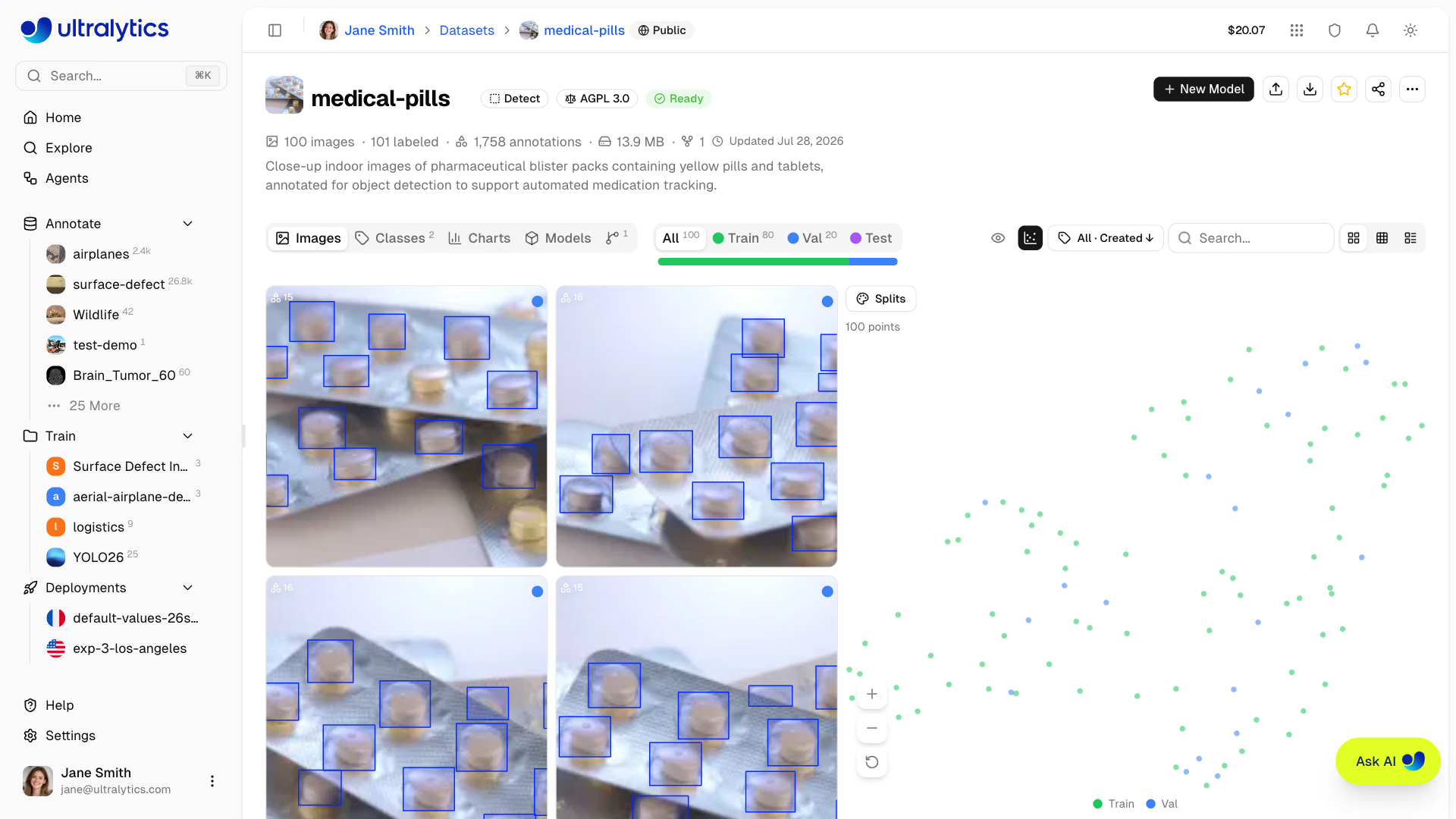
- Color by Splits: a tight island that mixes train and val points is a near-duplicate leak.
- Color by Clusters or Classes: a huge single-class island shows what the dataset over-represents; isolated points are outliers (wrong camera, corrupted frame, mislabeled image).
- Lasso or click a region to filter the gallery to those images (up to 1,000), then delete, move, or relabel them.
The same embeddings power Find similar images in the image context menu, which adds look-alikes from public and team datasets to train as unlabeled images: the fastest way to fill a gap the audit below finds.
Worked Example: Audit Classes per Split#
Download the NDJSON export from the dataset header or the Versions tab. Each line after the header is one image with its split and labels, so a few lines of Python count every class in every split. Here it runs on the public COCO8 export:
import json
from collections import Counter, defaultdict

counts = defaultdict(Counter)  # split -> class name -> instances
images = Counter()
with open("coco8.ndjson") as f:  # the NDJSON export from the dataset header or Versions tab
    header = json.loads(f.readline())
    names = header["class_names"]
    for line in f:
        record = json.loads(line)
        images[record["split"]] += 1
        for box in (record.get("annotations") or {}).get("boxes", []):
            counts[record["split"]][names[str(box[0])]] += 1

print("images per split:", dict(images))
for name in sorted(set(counts["train"]) | set(counts["val"])):
    train, val = counts["train"][name], counts["val"][name]
    flag = "missing in train" if not train else "too few in val" if val < 10 else ""
    print(f"{name:<14} train {train:>3}  val {val:>3}  {flag}")
images per split: {'train': 4, 'val': 4}
bowl train 3 val 0 too few in val
broccoli train 1 val 0 too few in val
dog train 0 val 1 missing in train
elephant train 0 val 2 missing in train
giraffe train 2 val 0 too few in val
horse train 0 val 2 missing in train
orange train 4 val 0 too few in val
person train 0 val 10 missing in train
potted plant train 1 val 1 too few in val
umbrella train 0 val 1 missing in train
vase train 1 val 0 too few in val
zebra train 1 val 0 too few in valReading it: the header line holds class_names; each detection box is [class, x, y, w, h]. Missing in train means the model can't learn the class at all, and its val AP will be zero. Too few in val means its AP will swing wildly between runs: with 7 pallets in val, one missed pallet moves pallet AP by about 14 points. COCO8 is an 8-image smoke test, so every class fails; your production version should print no flags. Fix gaps by collecting more examples, not by tuning.
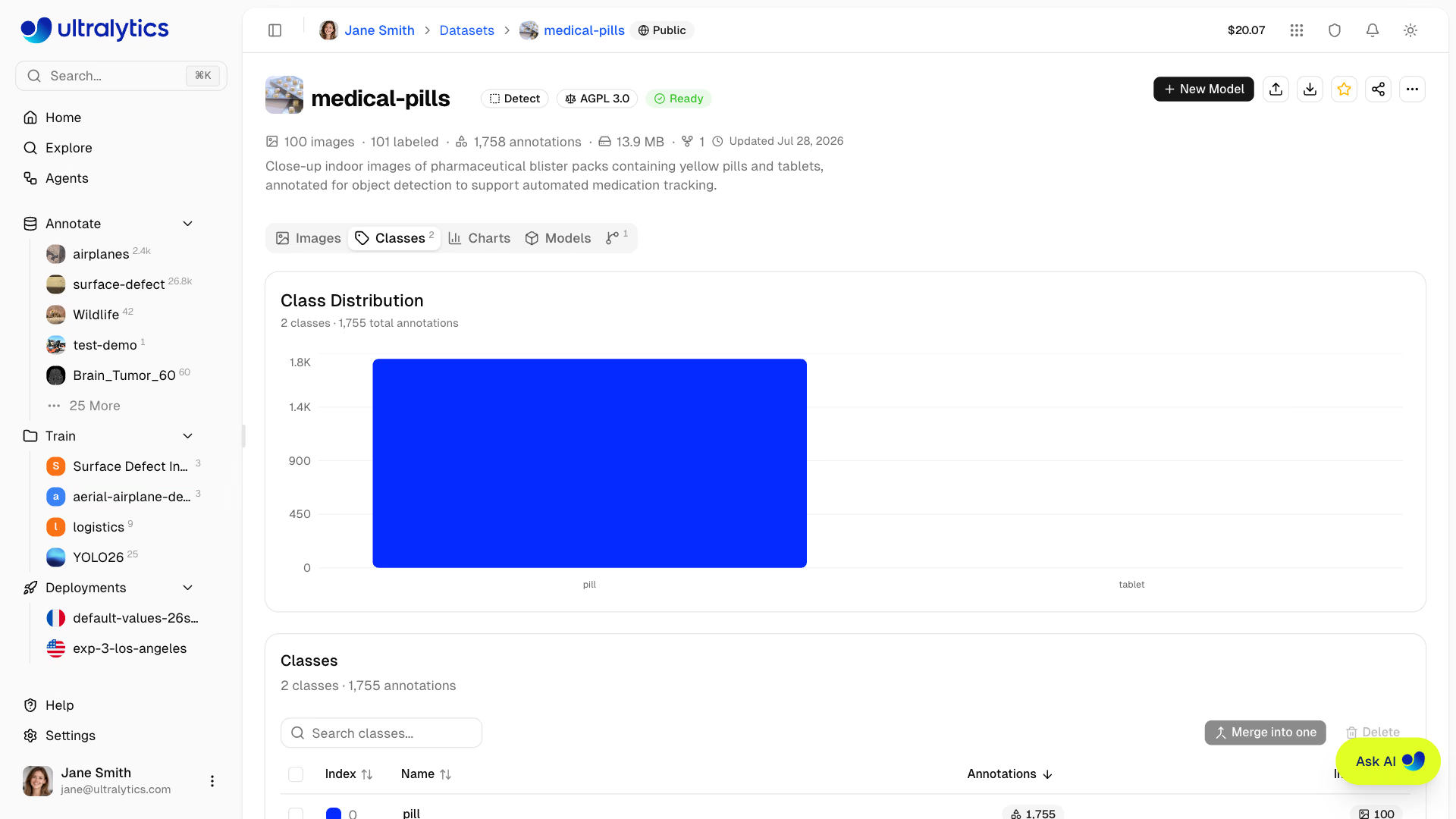
The Classes tab shows the same counts for the live dataset, with a log-scale switch for imbalanced data. Merge into one folds duplicates such as car, automobile, and vehicle into one class without losing annotations; Delete removes a class and all of its annotations.
Split by the Unit You'll Generalize Across#
Frames from one camera, session, or day are correlated. If they appear in both train and val, the model is graded on scenes it has already seen. Hold out whole units of whatever varies in production: new cameras, so hold out cameras; same cameras on new days, so hold out days.
Platform's split tools differ in exactly this respect:
| Tool | How it assigns | Use it for |
|---|---|---|
train/, val/, test/ folders in an upload | Keeps your assignment | Group splits prepared offline |
| Split filter set before uploading | Every file in that upload goes to the selected split | Uploading one camera per split |
| Move to split in Table view | Moves the selected images | Fixing specific images |
| Split bar, Redistribute Splits | Randomly reassigns all images | Independent photos only |
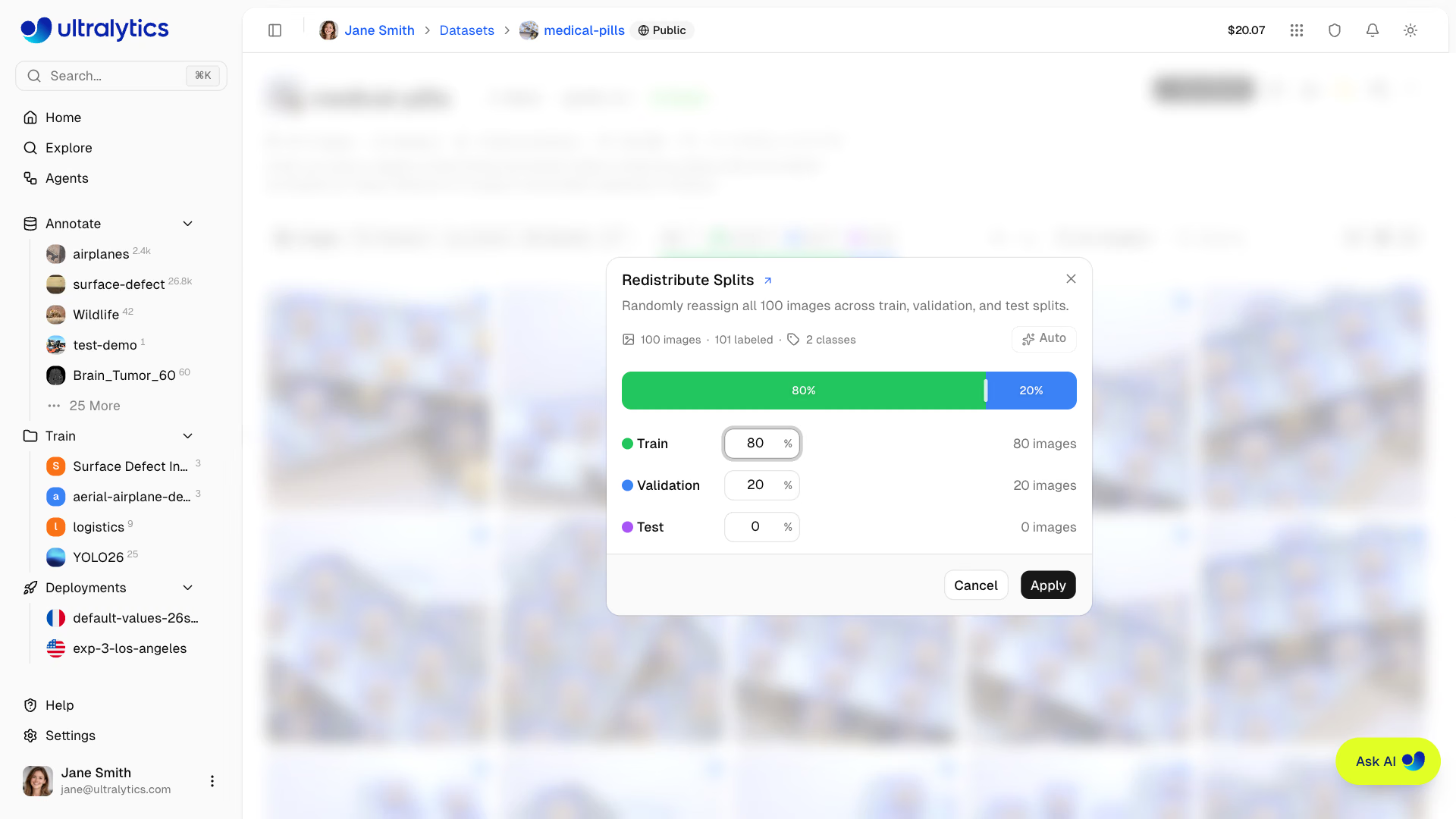
The Split the Dataset Correctly lesson covers choosing the unit; for very small datasets, k-fold cross-validation squeezes more signal out. To check groups after upload, add a group key to the class audit (for example record["file"].split("_")[0] for files named cam07_000123.jpg, or a camera field in image metadata) and report any group that appears in two splits.
Freeze a Version That Passed#
Training needs a fixed snapshot. In the Versions tab, enter a description ("v5: cam07 held out, +80 pallet images") and click New Version. Each version is an immutable, numbered NDJSON snapshot you can download, compare, or restore; the training dialog's Save Dataset Version does the same at launch and reuses a matching version when nothing changed. Versions aren't available for connected cloud or On Premise datasets.
Pitfalls#
Symptom: after clicking Auto 80/20, validation mAP jumps and production accuracy doesn't. Fix: Redistribute Splits randomly reassigns every image (and removes exact duplicates on the way), putting neighboring frames in train and val. Use upload folders or Move to split for grouped data.
Symptom: an old export or a model's predictions suddenly carry the wrong class names. Fix: class IDs are positional, so merging or deleting a class shifts every higher index down. Create a version before any class change, and retrain rather than reuse old label files.
Symptom: a new run scores 5 points lower, and nothing else changed. Fix: metrics are only comparable on the same split. When you change the split, note it in the version description and rerun the baseline on the new version before comparing anything.
Show solution
Worked answer for an 8-camera forklift dataset. The duplicate check finds 41 identical images between train and val, all from a re-uploaded folder; delete the val copies. The audit, extended with group = record['file'].split('_')[0], shows cam02 in both train and val, so select its val images in Table view and Move to split > Train. It also flags pallet: train 63, val 7, too few in val: use Find similar images on two pallet images to add 40 unlabeled look-alikes, label them, and move 15 cam07 pallet images into val so cam07 stays whole. Rerun: 0 duplicates, 0 leaking groups, pallet val 22. Clustering colored by split shows no mixed islands. Save v5: cam07 val, cam08 test, +40 pallets.