Privacy, Regions, and Compliance
Choose data and deployment regions from your contracts, keep data private, anonymize images before upload, and answer a pre-launch compliance checklist.
Vision data is often personal: faces, license plates, a worker's badge on a factory floor. A data region picked casually at signup, or one dataset left Public, can break a customer contract, and both are hard to undo. This lesson works through the region, visibility, and anonymization decisions with a runnable pre-upload blur step, and ends with a checklist you can hand to a compliance reviewer.
Hands-on
Data Region vs Deployment Region#
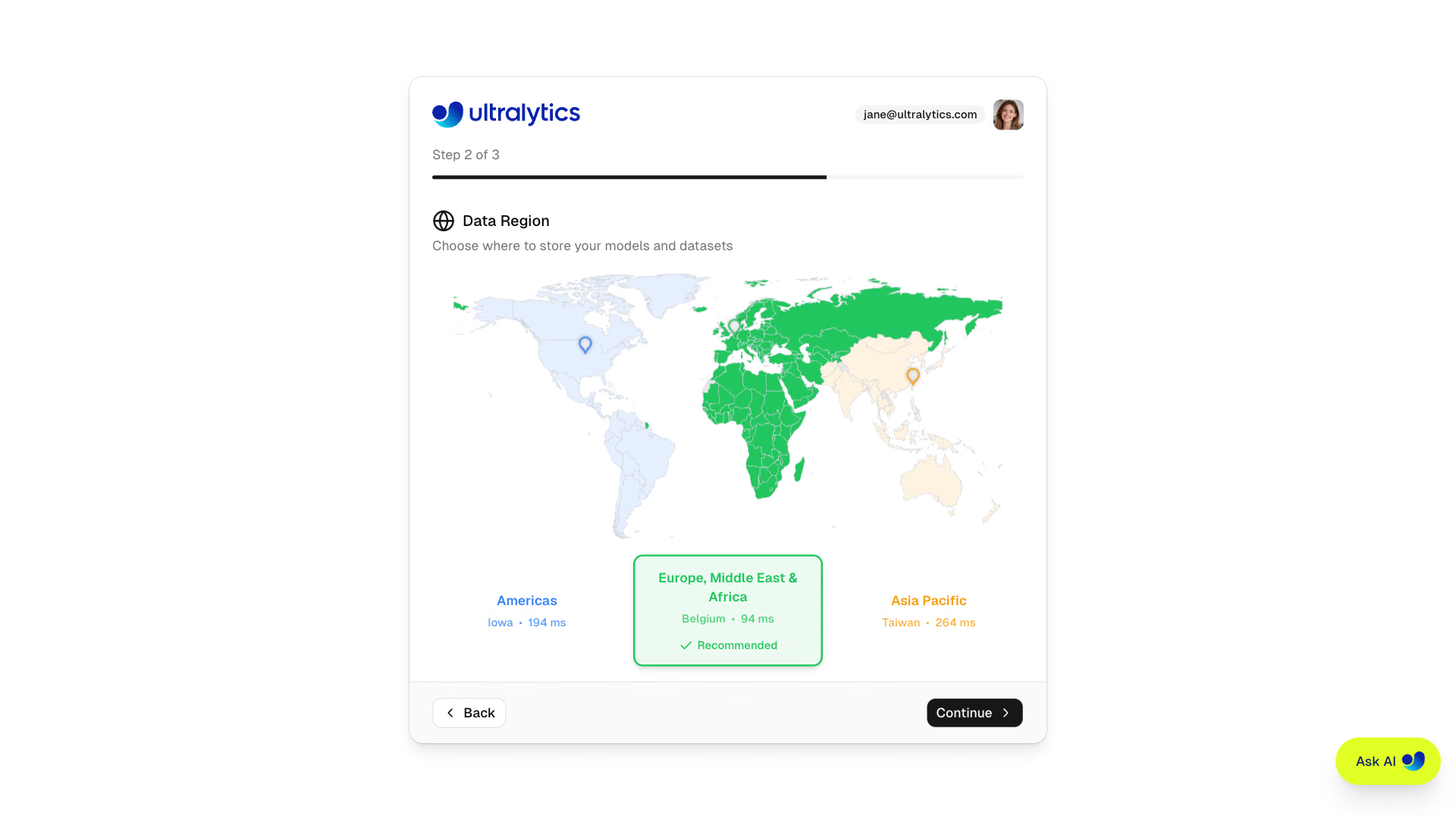
During onboarding Platform measures latency to its three data regions and recommends the closest. Your choice becomes the account's dataRegion:
| Data region | Location | Typical choice for |
|---|---|---|
US (us) | Iowa, USA (us-central1) | Americas |
EU (eu) | St. Ghislain, Belgium (europe-west1) | Europe, Middle East, and Africa; GDPR-driven residency |
AP (ap) | Changhua, Taiwan (asia-east1) | Asia-Pacific |
The data region governs where Platform stores datasets, models, and managed training data, and where shared inference runs. Three things sit outside it:
- Dedicated endpoints run in whichever of the 42 deployment regions you pick, so an EU workspace can serve from Tokyo, and each request's image goes there.
- Account-level data such as profile, billing, and activity is processed globally, as the privacy policy describes.
- Compute location. The data region is a storage guarantee. If a contract restricts where processing happens, confirm GPU and endpoint locations with Ultralytics before training, or use On Premise.
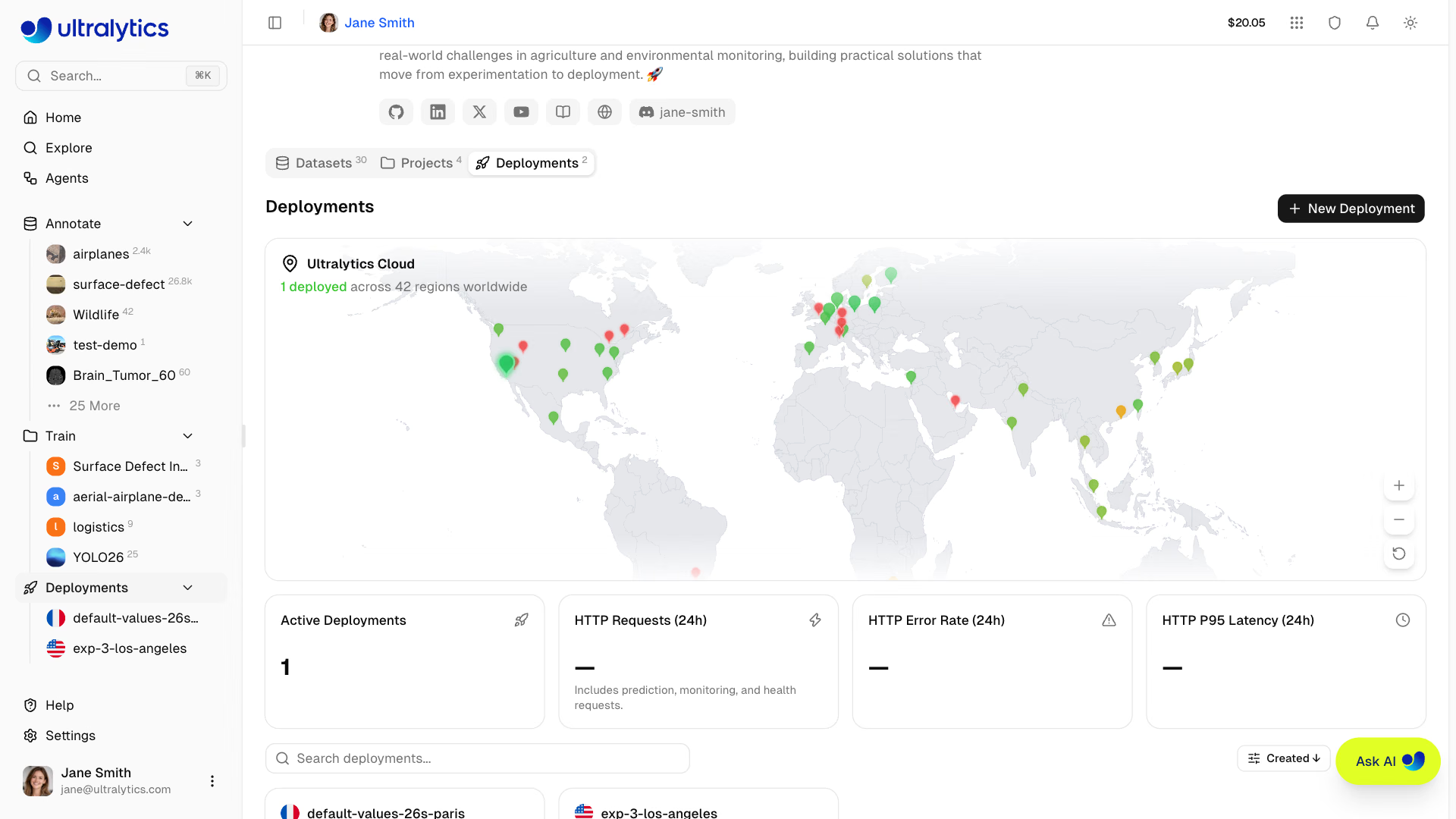
You can't change the data region yourself; it takes a support request. Team workspaces inherit the data region of the person who creates them. Work the decision from the contract, not from latency:
When latency and residency pull apart for multinational users, choose deliberately: one endpoint in the data region (simplest compliance, slower for distant users), endpoints in several regions (faster, but each region receives request images, so check each against the contract), or separate workspaces per jurisdiction (strongest separation, more to operate).
Visibility and Access#
New datasets and projects default to Public on Free and Pro and Private on Enterprise. Public resources can be viewed by anyone, including signed-out visitors, and cloned from Explore; making one private later doesn't remove copies others already cloned. Team workspaces (Pro and Enterprise) use four roles:
| Role | Can |
|---|---|
| Owner | Everything, including members, billing, team deletion, and ownership transfer |
| Admin | Edit everything; manage billing, settings, and members below admin |
| Editor | Create, edit, and delete resources; upload; train, export, and deploy |
| Viewer | Read team resources and members |
Each dedicated endpoint is bound to one API key, and only the workspace owner can view key values. Deleting that key doesn't lock the endpoint; stopping or deleting the deployment does.
Worked Example: Anonymize Before Upload#
Platform blurs faces: right-click an image and choose Blur faces (free), run it on a whole dataset from More actions ($1.00 per 1,000 images), or turn on blurring in the New Dataset dialog so uploads are blurred during processing at no charge. It doesn't blur license plates, screens, or whole bystanders, and it isn't available on connected datasets.
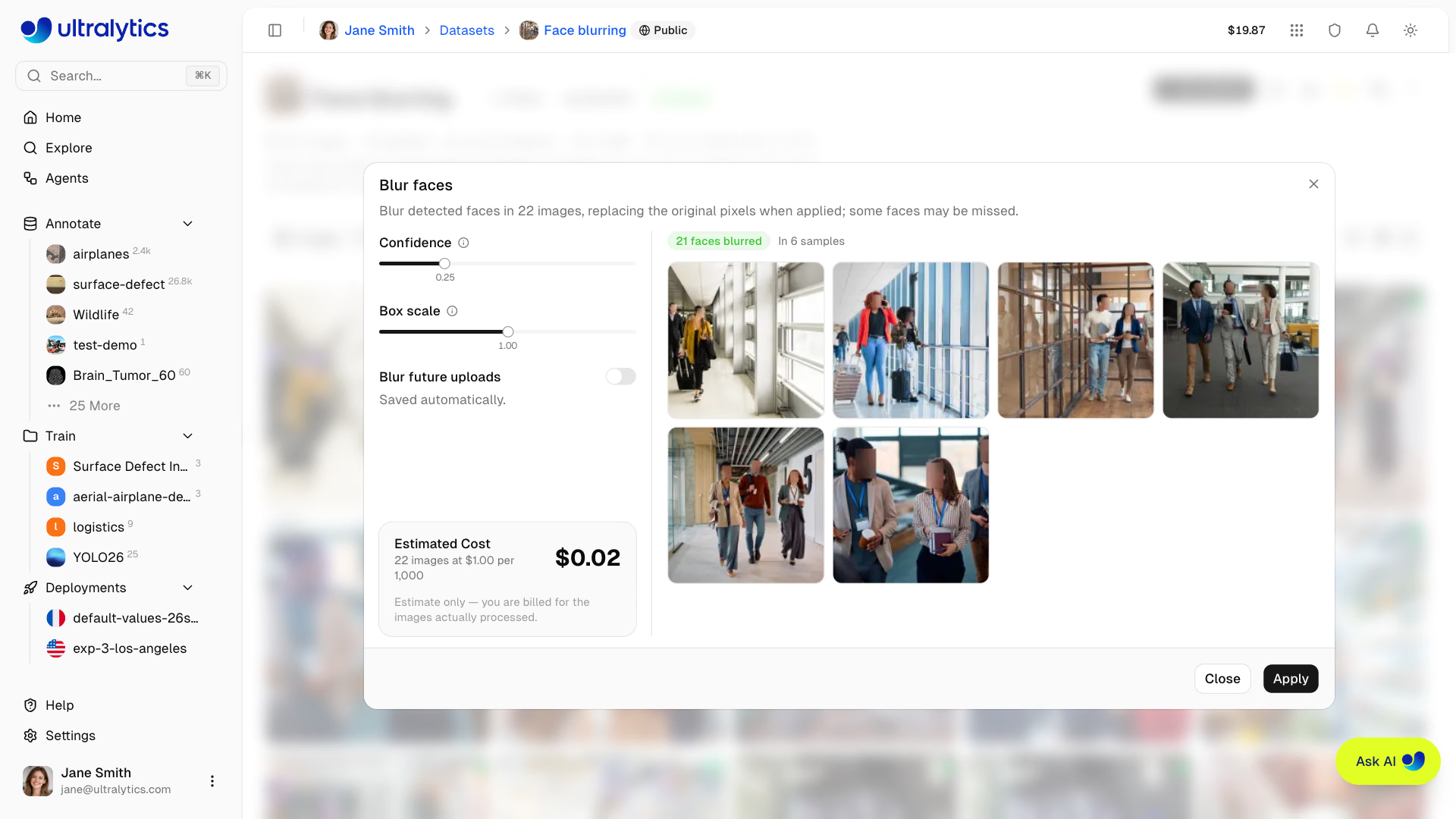
For anything else, anonymize before the pixels leave your machine. In a forklift project, for example, people are bystanders, not a class you detect, so blur each one completely:
from pathlib import Path

import cv2

from ultralytics import YOLO

model = YOLO("yolo26n.pt")  # swap in a plate or face detector for those objects
out = Path("anonymized")
out.mkdir(exist_ok=True)

for result in model.predict("https://ultralytics.com/images/bus.jpg", classes=[0], conf=0.25, verbose=False):
    img = result.orig_img
    for x1, y1, x2, y2 in result.boxes.xyxy.int().tolist():
        img[y1:y2, x1:x2] = cv2.GaussianBlur(img[y1:y2, x1:x2], (51, 51), 0)  # irreversible once saved
    cv2.imwrite(str(out / Path(result.path).name), img)
    print(f"{Path(result.path).name}: blurred {len(result.boxes)} people")
bus.jpg: blurred 4 peopleclasses=[0]limits detection to people; pointpredictat your frames folder to process a whole batch.conf=0.25is deliberately low: for privacy, an extra blurred patch is cheaper than a missed person. Spot-check the output anyway, because detectors miss small and occluded people.- Upload only the
anonymized/folder, and keep originals where your retention policy says.
Decision rules: blur faces only (Platform's tool) when people are a class you detect, because blurring whole bodies would destroy the signal the model learns from. Blur whole bystanders when people aren't a class. Mask plates when your rules treat them as personal data, as the EU and California often do. When only counts or alerts may leave the site, run inference at the edge and send metadata instead of frames.
Retention and Deletion#
| Item | What deletion does |
|---|---|
| Datasets, projects, models | Move to Trash for 30 days (still counting toward storage), then are deleted permanently |
| Deployments | Deleted immediately and permanently, including metric and log history |
| Monitoring examples and statistics | Live in endpoint memory; gone on stop or restart unless saved to a dataset |
| Your account | Settings > Profile > Delete My Account; team owners delete or transfer teams first |
For access requests, Export All Data in Settings > Profile produces a JSON file of your metadata (profile, datasets, projects, models, activity), not images or weights.
A Pre-Launch Compliance Checklist#
- What leaves the customer environment? Frames, predictions, or only aggregates?
- Which data region, and which deployment regions? Does each satisfy the contract?
- Is every sensitive dataset and project Private? Check for public clones made earlier.
- Are faces blurred and plates masked where required? Who spot-checks what blurring missed?
- May you train on this customer's data at all? If not, keep it in a separate workspace.
- How do you delete one customer's images on request? Name the datasets and the Trash step.
- Who has which role, and who holds the deployment API keys?
Ultralytics publishes its security posture, including ISO/IEC 27001:2022 and SOC 2 Type I compliance, on the security page. Have a compliance reviewer sign off on any regulated deployment.
Pitfalls#
Symptom: a residency audit finds request images processed in Iowa. Fix: the data region doesn't constrain endpoints. Deploy in a region that satisfies the contract, and list every endpoint region in the checklist.
Symptom: after anonymizing, the person detector's recall collapses. Fix: blurring whole people removes the features the model learns. Blur only faces when people are a target class, and whole bodies only when they're bystanders.
Symptom: you made a dataset private, and copies still appear on Explore. Fix: clones made while it was public belong to their owners. Treat Public as irreversible for sensitive data, and set visibility at creation.
Show solution
Worked answer for the German pill line: (1) Frames leave the plant only for labeling; predictions go to the MES. (2) Data region EU; endpoint europe-west1. (3) Both datasets and the project are Private; no clones exist. (4) Operators' hands and faces sometimes appear: Blur faces on upload is on, and the QA lead spot-checks 20 images a week. (5) The contract allows training on plant data. (6) Each customer's images live in their own dataset, so a deletion request means deleting that dataset and then using Empty Trash instead of waiting 30 days for automatic deletion. (7) Ravi is owner and holds the endpoint key; Ana is editor; QA is viewer. anonymize.py on 20 frames blurred 23 people; one partly occluded operator was missed and masked by hand, so the threshold dropped to 0.15.