Monitor Health and Accuracy
Read Platform's endpoint metrics and prediction statistics, alert from a scheduled health check, and catch accuracy drift with a holdout job.
An endpoint can return 200 OK on every request while its accuracy falls 5 points because the night shift turned the lights down. Platform shows how each endpoint behaves, but it doesn't page anyone and can't see accuracy without labels. This lesson builds the two scheduled checks that close the gap and rehearses the accuracy alert with a simulated night shift.
Hands-on
What Platform Shows#
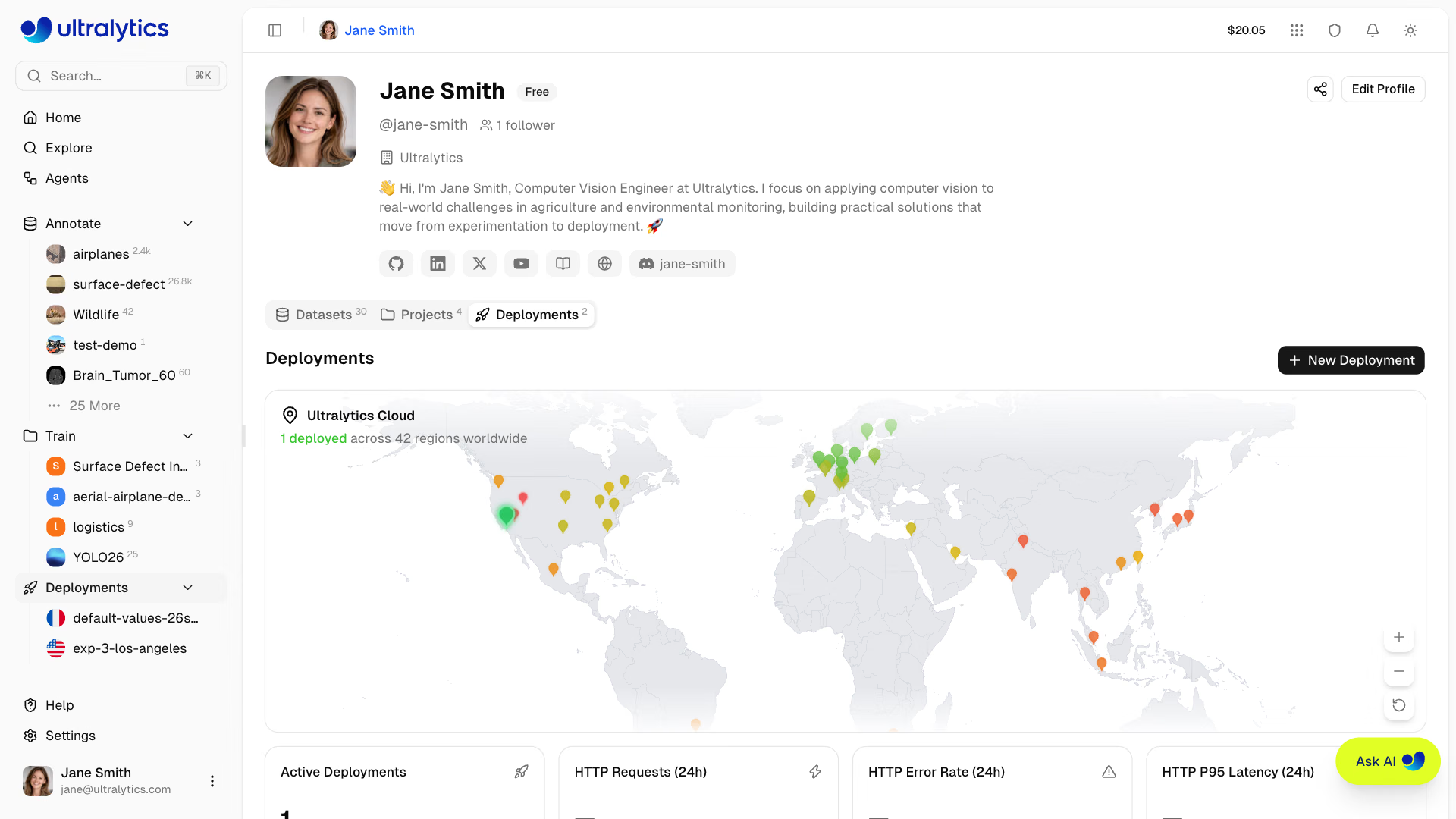
| Signal | Where | How long it lasts |
|---|---|---|
| HTTP requests, error rate (4xx and 5xx), P95 latency | Cards on the deployment page and Deployments tab, refreshed every minute | Cards cover 24 hours; the API serves 1 hour to 30 days |
| Health | Endpoint card on the Overview tab | Live; retried automatically while unhealthy |
| Logs | Logs tab: 20 most recent, Errors filter | API returns up to 200 entries per request, with paging |
| Prediction statistics and temporary examples (up to 100 images) | Monitoring tab | Serving instance memory only |
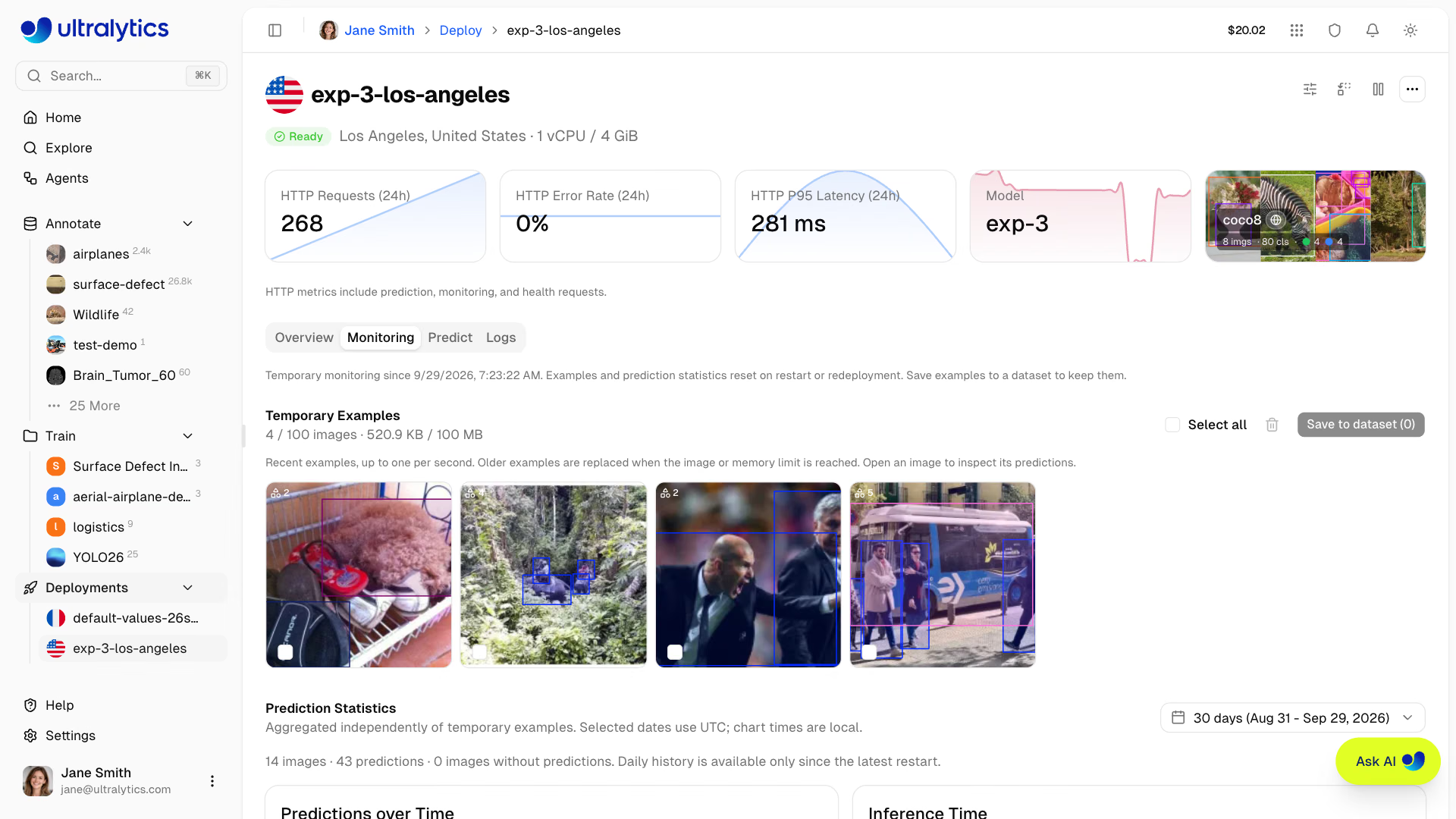
Two caveats shape everything else. Metrics are collected only while the endpoint is Ready, and deleting a deployment ends access to its history. Monitoring tab statistics and examples are lost whenever the endpoint stops, restarts, resizes, or replaces its model: a live view, not an archive.
Worked Example: A Scheduled Endpoint Check#
Platform turns the error-rate card red above 5% and Slack can announce when a deployment becomes ready or fails to start, but there are no threshold alerts. Run this check every 5 minutes from cron, CI, or your monitoring agent, and page on a non-zero exit:
from ultralytics_platform import Platform

OWNER, DEPLOYMENT = "your-username", "yolo26n-iowa"  # from the deployment page URL
P95_BUDGET_MS, MAX_ERROR_RATE = 300, 1.0  # errorRate is a percentage

with Platform() as client:  # reads ULTRALYTICS_API_KEY
    health = client.deployments.health(OWNER, DEPLOYMENT)
    summary = client.deployments.metrics(OWNER, DEPLOYMENT, range="1h", view="overview")["summary"]
    print(
        f"healthy={health['healthy']} requests={summary['totalRequests']} "
        f"p95={summary['p95LatencyMs']:.0f} ms errors={summary['errorRate']:.2f}%"
    )
    if not health["healthy"] or summary["p95LatencyMs"] > P95_BUDGET_MS or summary["errorRate"] > MAX_ERROR_RATE:
        for entry in client.deployments.logs(OWNER, DEPLOYMENT, severity="ERROR,WARNING", limit=5)["entries"]:
            print(entry["timestamp"], entry["severity"], entry["message"][:120])
        raise SystemExit(1)  # non-zero exit lets cron, CI, or your pager treat it as an alert
Run against a stubbed API returning a healthy endpoint, it prints one line and exits 0; with P95_BUDGET_MS = 100 the same data exits 1:
healthy=True requests=1200 p95=180 ms errors=0.40%healthpings the endpoint and returnshealthy,status, andlatencyMs. It also wakes a scaled-to-zero endpoint, so a 5-minute schedule doubles as a keep-warm ping.metrics(..., view="overview")returnstotalRequests,errorRate(a percentage), andp95LatencyMsfor the range.logspulls the latest errors and warnings, so the alert arrives with its first clue.
Install the SDK with pip install -U ultralytics-platform (the SDK requires Python 3.11+). Page on sustained breaches only, for example three failing checks in a row, and give every alert a one-line runbook entry.
Worked Example: Track Accuracy With a Holdout#
Request metrics can't see accuracy. A holdout can: 200–500 production-realistic images, labeled carefully, in their own private dataset version, never trained on. Score the deployed checkpoint weekly and append to a history file:
import json
import sys
from datetime import date
from pathlib import Path

from ultralytics import YOLO

DEPLOYED = "pills-v1.pt"  # the exact best.pt behind the endpoint
HOLDOUT = sys.argv[1] if len(sys.argv) > 1 else "medical-pills.yaml"  # labeled, never trained on

metrics = YOLO(DEPLOYED).val(data=HOLDOUT, split="val", plots=False, verbose=False)
history = Path("holdout_history.jsonl")
rows = [json.loads(line) for line in history.read_text().splitlines()] if history.exists() else []
row = {"date": date.today().isoformat(), "data": HOLDOUT, "map50_95": round(float(metrics.box.map), 4)}
history.write_text("".join(json.dumps(r) + "\n" for r in [*rows, row]))

baseline = rows[0]["map50_95"] if rows else row["map50_95"]
drop = baseline - row["map50_95"]
print(f"holdout mAP50-95 {row['map50_95']:.3f} (baseline {baseline:.3f}, drop {drop:+.3f})")
if drop > 0.01:  # more than 1 mAP point below the deployment-day baseline
    raise SystemExit("ALERT: holdout accuracy regressed - open the retraining runbook")
The first run records the deployment-day baseline. Then rehearse the alert before you need it: this script builds a "night shift" copy of the holdout with the same labels and images at 15% brightness:
import shutil
from pathlib import Path

import cv2

from ultralytics.data.utils import check_det_dataset

src = Path(check_det_dataset("medical-pills.yaml")["path"])
dst = Path("pills-night")
(dst / "images/val").mkdir(parents=True, exist_ok=True)
for img in (src / "images/val").glob("*.jpg"):  # darken every holdout image to mimic a dim night shift
    cv2.imwrite(str(dst / "images/val" / img.name), (cv2.imread(str(img)) * 0.15).astype("uint8"))
shutil.copytree(src / "labels/val", dst / "labels/val", dirs_exist_ok=True)  # same labels, darker pixels
Path("pills-night.yaml").write_text(f"path: {dst.resolve()}\ntrain: images/val\nval: images/val\nnames:\n  0: pill\n")
print("wrote pills-night.yaml")
$ python holdout_check.py
holdout mAP50-95 0.659 (baseline 0.659, drop +0.000)
$ python simulate_night_shift.py
wrote pills-night.yaml
$ python holdout_check.py pills-night.yaml
holdout mAP50-95 0.609 (baseline 0.659, drop +0.050)
ALERT: holdout accuracy regressed - open the retraining runbookEvery request on the night shift would still return 200 in milliseconds, yet the model lost 5 mAP points. Only the holdout sees it. Refresh the holdout each quarter with newly labeled production images, and reset the baseline whenever you deploy a new model. The model monitoring guide and the Observability and Drift lesson cover statistical drift tests.
Read the Monitoring Tab for Drift#
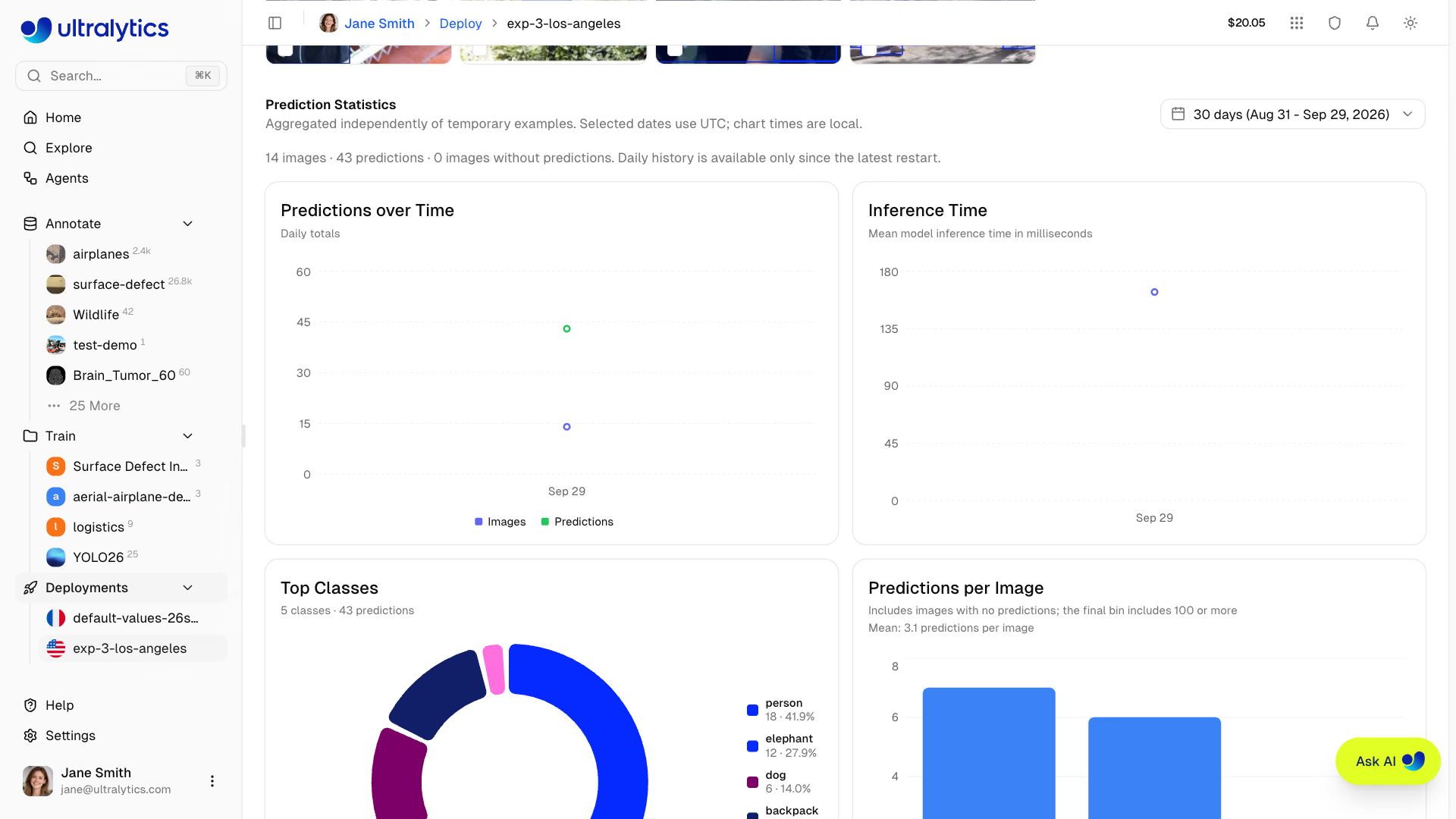
Note the charts' shape in the week you deploy, then compare. Confidence measures certainty, not correctness, so read these together with the holdout:
| Pattern | Likely cause | Action |
|---|---|---|
| Confidence drifts down, holdout holding | Benign domain shift | Watch; save examples for the next dataset version |
| Confidence down and holdout down | Real accuracy regression | Retrain (lesson 10) |
| Box sizes or locations shift suddenly | Camera moved, lens or site changed | Check the camera before touching the model |
| Predictions per image drop, confidence stable | Camera offline, quieter scene, or a client bug | Investigate upstream |
| P95 latency rises, inference time flat | Request handling, payload size, or capacity | Infrastructure, not the model |
Feed Production Images Back#
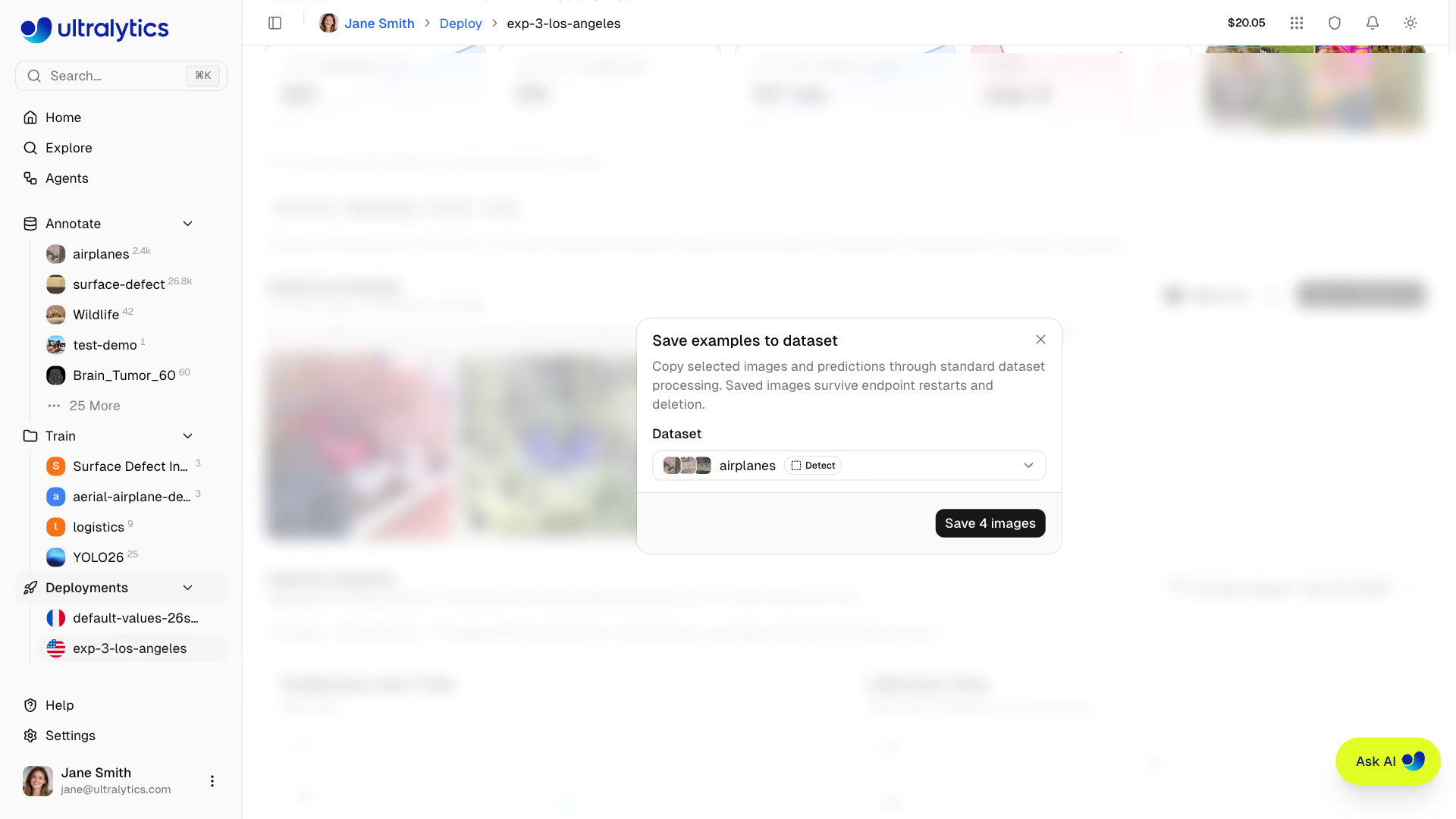
In the Monitoring tab, select examples and click Save to dataset; they go through normal ingestion with their predictions and keep deploymentId and region in their metadata. The Agents Collect Uncertain Detections template does the same for a whole dataset, predicting through your deployment and copying images with detections in a confidence range into a review dataset.
Pitfalls#
Symptom: the examples you meant to label are gone after a resize or model swap. Fix: they live in the serving instance's memory. Save them to a dataset and wait for ingestion to finish before you stop, resize, or replace the model.
Symptom: the holdout alert fires right after shipping a better model, or never fires again. Fix: the baseline is the first row of the history. Start a fresh holdout_history.jsonl (or record a new baseline row) each time you replace the model.
Symptom: the error rate spikes during a traffic burst while health is green. Fix: 429 responses count as errors but mean 'at capacity'. Check the logs; if it's 429s, spread traffic across more endpoints or use a larger custom size.
Show solution
Worked answer for the pill endpoint: a cron entry */5 * * * * python endpoint_check.py || ./page-oncall.sh with P95_BUDGET_MS = 300 and MAX_ERROR_RATE = 1.0; setting the budget to 100 ms against a real P95 of 180 ms exits 1 and pages, so the wiring works. The weekly CI job runs holdout_check.py with DEPLOYED = "pills-v2.pt" on the 300-image private holdout version: baseline 0.69. The night-shift rehearsal drops it by 0.05 and prints the ALERT line with exit 1, which fails the CI job and notifies the channel. Twelve Monitoring examples from the evening shift go to pill-review via Save to dataset, each tagged with deploymentId and europe-west1.