Train Your First Model
Fine-tune YOLO26 on your dataset with one call, read the live training log line by line, and find best.pt and the plots that matter in the run folder.
Training a detector from scratch takes days and huge datasets. Fine-tuning a pretrained YOLO26 on about a hundred images takes about a minute on a laptop CPU, because transfer learning reuses everything the model already knows about edges, shapes, and objects.
In this lesson you'll train on the pill dataset, watch mAP50-95 climb from a near-zero baseline to 0.66 in ten epochs, and learn to tell from the log, early, whether a run is healthy or wasting your time.
Hands-on
Worked Example: Train the Pill Detector#

Ultralytics Platform's Train New Model dialog asks for the same choices as the code below — base model, dataset, epochs, image size — and either runs them on cloud GPUs or generates the matching local command. These settings finish in about a minute on a laptop CPU:
from ultralytics import YOLO

model = YOLO("yolo26n.pt")  # pretrained on COCO
results = model.train(data="my_dataset/data.yaml", epochs=10, imgsz=320, name="pills_v1")
print(results.save_dir)
CLI and Python are equivalent. epochs=10 and imgsz=320 keep CPU runs short; with a GPU, drop both and accept the defaults (epochs=100, imgsz=640), because more epochs and pixels almost always help. Train mode runs this loop for you:
Read the Log Line by Line#
Real output, trimmed to the first and last two epochs:
optimizer: AdamW(lr=0.002, momentum=0.9) with parameter groups ...
Using 92 train, 23 val images for fraction=1.0 at imgsz=320
      Epoch    GPU_mem   box_loss   cls_loss    l1_loss  Instances       Size
       1/10         0G      1.818      3.899   0.008805        206        320: 100% 6/6 3.3s
                   all         23        399      0.957      0.805      0.927      0.548
       2/10         0G      1.434      3.291   0.006285        208        320: 100% 6/6 4.4s
                   all         23        399      0.953      0.911      0.964      0.592
       ...
       9/10         0G      1.121      1.103   0.005143        194        320: 100% 6/6 5.0s
                   all         23        399      0.949      0.957      0.975      0.656
      10/10         0G      1.174      1.125   0.005068        212        320: 100% 6/6 5.1s
                   all         23        399       0.97      0.957      0.977      0.659
10 epochs completed in 0.015 hours.
optimizer: AdamW(lr=0.002 ...): the defaultoptimizer=autopicked the optimizer and learning rate for you.Using 92 train, 23 val images: confirm these match your dataset. A smaller number means skipped images.GPU_mem 0G: training on the CPU. On a GPU you'd see memory in use here;0Gon a GPU machine means it isn't being used.- Each epoch's first row: the three losses for the training split, plus how many labeled objects were in the last batch (
Instances) and the image size. - Each epoch's
allrow: precision, recall, mAP50, and mAP50-95 on the validation split. This row is the one to watch.
| Column | Meaning | Healthy trend |
|---|---|---|
box_loss | How far predicted boxes are from labeled boxes | Falls, then flattens |
cls_loss | How wrong the class scores are | Falls, then flattens |
l1_loss | YOLO26's direct box-coordinate error | Falls |
P, R | Precision and recall on the val split | Rise and stay balanced |
mAP50, mAP50-95 | Detection quality; mAP50-95 also rewards tight boxes | Rise, then plateau |
Here, mAP50-95 went from the 0.0002 baseline to 0.548 after one epoch and 0.659 after ten. Precision dipped to 0.80 at epoch 4 and recovered: single epochs are noisy on 23 validation images, so judge the trend, not one row. Decision rules while a run is live:
- Losses fall and mAP rises: let it run.
- Losses flat from epoch 1: stop with Ctrl+C and check the labels and YAML.
- Precision far above recall: the model is cautious and misses objects. Recall far above precision: it fires on things that aren't there.
- mAP flat for many epochs: more epochs won't help; change the data or
imgsz.
The three losses are the parts of YOLO26's loss function; the performance metrics guide explains each metric in depth.
Find What the Run Wrote#
Everything lands in runs/detect/pills_v1/:
| File | What it's for |
|---|---|
weights/best.pt | Checkpoint with the best validation fitness across epochs; use it for inference and export |
weights/last.pt | Latest checkpoint; used to resume an interrupted run |
args.yaml | Every argument the run used, for reproducing it |
results.csv, results.png | Per-epoch losses and metrics, as data and as plots |
labels.jpg | Class counts and box size and position histograms |
train_batch*.jpg | Augmented training batches with labels drawn |
val_batch*_labels.jpg, val_batch*_pred.jpg | Ground truth vs predictions on validation images |
confusion_matrix*.png, Box*_curve.png | Confusion matrix and precision, recall, F1, and PR curves |
Open train_batch0.jpg before anything else. If its boxes don't sit on objects, the labels are wrong, and no number of epochs will fix that.
Change These Arguments First#
| Argument | Default | Change it when |
|---|---|---|
epochs | 100 | Short CPU experiments or tiny datasets that start overfitting (lower); large datasets still improving (higher, 200–300) |
imgsz | 640 | Small objects (raise to 1024 or 1280) or CPU experiments (lower) |
batch | 16 | Batch size: lower it on out-of-memory errors, or use -1 to auto-size to about 60% of GPU memory |
patience | 100 | Stop early when validation fitness hasn't improved for N epochs, e.g. patience=20 |
device | auto | Force cpu, mps, a GPU index like 0, or several like [0, 1] |
name | train | Always: name runs after what changed |
model.train(data="my_dataset/data.yaml", epochs=200, imgsz=1024, batch=-1, patience=20, name="pills_v1_1024")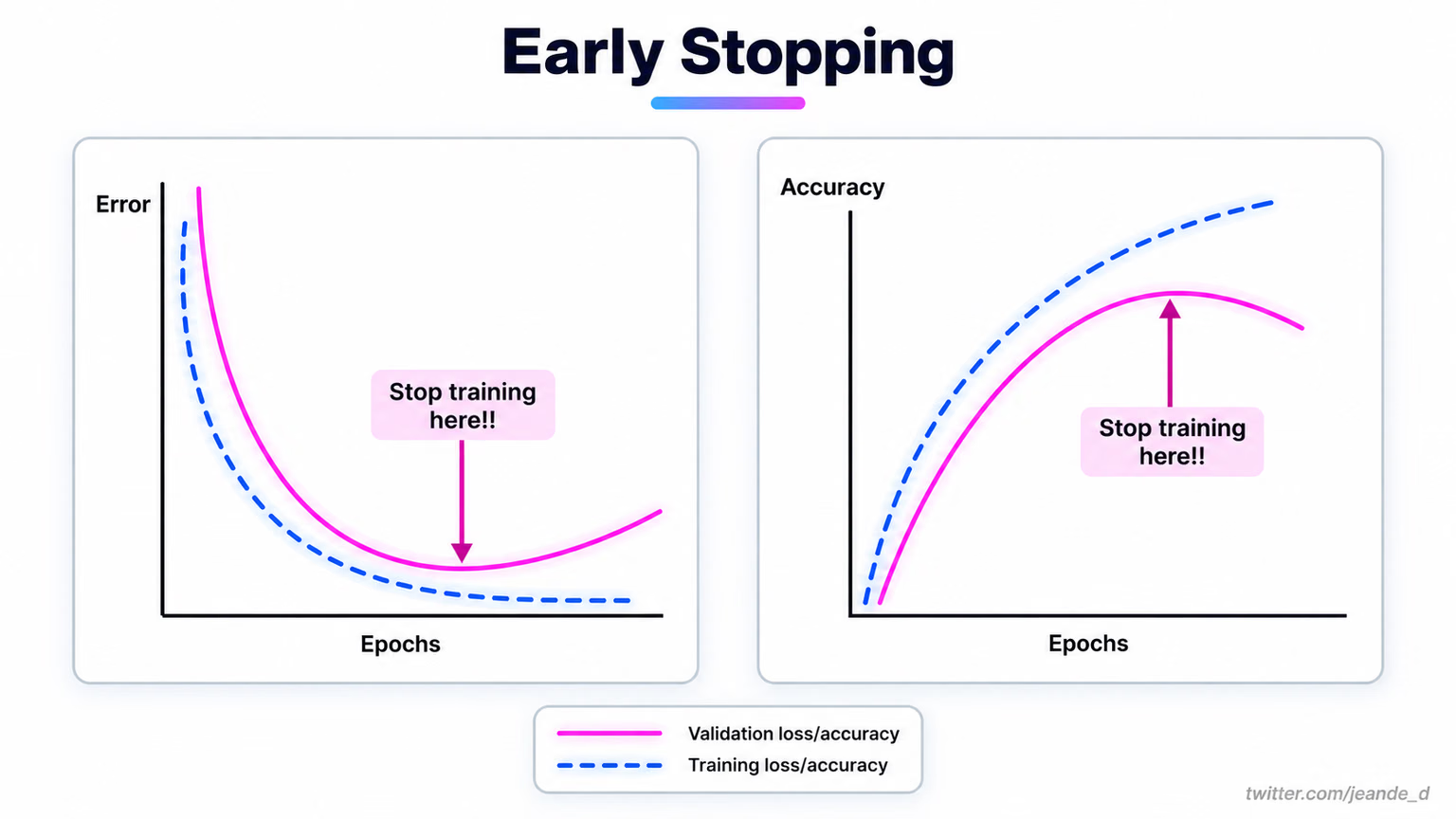
The patience default of 100 means a 100-epoch run never stops early. A tighter value ends a stalled run where the curves above say it should; best.pt is kept either way.
With several GPUs, pass a list such as device=[0, 1, 2, 3]: Ultralytics launches distributed data-parallel (DDP) training for you, batch is the total across GPUs, and training uses mixed precision by default (amp=True). When a run outgrows your laptop, the same dataset and arguments run on cloud GPUs on Ultralytics Platform, as covered in Train, Read, and Fine-Tune Runs.
Avoid These Mistakes#
Symptom: mAP near zero after many epochs on a small dataset. Cause: the model came from yolo26n.yaml (random weights) instead of yolo26n.pt. Fix: always start from a pretrained .pt. Training from scratch only pays off for backbone research or very large datasets.
Symptom: CUDA out of memory in the first epoch. Fix: halve batch, or set batch=-1 so AutoBatch picks a size that fits. Lowering imgsz also helps, but changes what the model can see.
last.pt is the final epoch, which may be worse than an earlier one. best.pt is the epoch with the best validation fitness, and it's the one to validate, export, and ship.
The model training tips guide covers the remaining arguments, and the hyperparameter tuning guide covers learning rate sweeps and the genetic tuner. The fine-tuning guide covers layer freezing.
Show solution
from ultralytics import YOLO

model = YOLO("yolo26n.pt")
results = model.train(data="my_dataset/data.yaml", epochs=10, imgsz=320, name="pills_v1")
print(results.save_dir)  # runs/detect/pills_v1
Baseline (yolo26n.pt, no pill class): mAP50 0.001, mAP50-95 0.0002
pills_v1 (10 epochs, imgsz 320, CPU, ~1 min): mAP50 0.977, mAP50-95 0.659
Plateau: mAP50-95 gains shrink after epoch 8 (0.649 -> 0.656 -> 0.659)
train_batch0.jpg: yes, boxes sit on the pillsExact numbers vary slightly with hardware and package version.