Validate and Diagnose
Validate best.pt against a baseline, read the confusion matrix, per-class numbers, and prediction images, and turn them into a specific fix list.
A single mAP number tells you how much the model gets wrong, not what. Missed small objects, two classes confused with each other, and loose boxes all lower mAP, and each needs a different fix. Guess wrong and you spend a week collecting the wrong data.
In this lesson you'll run Val mode on best.pt, compare it with the baseline, and read the confusion matrix and prediction images until you can write the next round's fix list. The performance metrics guide is the long-form companion.
Hands-on
Worked Example: Validate best.pt#
from ultralytics import YOLO

model = YOLO("runs/detect/pills_v1/weights/best.pt")
metrics = model.val(data="my_dataset/data.yaml")

print(f"precision {metrics.box.mp:.3f}  recall {metrics.box.mr:.3f}")
print(f"mAP50 {metrics.box.map50:.3f}  mAP50-95 {metrics.box.map:.3f}")
Real output from val.py:
precision 0.970  recall 0.957
mAP50 0.977  mAP50-95 0.659
The plots land in a new runs/detect/val folder (then val-2, ...). Put the numbers next to the baseline:
| Model | mAP50 | mAP50-95 |
|---|---|---|
Pretrained yolo26n.pt (no pill class) | 0.001 | 0.0002 |
pills_v1 (10 epochs, imgsz 320, CPU) | 0.977 | 0.659 |
What the numbers say:
- Precision 0.970, recall 0.957: balanced. Few false alarms, few misses.
- mAP50 0.977: with a loose overlap requirement, the model finds nearly every pill.
- mAP50-95 0.659: with strict overlap, many boxes aren't tight. A gap this large points at localization — more epochs, a larger
imgsz, or tighter labels — rather than at missing data.
For how precision, recall, and mAP trade off, see Reading Detection Metrics Honestly.
Know Which File Answers Which Question#
| Question | File |
|---|---|
| Which classes get confused, and which get missed? | confusion_matrix_normalized.png |
| How does each class trade precision for recall? | BoxPR_curve.png |
| Which confidence threshold to deploy at? | BoxF1_curve.png: its peak is a good starting conf |
| What do the failures look like? | val_batch0_labels.jpg vs val_batch0_pred.jpg |
| Is the model overfitting? | results.png in the training folder |
Read the Confusion Matrix#
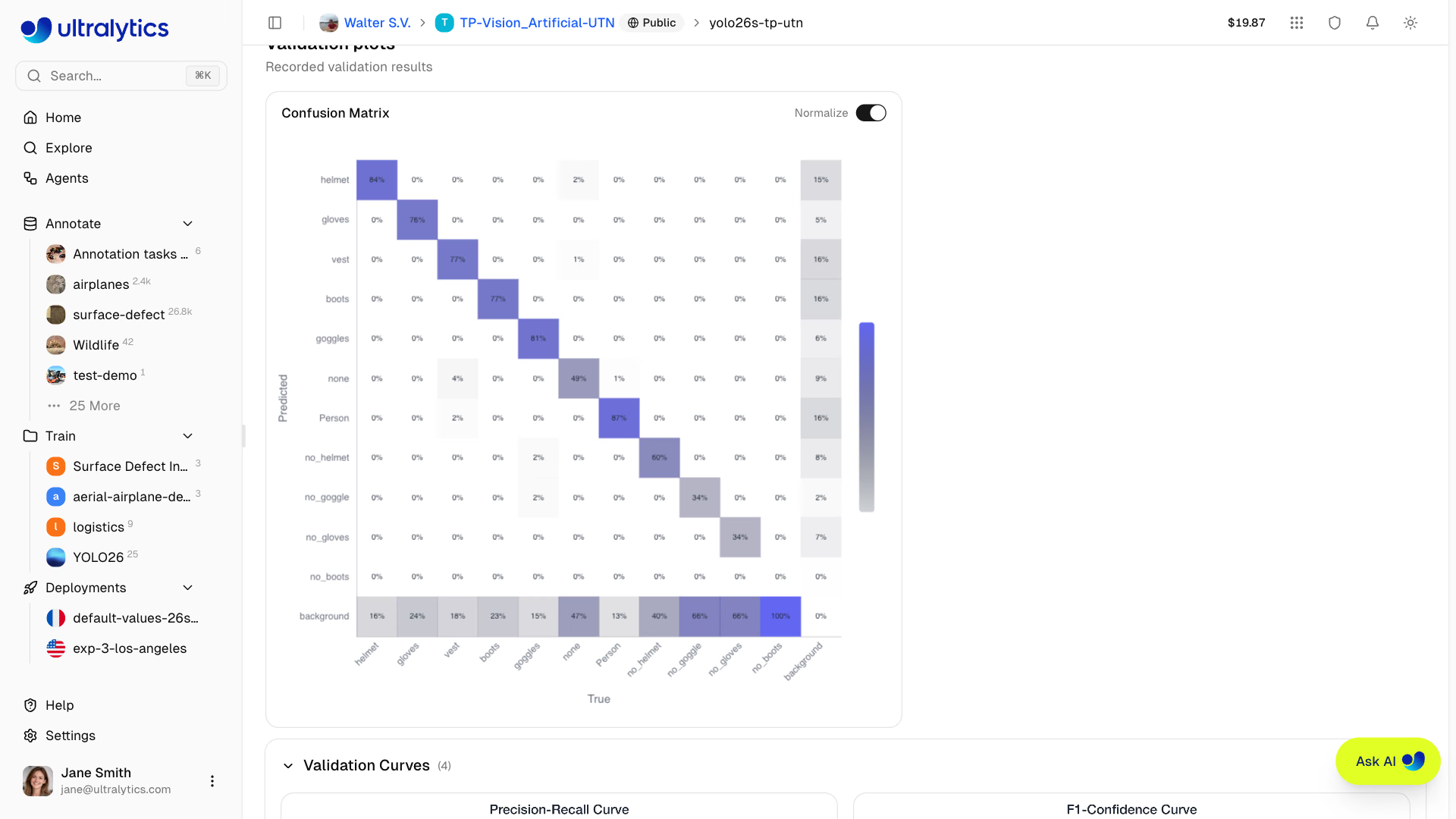
The confusion matrix is the single most useful diagnostic. In Ultralytics plots, columns are the true class and rows are the predicted class, with an extra background row and column. The normalized version divides each column by its total, so each column shows where that class's objects went. Pills has one class, so practice on this three-class warehouse example (illustrative numbers):
| Predicted ↓ / True → | forklift | person | pallet | background |
|---|---|---|---|---|
| forklift | 0.78 | 0.03 | 0.18 | 0.45 |
| person | 0.04 | 0.91 | 0.00 | 0.20 |
| pallet | 0.10 | 0.00 | 0.65 | 0.35 |
| background | 0.08 | 0.06 | 0.17 | — |
- Diagonal: share of each class detected correctly. Pallet, at 0.65, is the weak class.
- Off-diagonal: confusions. 18% of true pallets were predicted as forklifts, and 10% of forklifts as pallets.
- Background row: misses. 17% of pallets weren't detected at all.
- Background column: false positives, boxes drawn on empty space. Of those, 45% were called forklifts.
Each cell type maps to a fix:
| Pattern | Fix |
|---|---|
| Two classes confuse each other | Add examples that separate them: forklifts carrying pallets, pallets stacked next to forklifts |
| High background row (misses) | More examples of that class, in the conditions it's missed |
| High background column (false alarms) | Background images of the scenes that trigger them, such as empty aisles |
Read the Per-Class Numbers#
With several classes, the validation log prints one row per class, and metrics.box.maps holds per-class mAP50-95 for code. Continuing the warehouse example:
                 Class     Images  Instances      Box(P          R      mAP50  mAP50-95)
                   all         50        102       0.78       0.71       0.74       0.51
              forklift         30         45       0.85       0.78       0.81       0.58
                person         40         50       0.92       0.88       0.91       0.64
                pallet          5          7       0.58       0.48       0.51       0.31
pallet is far below the others, and it has only 7 instances in validation. Either the model is bad at pallets or there's too little validation data to tell. Both lead to the same step: collect more pallets, for training and validation.
Look at the Failures#
Open val_batch0_labels.jpg and val_batch0_pred.jpg side by side. The differences are your failures as pictures, and patterns among them are the diagnosis: misses at the image edge, small objects, one lighting condition, one confusing look-alike. Dataset patterns like these beat hyperparameter tuning almost every time.
In the pill model's validation images, clearly visible pills score near 1.0. The low-confidence boxes, around 0.3–0.5, cluster on pills partly hidden under another blister pack and on pills cut off by the image edge. That isn't something to tune away with conf; it's a labeling-policy question. Should a half-hidden pill count? Decide, write the rule down, and label every image the same way.
Then open results.png. Training and validation losses should fall together. If training loss keeps falling while validation loss climbs, the model is overfitting; both stuck high is underfitting. The bias-variance tradeoff is the lens for both.
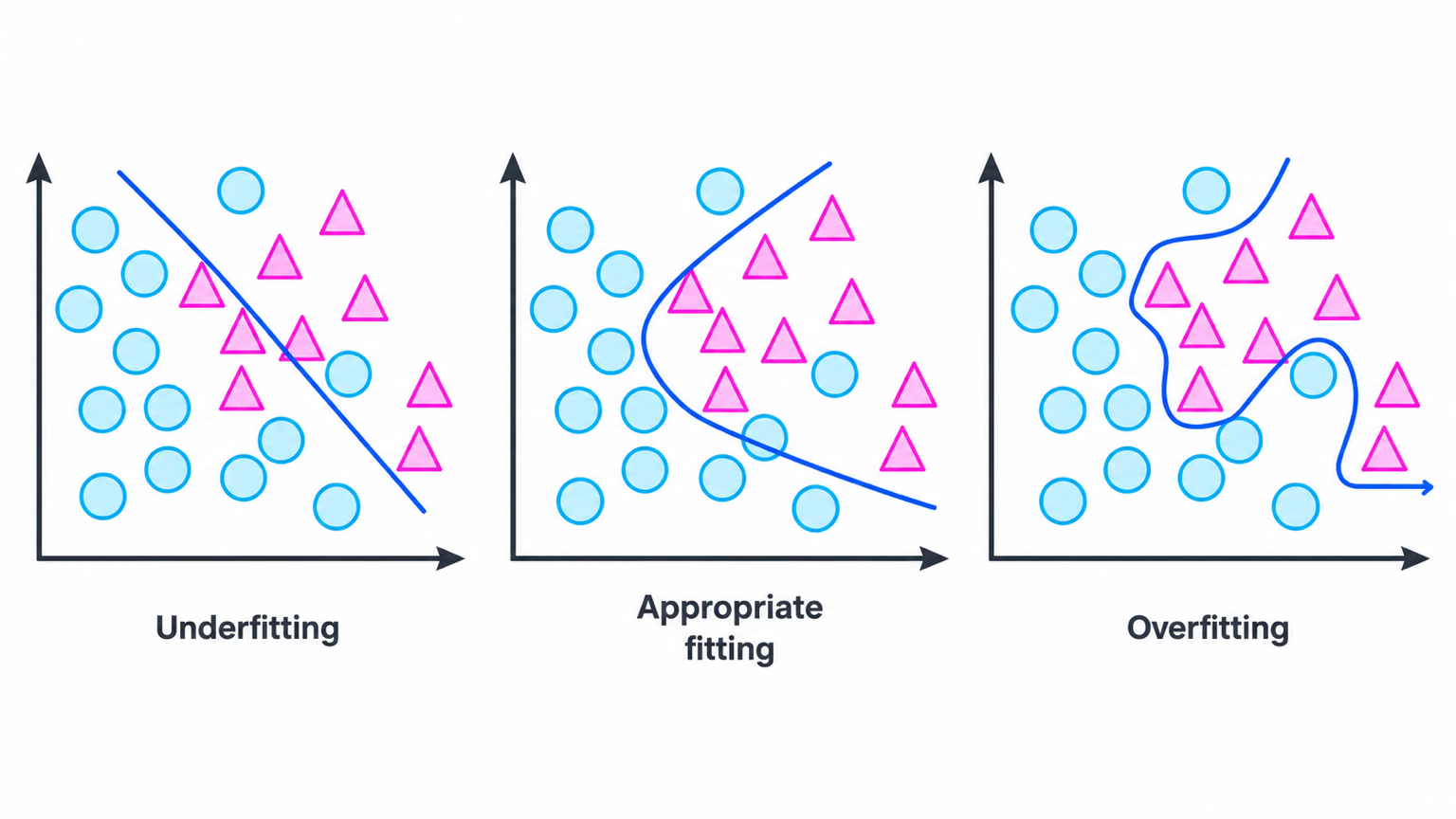
For overfitting, the fixes in order of how often they work: more varied data; fewer epochs or a tighter patience; and data augmentation (hsv_h, degrees, translate, scale, fliplr, mosaic, ...). The augmentation defaults are already strong; change them only for a reason, such as turning off fliplr when left and right matter.
Turn Findings Into a Fix List#
Fix data before tuning hyperparameters, and change one thing per round so you know what helped. The dataset side of this loop is covered in First Fine-Tune and the Iteration Loop.
Avoid These Mistakes#
Symptom: a model that scored 0.659 mAP50-95 suddenly scores 0.403. Cause: pills_v1 was trained at imgsz=320 and validated with imgsz=640; objects appear twice as large as anything it learned. Fix: validate and deploy at the training imgsz, and compare runs only at the same size.
Validation runs at conf=0.001 so it can trace the full precision-recall curve, which is why val_batch0_pred.jpg shows boxes your app would never report. Pick the deployment threshold from BoxF1_curve.png, then check it with predict.
With 23 images, one epoch's precision swung from 0.93 to 0.80 and back. Judge trends across epochs and runs, and grow the validation set before trusting differences of a point or two.
Show solution
Baseline mAP50-95 0.0002 -> pills_v1 0.659 (mAP50 0.977), both at imgsz=320

Failures:
- Low-confidence boxes (about 0.3-0.5) on pills half-hidden under another pack.
- Low-confidence or missing boxes on pills cut off at the image edge.

Overfitting: none. val/box_loss flattened near 1.05; val/cls_loss spiked at epochs 4-6
and then fell to its lowest value (1.08) at epoch 10.

Fix list:
1. Write a labeling rule for partly hidden and edge pills, then relabel the val set to match.
2. Train longer and larger: epochs=50, imgsz=640 (mAP50-95 lags mAP50, so box tightness is the gap).
3. Add 20 frames with overlapping packs, labeled under the new rule.