Choose a Deployment Target
Turn the device, the latency budget, and the fleet into one runtime and export format, then confirm it on the device.

The same YOLO26n takes 38.9 ms per image on a CPU with ONNX Runtime and 1.7 ms on a T4 GPU with TensorRT in the YOLO26 benchmarks. Pick the wrong runtime and you either pay for far more hardware than you need or ship cameras that cannot keep up. This lesson turns the choice into a ten-minute decision you can defend with numbers measured on the device itself.
Hands-on
Start From the Device#
The runtime follows from where inference runs, not from habit. Walk the tree from the top and stop at the first match:
Each runtime maps to one format= value in Export mode:
| Target | Runtime | format= | Watch out for |
|---|---|---|---|
| NVIDIA GPU, Jetson | TensorRT | engine | An engine only runs on the GPU family and TensorRT version that built it |
| Intel CPU, iGPU, NPU | OpenVINO | openvino | Tuned for Intel; measure before using it elsewhere |
| Any CPU or GPU | ONNX Runtime | onnx | Choose the execution provider explicitly |
| iPhone, iPad, Mac | CoreML | coreml | Export runs on macOS or Linux, not Windows |
| Android, embedded | LiteRT | litert | INT8 needs calibration data |
| Snapdragon NPU | Qualcomm QNN | qnn | Quantized export only; pass the Hexagon target as name |
| Raspberry Pi, ARM CPU | NCNN | ncnn | The fastest format in the Raspberry Pi guide |
| Browser | ONNX Runtime Web | onnx | Keep to n or s models |
On recent Apple platforms you can also export Apple's newer Core AI format (format=coreai, exported on macOS 26+ Apple silicon or x86-64 Linux). New to exporting? The Export for Deployment lesson covers the basics.
If you would rather not run inference servers at all, Ultralytics Platform deploys a model as a dedicated endpoint in one of 42 regions, and your profile's Deployments tab maps where each one runs:
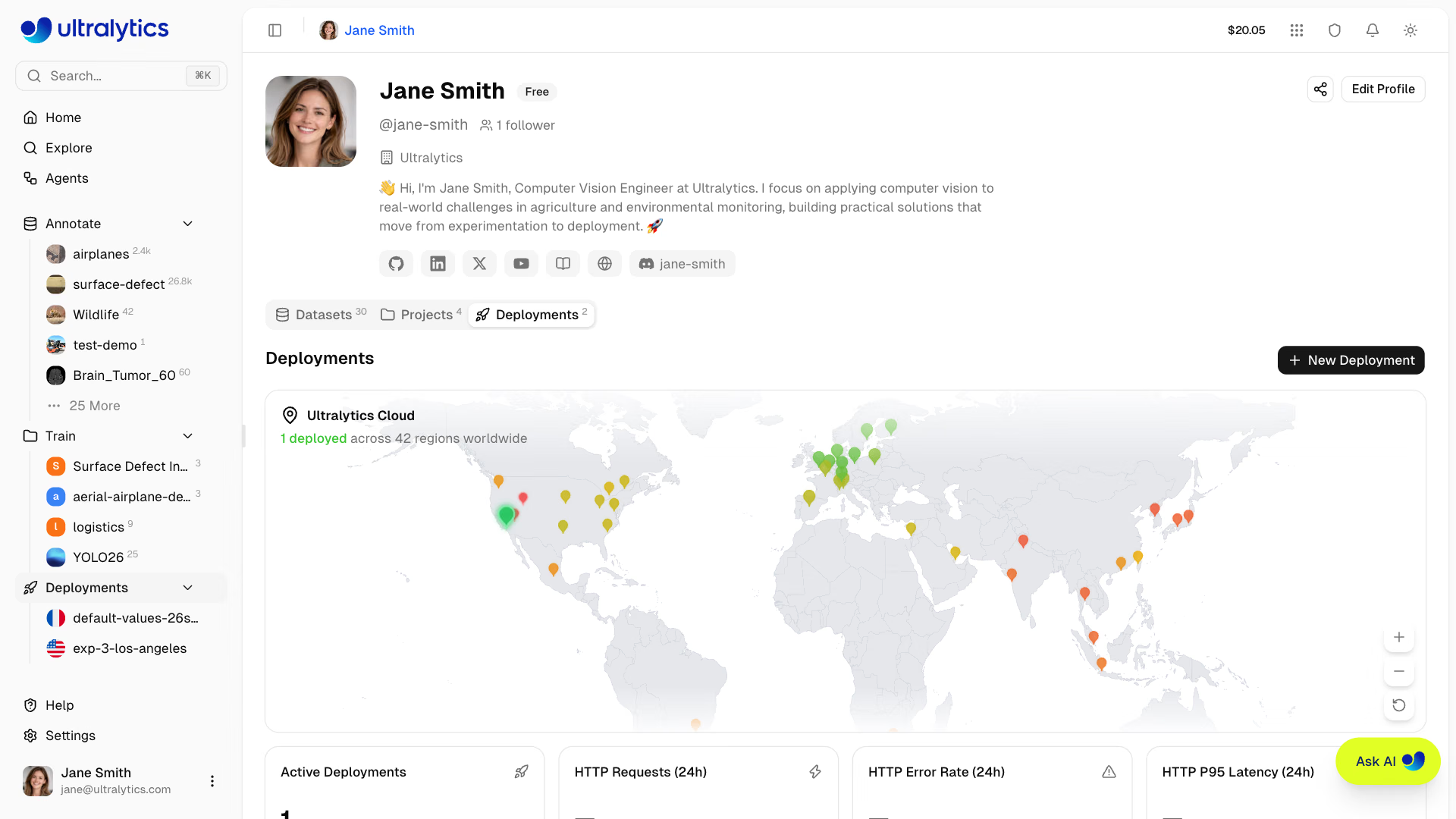
That path is covered in Deploy and Call an Endpoint. The rest of this course is for when you run the model yourself.
Turn the FPS Target Into a Millisecond Budget#
"Real time" is not a requirement; a number is. Work it out before you benchmark anything:
| Step | Example: 20 FPS per camera |
|---|---|
| Frame budget = 1000 ÷ FPS | 50 ms |
| Minus decode (RTSP, 1080p) | about 10 ms |
| Minus tracking, counting, sinks | about 5 ms |
| Minus 20% headroom for peaks | 10 ms |
| Left for the model | about 25–30 ms |
Then apply these decision rules:
- If YOLO26n needs more than your model budget on the device's CPU, move to an accelerator (GPU, iGPU, NPU) or shrink
imgszbefore anything else; the YOLO26 benchmarks list YOLO26n at 38.9 ms on CPU ONNX and 1.7 ms on a T4 with TensorRT. - If one device must serve several cameras, divide the model budget by the camera count.
- If the fleet has more than a handful of device types, prefer runtimes that do not need per-device builds, or plan a build per device class.
- If the calling code is Swift, Kotlin, or C++, check the runtime's SDK for that language before committing.
Benchmark the Candidates on the Device#
Spec sheets and other people's benchmarks are a starting point. The decision is made on the hardware you will deploy, and by the slow frames, not the average: a runtime that is fast at the median but stalls on one frame in twenty will still drop frames. This script exports each candidate, times 100 inferences on a real frame, and judges each by its 95th percentile (p95):
from ultralytics import YOLO
from ultralytics.utils.downloads import safe_download

BUDGET_MS = 30  # the model's share of a 20 FPS frame budget
CANDIDATES = ("onnx", "openvino")  # runtimes the decision tree allows on this machine

if __name__ == "__main__":  # exports and inference can start worker processes on macOS and Windows
    frame = str(safe_download("https://ultralytics.com/images/bus.jpg"))  # use a real frame from your camera
    for fmt in CANDIDATES:
        model = YOLO(YOLO("yolo26n.pt").export(format=fmt))
        for _ in range(5):  # warm up: the first calls include one-time setup
            model(frame, verbose=False)
        runs = sorted(model(frame, verbose=False)[0].speed["inference"] for _ in range(100))
        p50, p95 = runs[49], runs[94]
        verdict = "meets" if p95 <= BUDGET_MS else "misses"
        print(f"{fmt:9s} p50 {p50:5.1f} ms  p95 {p95:5.1f} ms  {verdict} the {BUDGET_MS} ms budget")
On the Apple silicon laptop used to test this course, while other jobs shared the CPU:
onnx      p50  30.0 ms  p95  46.4 ms  misses the 30 ms budget
openvino  p50  22.8 ms  p95 113.5 ms  misses the 30 ms budget
Read it line by line:
speed["inference"]is the model's own time for that frame, without decoding or drawing, so it compares runtimes fairly.- OpenVINO wins the median and loses the p95 by a factor of more than two. Judged on averages, you would ship the runtime that stalls on busy moments; judged on p95, ONNX Runtime is the steadier choice on this machine.
- Both miss the budget, so the next move here is a smaller
imgsz, an accelerator, or fewer cameras per device, not another CPU runtime.
For a quick accuracy-and-speed sweep across formats, Benchmark mode exports, validates, and times each one:
yolo benchmark model=yolo26n.pt data=coco8.yaml imgsz=640 format=onnxDrop format= to sweep every format the machine supports. COCO8 has only four validation images, so treat its mAP column as a smoke test and use your own dataset YAML for accuracy decisions.
Pitfalls#
Symptom: the model hit 60 FPS on your workstation and drops frames on the device. Fix: benchmark on the deployment hardware, or the closest machine you can get, and run it under the load it will see in production (other processes, other cameras).
Symptom: an .engine built on a data-center GPU fails to load on a Jetson Orin. Fix: build on the target at install time (a YOLO26n FP16 build takes about 5 minutes on a Jetson Orin, per the Platform export docs), or keep one build per device class and TensorRT version, and ship the .pt or .onnx so any device can rebuild.
yolo benchmark measures at the imgsz you pass. If production runs at imgsz=1280, benchmark at 1280: compute grows with pixel count, so 640 numbers understate a 1280 deployment about 4×.
Edge Devices Add Four Questions#
The Raspberry Pi, NVIDIA Jetson, and DeepStream on Jetson guides cover the common targets in detail. Before you commit to an edge box, answer:
- Cold start: where is the TensorRT engine built, and who waits for it?
- Power and heat: can the enclosure sustain the model at full FPS all day?
- Memory: is there room for frame buffers and tracker state next to the model? INT8 halves the model's share.
- Updates: how does a new
best.ptreach 1,000 devices? A Docker image keeps them consistent.
Show solution
A worked brief for a retail analytics rollout:
| Question | Answer |
|---|---|
| Device | 40 in-store mini PCs with Intel Core Ultra CPUs, no discrete GPU |
| FPS and cameras | 10 FPS per camera, 2 cameras per box |
| Caller | Python service on Linux |
| Fleet | 40 boxes, updated from a Docker image |
Budget: 1000 ÷ 10 = 100 ms per frame; minus about 15 ms for decode and tracking and 20% headroom leaves about 65 ms, shared by two cameras, so about 30 ms per inference. The decision tree says OpenVINO (Intel CPU), with ONNX Runtime as the fallback, so on one store box:
python pick_runtime.py # CANDIDATES = ("onnx", "openvino"), BUDGET_MS = 30The Core Ultra 7 155H CPU benchmark in the OpenVINO docs puts YOLO26n at 13.4 ms with OpenVINO FP32, so yolo26n should fit with room to spare; if the p95 on the real box, with both camera pipelines running, is under 30 ms, ship OpenVINO. If it misses, try the box's integrated GPU with device="intel:gpu" before buying hardware.