Multi-Stream Inference
Run several cameras through one model with batched inference, bounded queues, and measured frame drops.
A system that keeps up with one camera can fall minutes behind with four, and nothing crashes: results just arrive later and later until memory runs out. On the laptop CPU used here, one 30 FPS stream kept up, four dropped half their frames, and eight dropped more than two-thirds. This lesson builds the pipeline that measures that number, because it is how you size hardware.
Hands-on
Where the Time Goes#
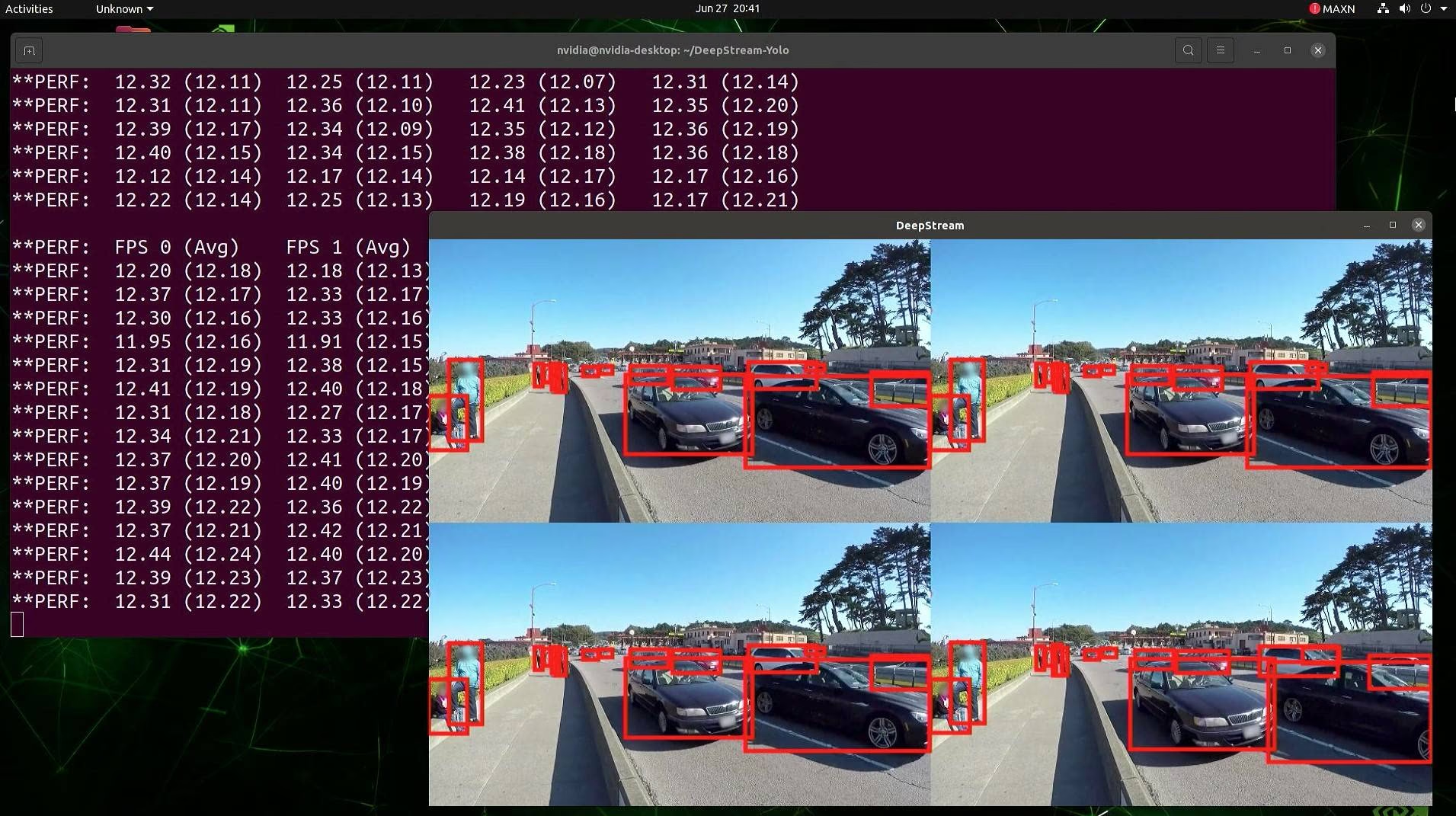
Each frame goes through four stages:
| Stage | Typical cost | Runs on |
|---|---|---|
| Decode (RTSP or file → array) | 5–20 ms per 1080p frame | CPU |
| Preprocess (letterbox, normalize) | about 1 ms | CPU |
| Inference | a few ms (GPU) to tens of ms (CPU) | Accelerator |
| Postprocess, tracking, sinks | a few ms, more for slow databases | CPU |
Run them one after another, camera by camera, in one thread, and the accelerator idles while frames decode. The fix is to separate the stages, which is what the DeepStream pipeline above does: four streams share one device, each reporting its own FPS (about 12 here). The same structure in Python:
Built-In: a .streams File#
Ultralytics batches multiple sources for you. Put one source per line in a .streams file and pass it to Predict or Track mode. Each stream gets its own reader thread and tracker, and every iteration runs one batched forward pass across all streams:
from collections import Counter
from pathlib import Path

from ultralytics import YOLO
from ultralytics.utils.downloads import safe_download

base = "https://github.com/ultralytics/assets/releases/download/v0.0.0/"
clips = [safe_download(base + name) for name in ("solutions_ci_demo.mp4", "ground-vehicles-airport.mp4")]
Path("cams.streams").write_text("\n".join(str(c) for c in clips))  # production: one rtsp:// URL per line

model = YOLO("yolo26n.pt")  # use your optimized export in production
frames = Counter()
for r in model.track("cams.streams", stream=True, stream_buffer=True, tracker="bytetrack.yaml", verbose=False):
    frames[Path(r.path).name] += 1  # r.path tells you which stream this result came from
print(frames)
Counter({'solutions_ci_demo.mp4': 62, 'ground-vehicles-airport.mp4': 62})Both streams produced 62 results because iteration stops when the shortest stream ends (the airport clip has 150 frames). stream_buffer=True processed every frame, which is right for recorded files; for live cameras keep the default False so a slow model skips stale frames instead of falling behind. Pair this with a TensorRT or OpenVINO export for the best per-stream throughput.
Custom: Producer-Consumer With Drop Counters#
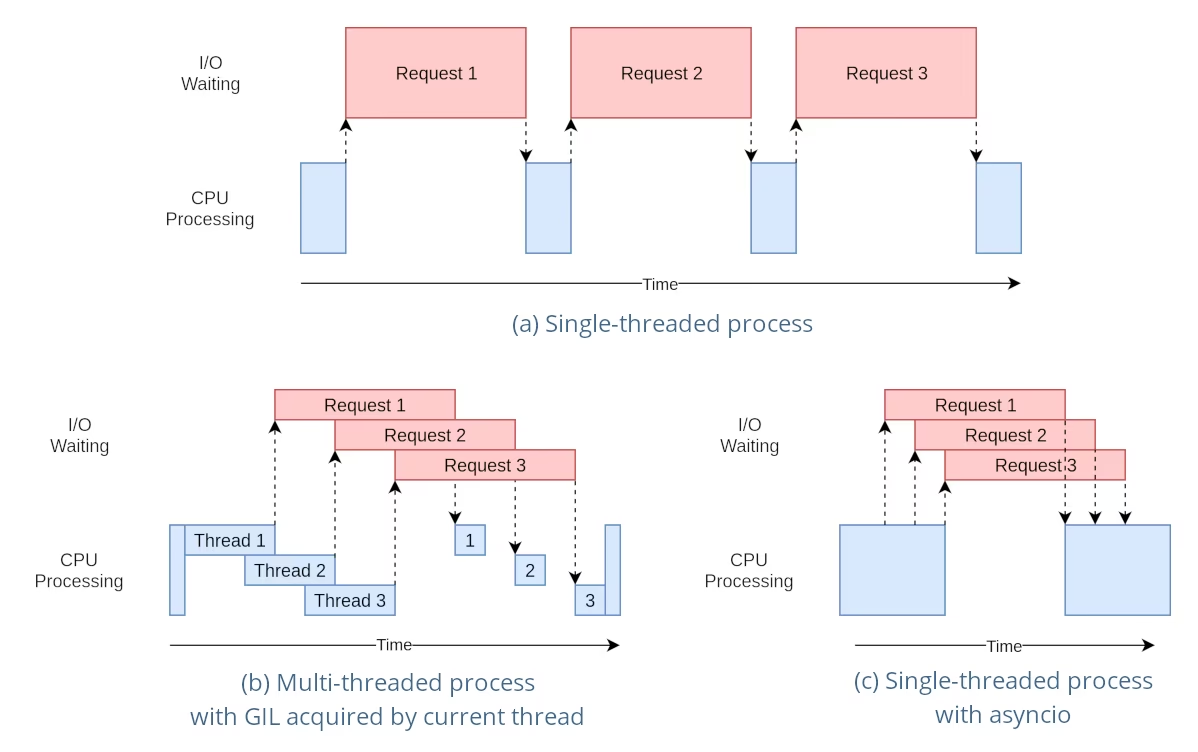
The diagram shows why threads work for this pipeline. Decoding is mostly waiting (the pink I/O bars), and OpenCV and PyTorch release Python's GIL while they work, so decoder threads overlap well (panel b). Heavy Python postprocessing does not overlap; move that into separate processes.
When you need your own sinks, per-camera logic, or explicit drop metrics, build the pipeline yourself. Decoder threads never touch the model; one consumer loop owns it, which also keeps you within the thread-safe inference rules:
import queue
import threading
import time

import cv2

from ultralytics import YOLO
from ultralytics.utils.downloads import safe_download

base = "https://github.com/ultralytics/assets/releases/download/v0.0.0/"
SOURCES = [str(safe_download(base + n)) for n in ("solutions_ci_demo.mp4", "ground-vehicles-airport.mp4")]
frames = queue.Queue(maxsize=16)  # bounded: memory and latency stay flat under overload
dropped = [0] * len(SOURCES)

def decode(stream_id, source):
    """Producer: read frames at the camera's pace and never block on a full queue."""
    cap = cv2.VideoCapture(source)
    interval = 1 / (cap.get(cv2.CAP_PROP_FPS) or 30)
    while True:
        ok, frame = cap.read()
        if not ok:
            break
        try:
            frames.put_nowait((stream_id, frame))
        except queue.Full:
            dropped[stream_id] += 1  # consumer is behind: drop rather than serve stale frames
        time.sleep(interval)  # pace files like a live camera; remove for RTSP sources
    cap.release()

model = YOLO("yolo26n.pt")  # one model, used only by the consumer loop below
model.predict("https://ultralytics.com/images/bus.jpg", verbose=False)  # warm up before cameras start

decoders = [threading.Thread(target=decode, args=(i, s), daemon=True) for i, s in enumerate(SOURCES)]
for t in decoders:
    t.start()

processed = [0] * len(SOURCES)
while any(t.is_alive() for t in decoders) or not frames.empty():
    batch = []
    while len(batch) < 8:  # gather up to 8 frames from any camera
        try:
            batch.append(frames.get(timeout=0.05))
        except queue.Empty:
            break
    if not batch:
        continue
    results = model([frame for _, frame in batch], verbose=False)  # one batched forward pass
    for (stream_id, _), r in zip(batch, results):
        processed[stream_id] += 1  # per-stream postprocessing and sinks go here

print(f"processed={processed} dropped={dropped}")
processed=[56, 131] dropped=[6, 19]The two clips have 62 and 150 frames, and every frame is either processed or dropped (56 + 6 = 62, 131 + 19 = 150), so the counters account for everything. 25 of 212 frames were dropped: this laptop's CPU cannot run yolo26n in PyTorch on two 30 FPS streams. Repeating the clips to simulate more cameras, in one sweep:
| Streams (30 FPS each) | Frames dropped |
|---|---|
| 1 | 0% |
| 2 | 12% |
| 4 | 51% |
| 8 | 69% |
Plan Capacity From Measurements#
Streams per device ≈ sustained throughput (frames per second the model processes at your batch size) ÷ required FPS per stream. Measure throughput with the optimized export from earlier lessons on the real hardware, keep 20–30% headroom for peaks, and alert when drops rise above zero. Higher resolution costs roughly with pixel count: 1280×1280 needs about 4× the compute of 640×640. For large fleets, Triton Inference Server and DeepStream on Jetson are the natural production homes.
Pitfalls#
Symptom: model.track(["cam1.mp4", "cam2.mp4"]) treats the list as a batch of images, not streams. Fix: write the sources into a .streams file, one per line.
Symptom: each file yields only a frame or two. Fix: stream_buffer=False drops stale frames, and file readers race ahead of the model; set stream_buffer=True for files and keep the default for live cameras.
Symptom: occasional wrong or mixed-up results under load. Fix: never call one YOLO instance from several threads at once. Let one consumer own it, as above, or create a model inside each inference thread.
Symptom: latency grows every minute and memory climbs until the process dies. Fix: a bounded queue that drops when full, plus a drop counter. Real-time systems should drop frames during overload, not lag.
Show solution
Make the stream count a command-line argument by adding these lines to producer_consumer.py, right after the SOURCES line:
import sys

N = int(sys.argv[1]) if len(sys.argv) > 1 else 2  # number of simulated cameras
SOURCES = [SOURCES[i % len(SOURCES)] for i in range(N)]
Then sweep it:
for n in 1 2 4 8; do python producer_consumer.py $n; doneprocessed=[62] dropped=[0]
processed=[56, 131] dropped=[6, 19]
processed=[23, 82, 23, 81] dropped=[39, 68, 39, 69]
processed=[14, 53, 13, 53, 13, 52, 13, 53] dropped=[48, 97, 49, 97, 49, 98, 49, 97]The answer for this machine is one stream: drops start at two. To serve four cameras, export to a faster runtime (lessons 3 and 4), lower imgsz, or move to an accelerator, then rerun the sweep.