OpenVINO on CPU
Export FP32, FP16, and INT8 OpenVINO models, validate each, and keep INT8 only where it pays on your own CPU.
An Intel CPU you already own can often replace a GPU instance: in the Ultralytics benchmarks, YOLO26m drops from 192 ms in PyTorch to 36 ms with OpenVINO INT8 on a laptop Core Ultra CPU. The gains depend on the chip, though, and on the ARM test laptop for this course, an INT8 export calibrated on four images lost 3 mAP points. You will learn to measure which case you are in before you ship.
Hands-on
What OpenVINO Brings#
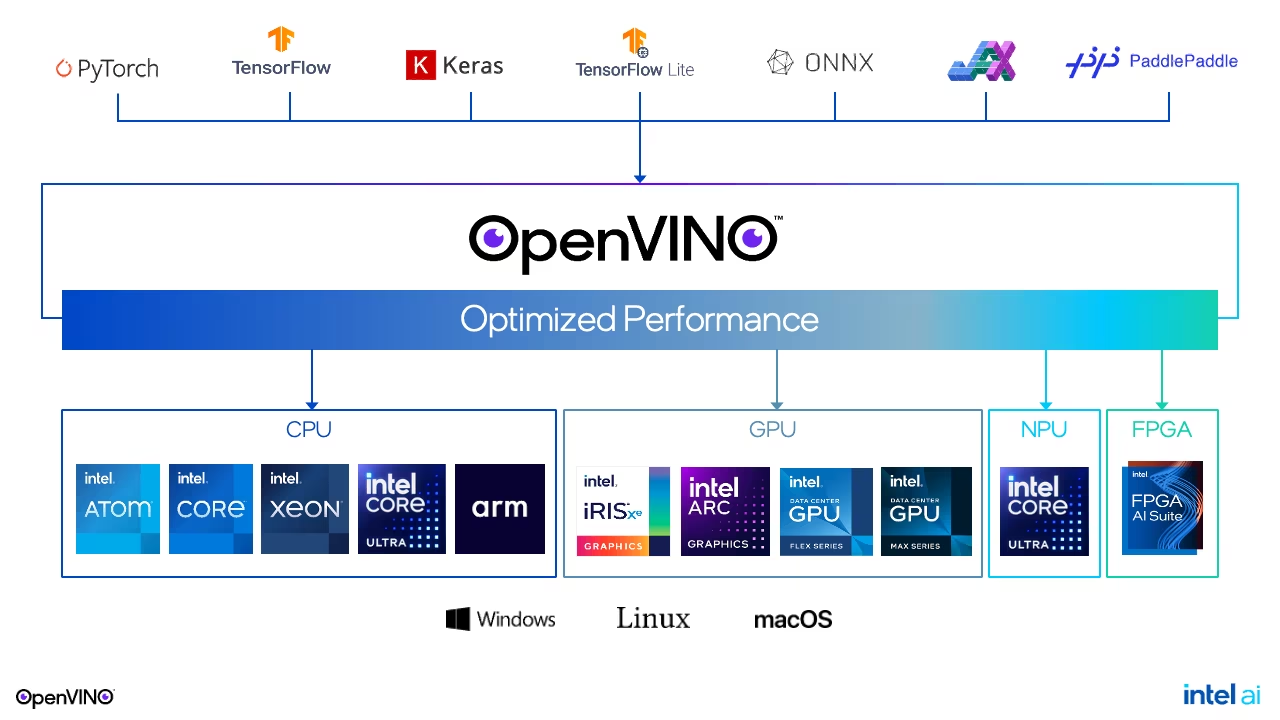
OpenVINO takes models from PyTorch and ONNX and runs them on Intel CPUs, integrated and discrete GPUs, and NPUs through one API. Its CPU kernels target Intel instruction sets (AVX2, AVX-512, AMX), and its INT8 path is mature. Note the arm tile in the CPU column: OpenVINO runs on ARM too, but its kernels are tuned for Intel, so measure before relying on it there.
The published benchmark on an Intel Core Ultra 7 155H CPU (COCO128):
| Model | PyTorch FP32 | OpenVINO FP32 | OpenVINO INT8 | mAP50-95 FP32 → INT8 |
|---|---|---|---|---|
| YOLO26n | 33.19 ms | 13.43 ms | 11.40 ms | 0.4734 → 0.4611 |
| YOLO26s | 70.92 ms | 36.16 ms | 15.54 ms | 0.5632 → 0.5471 |
| YOLO26m | 192.45 ms | 102.52 ms | 35.72 ms | 0.6191 → 0.6025 |
Three rules fall out of that table:
- OpenVINO FP32 alone roughly halves PyTorch latency on an Intel CPU. Do this first.
- INT8 pays off more as the model grows: 1.2× for
n, 2.9× form, for 1.2–1.7 mAP points. Onn, INT8 is rarely worth the accuracy. - Try the integrated GPU before buying hardware: the same chip's Arc iGPU (
device="intel:gpu") ran YOLO26n FP32 in 9.13 ms and YOLO26m in 34.47 ms.
Compare Precisions on Your Own CPU#
Export each precision, validate it immediately, and only then export the next:
from ultralytics import YOLO

if __name__ == "__main__":  # validation starts worker processes on macOS and Windows
    model = YOLO("yolo26n.pt")  # or runs/detect/pills_v1/weights/best.pt
    for name, quantize in (("FP32", None), ("FP16", 16), ("INT8", 8)):
        path = model.export(format="openvino", quantize=quantize, data="coco8.yaml")  # or my_dataset/data.yaml
        m = YOLO(path).val(data="coco8.yaml", batch=1, plots=False, verbose=False)  # before the next export overwrites it
        print(f"{name}: mAP50-95 {m.box.map:.4f}  -> {path}")
OpenVINO: export success ✅ 2.3s, saved as 'yolo26n_openvino_model/' (9.6 MB)
FP32: mAP50-95 0.6783 -> yolo26n_openvino_model/
OpenVINO: export success ✅ 1.6s, saved as 'yolo26n_openvino_model/' (5.1 MB)
FP16: mAP50-95 0.6783 -> yolo26n_openvino_model/
WARNING ⚠️ OpenVINO: >300 images recommended for INT8 calibration, found 4 images.
OpenVINO: export success ✅ 11.3s, saved as 'yolo26n_int8_openvino_model/' (3.2 MB)
INT8: mAP50-95 0.6460 -> yolo26n_int8_openvino_model/What each line tells you:
- FP32 and FP16 score the same and FP16 is half the size (5.1 vs 9.6 MB), but both were written to the same folder. Had you exported both first and validated later, you would have measured FP16 twice.
- INT8 is 3.2 MB and lost 3.2 points, because it was calibrated on COCO8's four images. The warning says so: real calibration needs hundreds of production-like images from your own YAML (
fractioncaps how many are used). - None of this measures speed. For that, use the benchmark below.
To run an exported model on a specific Intel device:
from ultralytics import YOLO

ov_model = YOLO("yolo26n_openvino_model/")
results = ov_model("https://ultralytics.com/images/bus.jpg", device="intel:cpu")  # or intel:gpu, intel:npu
Ship the whole folder: yolo26n.xml (the graph), yolo26n.bin (the weights), and metadata.yaml. intel:gpu and intel:npu need Intel hardware.
Time It Against ONNX Runtime#
Accuracy is settled; speed is decided on the target, under the load it will really carry. Run pick_runtime.py from the first lesson with CANDIDATES = ("onnx", "openvino"). On the Apple silicon test laptop, while other jobs shared the CPU:
onnx      p50  30.0 ms  p95  46.4 ms  misses the 30 ms budget
openvino  p50  22.8 ms  p95 113.5 ms  misses the 30 ms budget
OpenVINO had the better median and the much worse tail. The Ultralytics wrapper compiles OpenVINO with the LATENCY hint (the log says Using OpenVINO LATENCY mode for batch=1 inference on CPU), which spreads each request across the CPU's cores; when other work competes for those cores, the slowest requests suffer most. On a dedicated Intel box the picture is usually the published one above, but only your own p95 can tell you.
Decision rules:
Pitfalls#
Symptom: the FP16 export is half the size and exactly as slow. Fix: on most CPUs the plugin picks its own execution precision; use FP16 for smaller downloads, and INT8 or the iGPU for speed.
Symptom: FP32 and FP16 report identical numbers because they were the same file. Fix: FP32 and FP16 exports share the *_openvino_model/ folder; validate (or rename the folder) right after each export.
Symptom: the average looks fine, yet frames still drop at busy moments. Fix: time inference with the production load running and decide on p95, not the mean. For many streams on one server, compile with the THROUGHPUT hint by loading the .xml with the OpenVINO runtime directly, as the latency vs throughput modes guide shows.
On macOS and Windows, validation starts worker processes that re-import your script. Without if __name__ == "__main__":, the test run for this lesson repeated its exports inside those workers, wasting minutes and competing for the CPU it was trying to measure.
Show solution
python ov_compare.py    # accuracy and size of FP32, FP16, INT8
python pick_runtime.py  # p50 and p95 for ONNX Runtime and OpenVINO
A worked decision for the Core Ultra 7 155H numbers above:
| Option | mAP50-95 | Size | ms per image |
|---|---|---|---|
| OpenVINO FP32 | 0.4734 | 9.6 MB | 13.43 |
| OpenVINO INT8 | 0.4611 | 3.2 MB | 11.40 |
iGPU FP32 (intel:gpu) | 0.4758 | 9.6 MB | 9.13 |
Ship OpenVINO FP32 on the integrated GPU: it is the fastest option and loses nothing, while INT8 on the CPU would cost 1.2 points to save 2 ms. On a YOLO26m deployment the answer flips to CPU INT8 (2.9× faster for 1.7 points), if that loss is inside your budget.