Track Objects with ByteTrack, BoT-SORT, and TrackTrack
Give every object a stable ID across frames, pick a tracker, and tune its thresholds to your detector.
Every count, dwell time, and speed estimate depends on one question: is ID 17 in this frame the same object as ID 17 in the last one? On the same 62-frame clip of about 30 pedestrians and the same detector, ByteTrack found 32 IDs and the default TrackTrack found 9. Choosing and tuning the tracker is part of the model, and getting it wrong silently breaks every number downstream.
Hands-on
What a Tracker Adds#
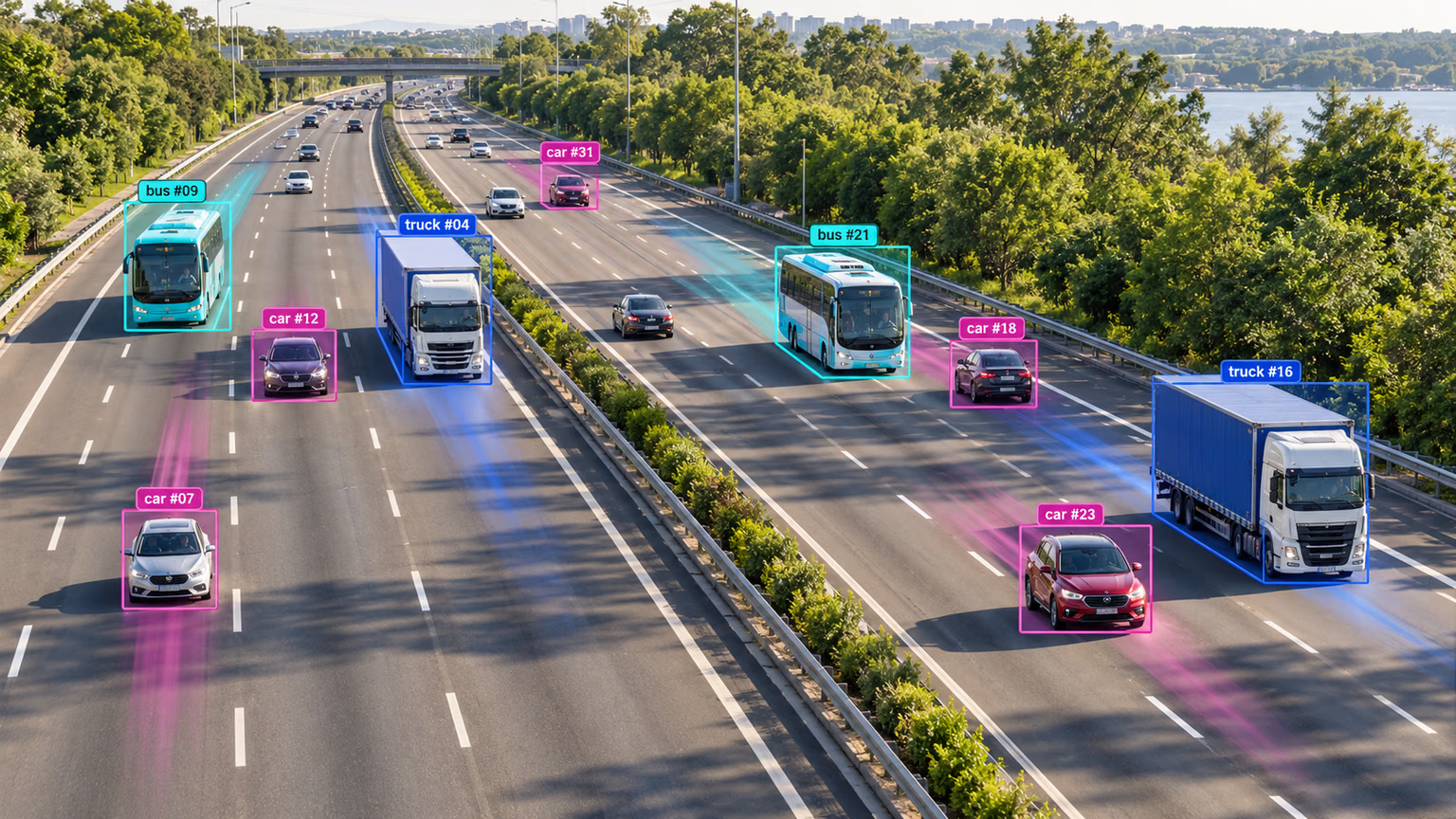
The labels and trails in this frame are what a tracker produces. Each ID is a track, a hypothesis about one real object, and the trail is its recent history. Every frame, the tracker predicts where each track should be with a Kalman filter, then matches the new detections to those predictions by box overlap (and, optionally, appearance):
Tracks that go unmatched for track_buffer frames are deleted. That is the whole mechanism, and its thresholds decide everything that follows.
Choose a Tracker#
Track mode ships six trackers: BoT-SORT, ByteTrack, OC-SORT, Deep OC-SORT, FastTracker, and TrackTrack (the default when you pass no tracker). Three cover most needs:
| Tracker | Matching cues (default config) | Reach for it when |
|---|---|---|
| ByteTrack | Motion and box overlap, plus a second pass that rescues low-confidence boxes | Fixed cameras, small or uncertain detectors, throughput matters |
| BoT-SORT | ByteTrack-style matching plus camera-motion compensation (gmc_method: sparseOptFlow) | Moving or shaking cameras; set with_reid: True for crowds and long occlusions |
| TrackTrack | Multi-cue cost (box shape, confidence, angle), track-aware initialization, camera-motion compensation | Confident detections from a strong, well-trained model |
BoT-SORT's appearance matching (re-identification) is off by default; with model: auto it reuses the detector's own features, so turning it on adds little overhead.
Compare Trackers on One Clip#
from ultralytics import YOLO

model = YOLO("yolo26n.pt")
video = "https://github.com/ultralytics/assets/releases/download/v0.0.0/solutions_ci_demo.mp4"

for tracker in ("bytetrack.yaml", "botsort.yaml", "tracktrack.yaml"):
    ids, frames = set(), 0
    for r in model.track(video, stream=True, tracker=tracker, classes=[0], verbose=False):
        frames += 1
        if r.boxes.is_track:
            ids.update(r.boxes.id.int().tolist())
    print(f"{tracker:16s} {frames} frames, {len(ids)} unique person IDs")
bytetrack.yaml 62 frames, 32 unique person IDs
botsort.yaml 62 frames, 33 unique person IDs
tracktrack.yaml 62 frames, 9 unique person IDsThe clip shows roughly 30 people crossing a plaza from above, so ByteTrack and BoT-SORT are close to the truth. TrackTrack is not broken: it starts a track only above new_track_thresh: 0.7 and matches first above track_high_thresh: 0.6, while YOLO26n's median person confidence on this clip is 0.53 and only 17% of detections reach 0.7. Most people never get an ID. The decision rule: compare the tracker's thresholds with your detector's confidence distribution before you trust any count.
Use IDs in a Pipeline#
from collections import defaultdict

from ultralytics import YOLO

model = YOLO("yolo26n.pt")
video = "https://github.com/ultralytics/assets/releases/download/v0.0.0/solutions_ci_demo.mp4"

counts = defaultdict(set)
for r in model.track(video, stream=True, tracker="bytetrack.yaml", verbose=False):
    if not r.boxes.is_track:  # no confirmed tracks in this frame yet
        continue
    for cls, tid in zip(r.boxes.cls.int().tolist(), r.boxes.id.int().tolist()):
        counts[r.names[cls]].add(tid)

for cls, ids in counts.items():
    print(f"{cls}: {len(ids)} unique objects")
person: 32 unique objectsA set per class counts each ID once, however many frames it appears in, so the result is objects rather than detections. stream=True yields results one frame at a time instead of holding the whole video in memory. Region counting, heatmaps, and distance calculation are thin layers on top of this loop.
Track Frames You Read Yourself#
Passing a path or URL handles tracker state for you. When frames come from your own decoder, a webcam, or an RTSP camera, pass persist=True so each call continues the same sequence (the Predict mode docs list every source type):
import cv2

from ultralytics import YOLO
from ultralytics.utils.downloads import safe_download

model = YOLO("yolo26n.pt")
video = safe_download("https://github.com/ultralytics/assets/releases/download/v0.0.0/solutions_ci_demo.mp4")
cap = cv2.VideoCapture(str(video))  # or 0 for a webcam, or an rtsp:// URL

seen = set()
while True:
    ok, frame = cap.read()
    if not ok:
        break
    r = model.track(frame, persist=True, tracker="bytetrack.yaml", classes=[0], verbose=False)[0]
    if r.boxes.is_track:
        seen.update(r.boxes.id.int().tolist())  # your logic: dwell time, trajectories, alerts
cap.release()
print(f"{len(seen)} unique IDs")
32 unique IDsSame answer as passing the path, because persist=True kept one tracker alive across all 62 calls.
Tune a Tracker to Your Detector#
Copy a packaged config, lower the thresholds that do not fit your detector, and pass the new file:
from pathlib import Path

from ultralytics import YOLO
from ultralytics.utils import ROOT

cfg = (ROOT / "cfg/trackers/tracktrack.yaml").read_text()  # packaged defaults
for old, new in (
    ("track_high_thresh: 0.6", "track_high_thresh: 0.3"),
    ("track_low_thresh: 0.25", "track_low_thresh: 0.1"),
    ("new_track_thresh: 0.7", "new_track_thresh: 0.35"),
):
    cfg = cfg.replace(old, new)
Path("tracktrack_tuned.yaml").write_text(cfg)

model = YOLO("yolo26n.pt")
video = "https://github.com/ultralytics/assets/releases/download/v0.0.0/solutions_ci_demo.mp4"
for tracker in ("tracktrack.yaml", "tracktrack_tuned.yaml"):
    ids = set()
    for r in model.track(video, stream=True, tracker=tracker, classes=[0], verbose=False):
        if r.boxes.is_track:
            ids.update(r.boxes.id.int().tolist())
    print(f"{tracker:22s} {len(ids)} unique person IDs")
tracktrack.yaml 9 unique person IDs
tracktrack_tuned.yaml 27 unique person IDsSetting the thresholds just below the detector's median confidence brought TrackTrack from 9 IDs to 27, close to the hand count. The knobs every tracker shares:
| Setting | ByteTrack default | Raise it to | Lower it to |
|---|---|---|---|
track_high_thresh | 0.25 | Ignore weak detections in the first match | Track a low-confidence detector |
new_track_thresh | 0.25 | Cut short-lived false tracks | Start tracks for faint objects |
track_buffer | 30 frames | Survive longer occlusions | Free IDs of departed objects sooner |
match_thresh | 0.8 | Match more leniently (fast motion, jumpy boxes) | Match more strictly (crowds) |
Pitfalls#
Symptom: far fewer IDs than objects, especially with a small model. Fix: print the median detection confidence (see the solution) and set new_track_thresh and track_high_thresh just below it.
Symptom: IDs reset every frame when you call model.track(frame) yourself, or jump between objects when two cameras feed one model. Fix: pass persist=True for consecutive frames of one stream, and give each camera its own model instance (or use a .streams source, which keeps one tracker per stream).
Symptom: a parked car's ID changes every few frames. Fix: the tracker is starting new tracks instead of matching old ones. Check the detector's confidence on that object first, then raise match_thresh and track_buffer.
Show solution
Measure the detector's confidences first, then set thresholds just below them:
import torch

from ultralytics import YOLO

model = YOLO("yolo26n.pt")
video = "https://github.com/ultralytics/assets/releases/download/v0.0.0/solutions_ci_demo.mp4"
conf = torch.cat([r.boxes.conf for r in model.predict(video, stream=True, classes=[0], verbose=False)])
print(f"median {conf.median():.2f}, share >= 0.7: {(conf >= 0.7).float().mean():.0%}")
median 0.53, share >= 0.7: 17%For the plaza clip the table reads: ByteTrack 32, BoT-SORT 33, TrackTrack 9, tuned TrackTrack 27, hand count about 30. Only 17% of detections clear TrackTrack's new_track_thresh: 0.7, so lowering it to 0.35 (with track_high_thresh: 0.3) is the right fix; for this fixed overhead camera, plain ByteTrack is the simpler choice.