Optimize with TensorRT
Build an FP16 TensorRT engine, decide whether INT8 is worth its accuracy cost, and gate the engine before shipping.
On an NVIDIA GPU, a TensorRT FP16 engine is usually the cheapest speedup you will ever get: about 1.5× faster in the Ultralytics A100 benchmark with no mAP change. INT8 goes further, but post-training INT8 cost YOLO26s through YOLO26m 4 to 6 mAP points on COCO. This lesson is about knowing which step you are taking and measuring it before your users do.
Hands-on
The code in this lesson requires an NVIDIA GPU with TensorRT installed. Every argument shown is listed for format=engine in the Export mode docs.
FP16 Is the Safe First Step#
NVIDIA GPUs from Volta onward have FP16 tensor cores, and detection models rarely need FP32 at inference. Start here:
from ultralytics import YOLO

model = YOLO("yolo26n.pt")  # or runs/detect/pills_v1/weights/best.pt
model.export(format="engine", quantize=16, workspace=4)  # FP16 engine, up to 4 GiB builder workspace
workspace caps the GPU memory TensorRT may use while building; leave it unset to let TensorRT decide. The TensorRT integration page publishes this A100 result (YOLOv8n, 640 px):
| Precision | Predict, batch 8 (ms) | COCO val mAP50-95 |
|---|---|---|
| FP32 | 0.52 | 0.37 |
| FP16 | 0.34 | 0.37 |
| INT8 | 0.28 | 0.33 |
The model is older than YOLO26, but the shape of the trade-off holds: FP16 was about 1.5× faster for free; INT8 bought another 1.2× and cost 4 points. If FP16 meets your budget, ship it.
No local NVIDIA GPU? Ultralytics Platform's Export tab builds the engine on a cloud GPU you select, with the same image size, precision, batch, dynamic, NMS, and workspace options:
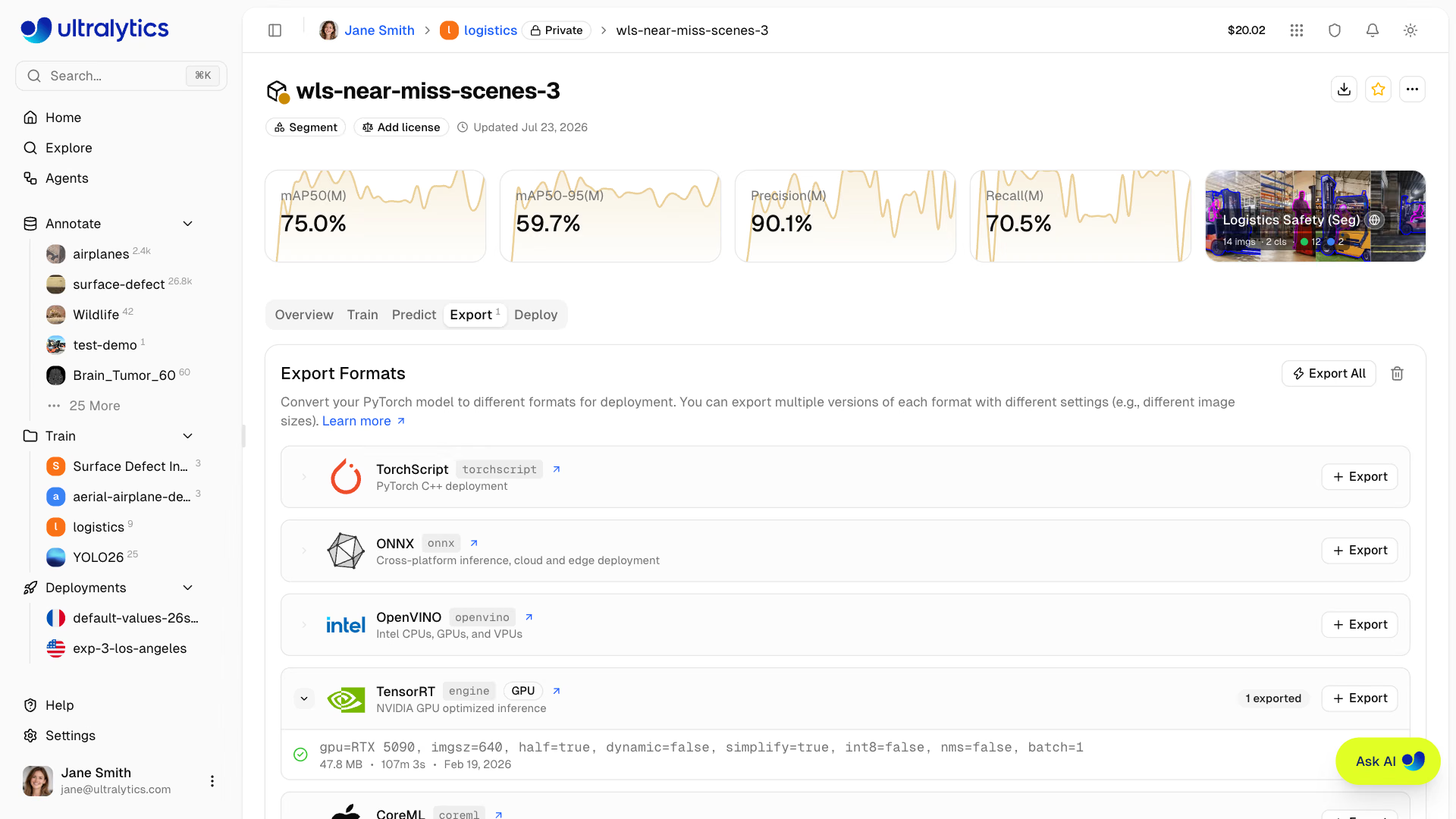
Pick the GPU family you will deploy on: the engine in the screenshot was built on an RTX 5090 and will only run on that family.
INT8 Needs Calibration Data#
INT8 quantization maps each layer's activations to 256 levels. To pick those ranges, the exporter runs calibration images through the model and records the activations it sees, so the images must look like production:
from ultralytics import YOLO

model = YOLO("yolo26n.pt")
model.export(
    format="engine",
    quantize=8,
    data="coco128.yaml",  # calibration images come from this dataset's val split; use my_dataset/data.yaml
    fraction=1.0,  # share (or count) of those images to use
    batch=8,  # larger calibration batches give more stable ranges
    dynamic=True,  # with batch=8, the engine accepts batches of 1 to 8
    workspace=4,
)
How much INT8 costs depends on the model. The Export mode docs measured YOLO26 TensorRT engines on COCO val (mAP50-95):
| Model | FP32 engine | INT8, calibrated (PTQ) | INT8 after quantization-aware training (QAT) |
|---|---|---|---|
| YOLO26n | 0.4032 | 0.3934 | 0.3935 |
| YOLO26s | 0.4794 | 0.4412 | 0.4711 |
| YOLO26m | 0.5269 | 0.4696 | 0.5137 |
Calibration alone costs YOLO26n 1 point and the larger models 4–6. QAT fine-tunes the model with quantize=8 in train so its weights tolerate INT8; the checkpoint carries its own ranges, its INT8 export needs no calibration data, and it lands within 1–2 points of FP32. The decision:
Gate the Engine Before Shipping#
Every engine passes the same checks on the deployment GPU:
| Check | Gate |
|---|---|
| mAP50-95 on your val set | Within 0.5 points of FP32 for FP16; your written budget for INT8 |
| Per-class AP | No class drops more than about 1 point (small classes vary most) |
| p95 latency | Under budget at your production batch size |
| Operating threshold | conf re-picked from the engine's own F1 curve |
| Determinism | The same image twice gives exactly the same boxes |
yolo val model=yolo26n.engine data=coco8.yaml  # or my_dataset/data.yaml
yolo benchmark model=yolo26n.pt data=coco8.yaml imgsz=640 format=engine quantize=16
Where the Speedup Comes From#
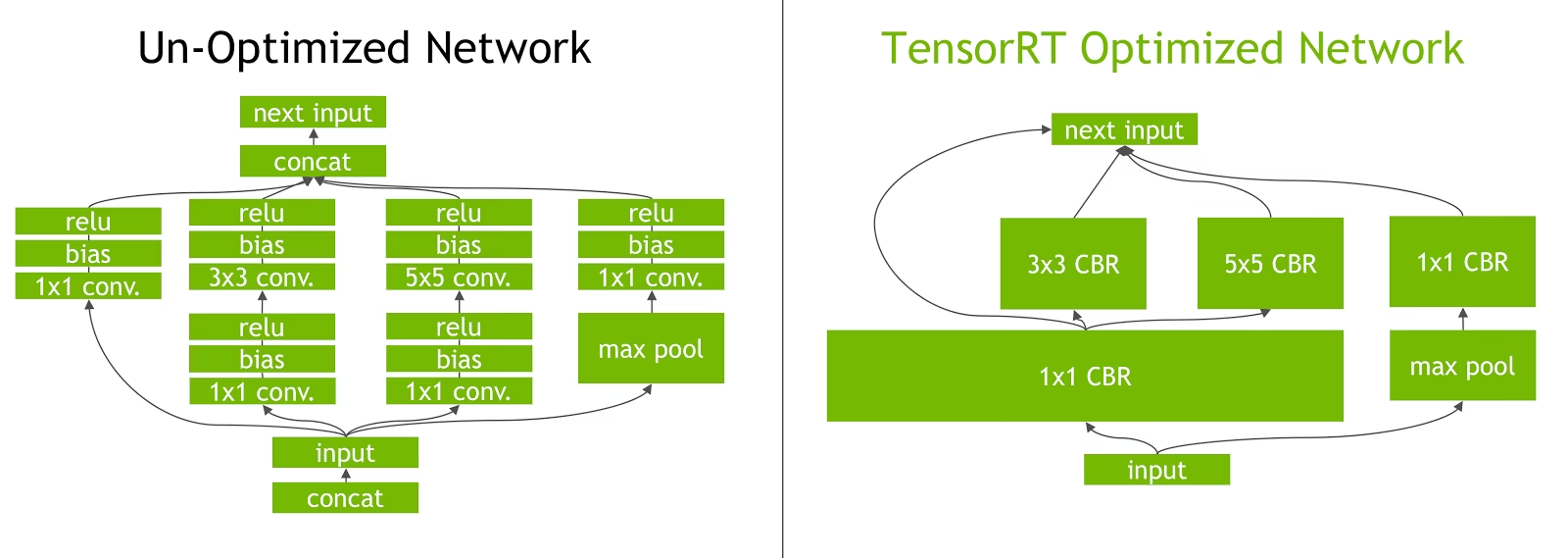
TensorRT fuses each convolution, bias, and ReLU into one kernel (the "CBR" blocks on the right) and drops the concat steps, so the GPU launches far fewer kernels and moves less data. In YOLO26 that pays off on the conv-BN-activation chains everywhere in the network, the attention (PSA) block in the backbone, and the detection head's many small ops. If an engine is still slow, profile it with trtexec or NVIDIA Nsight: often one layer takes 30% or more of the time.
Pitfalls#
Symptom: INT8 loses 1 point on COCO and 6 on your cameras. Fix: calibrate with a held-out slice of your validation set; NVIDIA recommends at least 500 representative images. Calibration also varies across devices, so calibrate on the GPU you deploy to.
Symptom: recall drops after switching to INT8 at the same conf. Fix: INT8 can shift confidence values; re-pick conf from the INT8 engine's own F1 curve.
Symptom: the engine fails to deserialize, or runs slower than expected, on the deployment box. Fix: build on the deployment GPU family with a matching TensorRT and CUDA runtime, and ship the .onnx so devices can rebuild. If calibration crashes during the build, raise workspace or lower imgsz or batch.
On Jetson, DeepStream runs the resulting engines in a hardware-accelerated video pipeline; in the data center, Triton Inference Server serves them.
Show solution
from ultralytics import YOLO

if __name__ == "__main__":  # validation starts worker processes on Windows
    data = "coco8.yaml"  # or my_dataset/data.yaml
    model = YOLO("yolo26n.pt")
    engine = model.export(format="engine", quantize=16, workspace=4)

    base = model.val(data=data, plots=False).box.map
    fp16 = YOLO(engine).val(data=data, plots=False).box.map
    print(f"PyTorch {base:.4f}  FP16 engine {fp16:.4f}  gap {abs(base - fp16) * 100:.2f} points")

    # Only if FP16 misses the latency budget:
    # model.export(format="engine", quantize=8, data=data, batch=8, dynamic=True, workspace=4)
A passing report reads: gap under 0.5 points, p95 under budget, decision ship FP16. If p95 misses, export INT8 with your own calibration YAML, rerun the same two lines, and ship INT8 only if the gap stays inside the budget you wrote down before starting; otherwise try QAT or a smaller model.