Cost and Latency Tuning
Profile the whole pipeline, pull the levers that actually move latency and cost in order, and stop at a budget.
Teams lose weeks shaving milliseconds off a model while a database write or an RTSP decoder is the real bottleneck. The big levers are few and well measured: YOLO26s takes 2.2 times longer than YOLO26n on CPU for 7.7 more mAP points, and running detection on every other frame halves the work. This lesson teaches you to profile first, pull the biggest lever that fits, and stop at a budget you set in advance.
Hands-on
Measure the Whole Pipeline First#
Every Results object splits its own time into stages:
from ultralytics import YOLO

model = YOLO("yolo26n.pt")
video = "https://github.com/ultralytics/assets/releases/download/v0.0.0/solutions_ci_demo.mp4"
totals = {"preprocess": 0.0, "inference": 0.0, "postprocess": 0.0}
for n, r in enumerate(model.predict(video, stream=True, verbose=False), 1):
    for stage in totals:
        totals[stage] += r.speed[stage]
print({stage: round(ms / n, 1) for stage, ms in totals.items()}, "ms per frame")
{'preprocess': 0.7, 'inference': 36.1, 'postprocess': 0.7} ms per frameHere inference is 95% of the model's time, so model levers will help. Time decode and your own sinks the same way (time.perf_counter() around each), then apply the rule for what you find:
| You measure | Fix first |
|---|---|
| 60 ms decoding RTSP, 5 ms inference | Hardware decode, lower stream resolution, or more decoder threads |
| 30 ms inference, 100 ms Python postprocessing | Vectorize with NumPy or move it to a worker process |
| 5 ms inference, 200 ms database writes | Batch the writes or make them asynchronous |
| Inference dominates | The lever leaderboard below |
The Lever Leaderboard#
Try from the top and stop when you meet the budget:
| Lever | Typical speedup | Typical accuracy cost |
|---|---|---|
| Smaller model (m → s, s → n) | 1.5–2.5× | 4.5–7.7 mAP points on COCO; less on narrow tasks |
Smaller imgsz (640 → 480) | about 1.8× | Small and distant objects first |
| Faster runtime, FP16 | about 1.5× on GPU | Usually none; verify parity |
| INT8 with calibration | a further 1.2× on GPU; up to 2.9× on CPU | 1 point (YOLO26n) to 4–6 points (larger models); QAT recovers most |
Fewer frames (vid_stride=N) | up to N× | Fast objects and short events can be missed |
| Larger batch (servers) | Higher throughput, not lower latency | None |
The numbers come from the YOLO26, TensorRT, and OpenVINO benchmark tables and the measurements below; yours will differ, so measure.
Smaller Model#
The YOLO26 benchmark table on COCO:
| Model | mAP50-95 | CPU ONNX (ms) | T4 TensorRT10 (ms) |
|---|---|---|---|
| YOLO26n | 40.9 | 38.9 | 1.7 |
| YOLO26s | 48.6 | 87.2 | 2.5 |
| YOLO26m | 53.1 | 220.0 | 4.7 |
On CPU each step down is 2.2–2.5× faster. The COCO accuracy gap is the worst case: a 3-class warehouse detector with large objects usually loses far less from m → n than an 80-class general detector, so the smaller model is always worth testing on your own val set.
Smaller Input#
Compute scales roughly with pixel count, so imgsz=480 needs about 56% of the work of 640. Measured on the test laptop's CPU with ONNX Runtime at batch 1 (median of 25 runs on bus.jpg):
| Model | 640 | 480 | 320 |
|---|---|---|---|
| YOLO26n | 21.3 ms | 12.1 ms | 7.1 ms |
| YOLO26s | 55.0 ms | 24.2 ms | 12.9 ms |
Decision rule: if your smallest important object still spans about 10 pixels or more at the new size, try it; if objects are small or distant (drones, shelves far from the camera), keep the resolution and shrink the model instead.
Fewer Frames#
If inference bounds your frame rate and the scene moves slowly, run detection on every Nth frame with vid_stride=N and let the tracker bridge the gaps:
import time

from ultralytics import YOLO

model = YOLO("yolo26n.pt")
video = "https://github.com/ultralytics/assets/releases/download/v0.0.0/solutions_ci_demo.mp4"
model.predict(video, vid_stride=30, verbose=False)  # warm up so the first timing is fair

for stride in (1, 2, 3):
    start, ids, frames = time.perf_counter(), set(), 0
    for r in model.track(video, stream=True, vid_stride=stride, tracker="bytetrack.yaml", classes=[0], verbose=False):
        frames += 1
        if r.boxes.is_track:
            ids.update(r.boxes.id.int().tolist())
    print(f"vid_stride={stride}: {frames} frames in {time.perf_counter() - start:.2f} s, {len(ids)} person IDs")
vid_stride=1: 62 frames in 2.66 s, 32 person IDs
vid_stride=2: 31 frames in 1.19 s, 30 person IDs
vid_stride=3: 20 frames in 0.95 s, 28 person IDsHalf the frames cost about half the time, and the tracker kept 30 of 32 identities. At vid_stride=3 it lost 4, which is the cue to stop for this walking-pace scene.
Cut Cloud Cost#
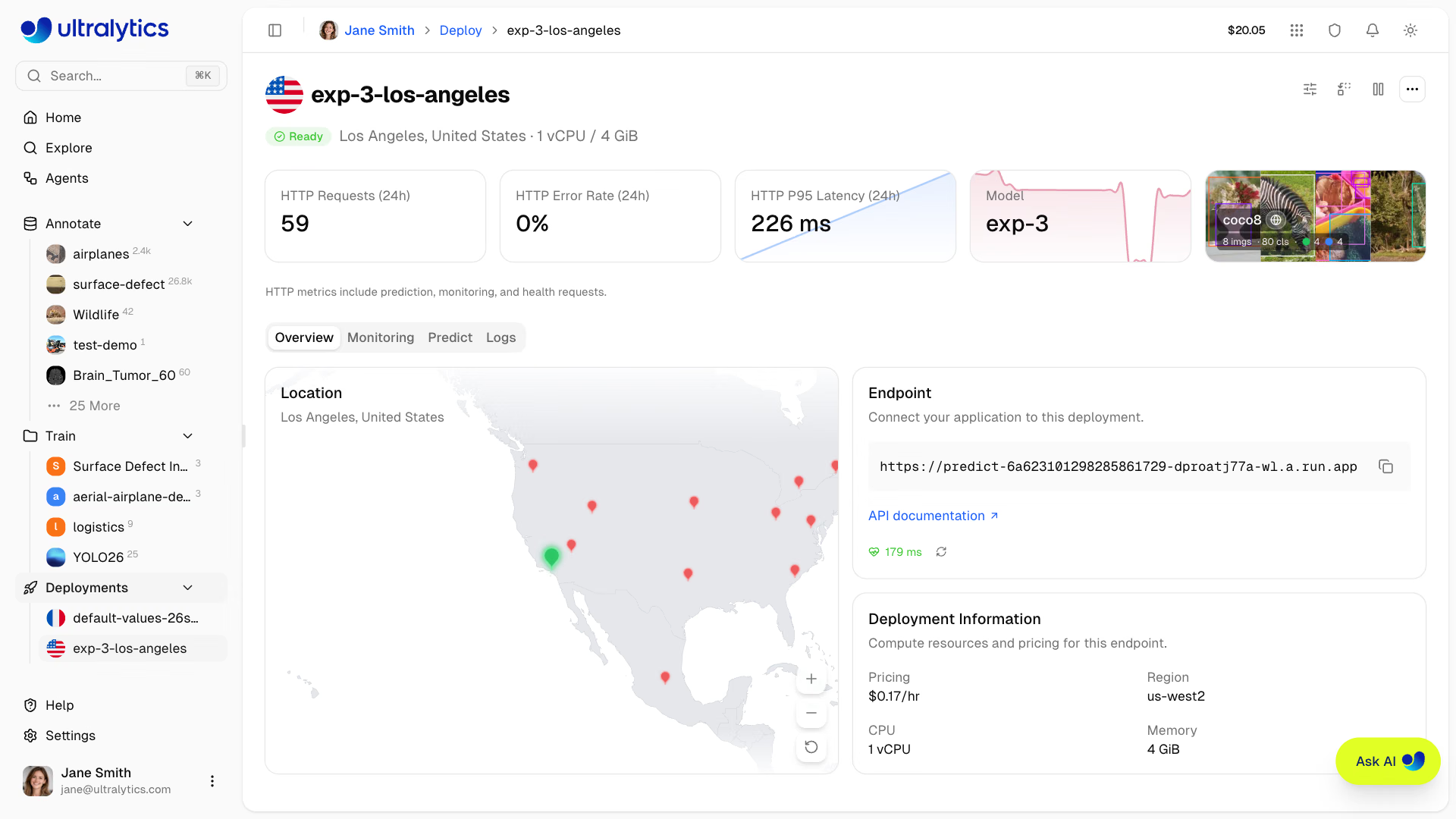
Cost is instance hours divided by useful work. A card like this one has the two numbers you need: what an hour costs ($0.17 for 1 vCPU and 4 GiB here) and how much work it does (59 requests in 24 hours at 226 ms P95, a mostly idle endpoint). Then:
- Raise utilization. A GPU at 30% utilization wastes 70% of its bill. Batch streams (previous lessons) or serve through Triton Inference Server.
- Right-size. Benchmark on a smaller GPU, or on a CPU with OpenVINO, before assuming you need a large one.
- Use spot or preemptible capacity for batch jobs. Reprocessing archived video tolerates interruptions; live streams do not.
Pitfalls#
Symptom: two weeks of tuning saved 10 ms and the system is still slow. Fix: profile the whole pipeline first and fix the largest stage, whatever it is.
Symptom: if i % 2: continue inside the results loop saves nothing. Fix: the model already ran on that frame; skip at the source with vid_stride.
Symptom: throughput rose but each frame now arrives later. Fix: larger batches raise throughput per dollar, not per-frame latency; use them for many streams or offline jobs, not a single real-time camera.
When the model levers are spent, better data is the next one. A dataset that matches production lets a smaller model reach the accuracy a larger one needed: a cost cut with no accuracy loss.
Show solution
from ultralytics import YOLO

if __name__ == "__main__":  # validation starts worker processes on macOS and Windows
    data, img = "coco8.yaml", "https://ultralytics.com/images/bus.jpg"  # use your val YAML and a production frame
    for weights, imgsz in (("yolo26s.pt", 640), ("yolo26n.pt", 640), ("yolo26n.pt", 480)):
        model = YOLO(weights)
        runs = [model(img, imgsz=imgsz, verbose=False)[0].speed["inference"] for _ in range(20)][5:]
        m = model.val(data=data, imgsz=imgsz, batch=1, plots=False, verbose=False).box.map
        print(f"{weights} imgsz={imgsz}: {sorted(runs)[len(runs) // 2]:.1f} ms, mAP50-95 {m:.3f}")
Each row drops the first five runs as warm-up and reports the median of the rest. Choose the first row that meets the latency budget with an mAP loss inside your budget. A worked budget: "two days, at most 1 mAP point, 20 FPS on the store box." If yolo26s at 640 misses 50 ms per frame and yolo26n at 640 meets it within 1 point on your val set, stop there; don't spend the second day on 480.