Annotation Quality
Know what a YOLO label contains, lint label files for broken rows, and keep annotators consistent with a guideline and a measured calibration round.
A model trained on inconsistent labels learns the inconsistency. Fifty thousand boxes drawn to one clear rule beat half a million drawn to twenty private interpretations, and relabeling is almost always cheaper than a bigger model. This lesson gives you a label linter, a one-page guideline, and a number for annotator agreement.
Hands-on
What a label actually is#
In the YOLO format, every image has a matching .txt file with one row per object. Coordinates are normalized to 0–1 by the image width and height, so labels survive resizing. The row layout depends on the task:
| Task | One label | Notes |
|---|---|---|
| Detection | class x_center y_center width height | Box center and size |
| Instance segmentation | class x1 y1 x2 y2 ... xn yn | Polygon outline |
| Pose | class x y w h px1 py1 v1 ... pxn pyn vn | Box, then keypoints with optional visibility |
| OBB | class x1 y1 x2 y2 x3 y3 x4 y4 | Four corners of the rotated box |
| Classification | No label file | Images sorted into one folder per class |
| Semantic segmentation | A PNG mask per image | Each pixel value is a class index |
| Depth estimation | A depth PNG or NPY per image | Each pixel value is a distance |
Class indices start at 0 and map to names in the dataset YAML. An image with no objects needs no label file — that's how background images work. The detection format, semantic, and depth dataset pages have worked examples.
Lint your label files#
Broken rows fail silently: a coordinate above 1, a class id the YAML doesn't define, or the same object boxed twice all become noise the model tries to learn. A short linter catches them before training:
from itertools import combinations
from pathlib import Path

from ultralytics.data.utils import check_det_dataset

def iou(a, b):
    """IoU of two normalized (x_center, y_center, width, height) boxes."""
    ax1, ay1, ax2, ay2 = a[0] - a[2] / 2, a[1] - a[3] / 2, a[0] + a[2] / 2, a[1] + a[3] / 2
    bx1, by1, bx2, by2 = b[0] - b[2] / 2, b[1] - b[3] / 2, b[0] + b[2] / 2, b[1] + b[3] / 2
    inter = max(0, min(ax2, bx2) - max(ax1, bx1)) * max(0, min(ay2, by2) - max(ay1, by1))
    return inter / (a[2] * a[3] + b[2] * b[3] - inter)

def check_labels(text, names):
    """Return a list of problems in one YOLO detection label file."""
    problems, boxes = [], []
    for i, row in enumerate(text.split("\n"), 1):
        values = row.split()
        if not values:
            continue
        if len(values) != 5:
            problems.append(f"row {i}: {len(values)} values, expected 5")
        elif int(values[0]) not in names:
            problems.append(f"row {i}: unknown class {values[0]}")
        elif not all(0 <= float(v) <= 1 for v in values[1:]):
            problems.append(f"row {i}: coordinates outside 0-1")
        else:
            boxes.append((i, int(values[0]), [float(v) for v in values[1:]]))
    for (i, ca, a), (j, cb, b) in combinations(boxes, 2):
        if ca == cb and iou(a, b) > 0.8:
            problems.append(f"row {j}: duplicate of row {i} (IoU {iou(a, b):.2f})")
    return problems

broken = "0 0.50 0.50 0.20 0.30\n0 0.51 0.50 0.20 0.30\n3 0.40 0.40 0.10 0.10\n0 1.20 0.50 0.10 0.10\n0 0.50 0.50 0.10"
print("\n".join(check_labels(broken, {0: "pill"})))

data = check_det_dataset("medical-pills.yaml")
files = sorted(Path(data["path"], "labels").rglob("*.txt"))
found = sum(len(check_labels(f.read_text(), data["names"])) for f in files)
print(f"medical-pills: {found} problems in {len(files)} label files")
row 3: unknown class 3
row 4: coordinates outside 0-1
row 5: 4 values, expected 5
row 2: duplicate of row 1 (IoU 0.90)
medical-pills: 0 problems in 115 label filesThe hand-made sample shows each error the linter catches; the real dataset passes cleanly. Run it after every labeling batch and before every training run — it takes seconds.
Why labels drift#
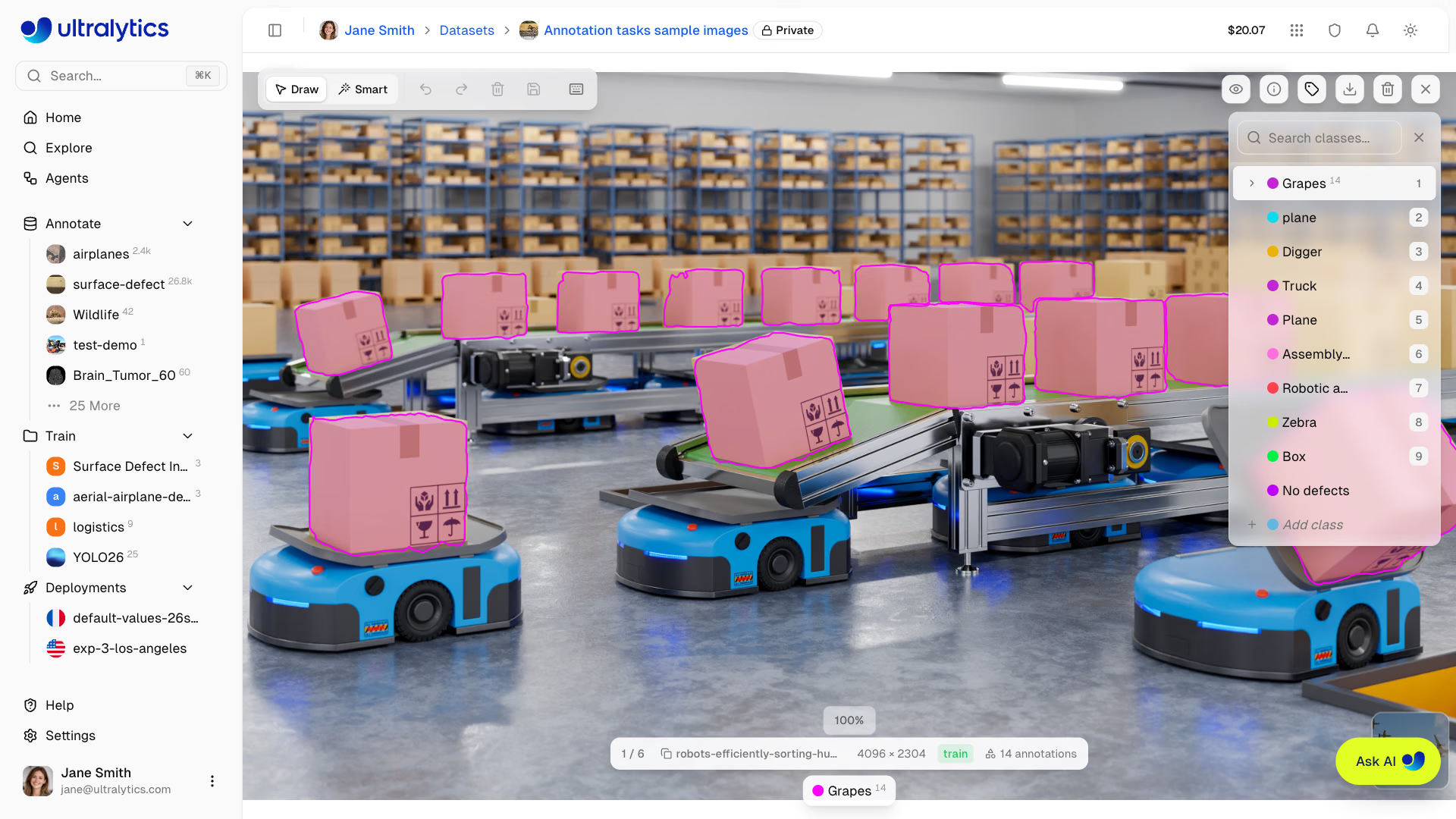
Look at the class panel in this editor: the 14 carton polygons are saved under Grapes, while a Box class sits further down the list — and plane and Plane exist as two separate classes. A linter can't catch either problem, because every row is valid, but a reviewer checking labels against the guideline would spot both in seconds. Most label errors are like this: valid files, wrong decisions.
Annotators rarely label badly because they're careless. They label inconsistently because the rules are ambiguous and each one makes a reasonable but different guess:
- Where does the box stop? The shadow, a carried bag, the load on a forklift's forks?
- Truncation. Is a person half outside the frame still a
person? From what visible fraction? - Occlusion. Is a car visible only as one wheel labeled or skipped?
- Class boundaries. Is a pickup a
caror atruck? Is a scooter abicycleorother? - Do-not-label cases. Reflections, posters, and screens that show the object.
Each choice is fine as long as everyone makes the same one.
A one-page guideline#
It fits on one page, has an example image for every rule, and puts the edge cases first:
## Class: forklift

Include:
- Forklifts with at least 30% of the body visible, moving or parked, any size or color.

Do not label:
- Pallet jacks (no overhead mast) → class `pallet_jack`.
- Reflections in glass or polished floors, and forklifts on posters or screens.

Box rules:
- Include the mast and the full visible body.
- Exclude the load (pallets, boxes) — those have their own classes.
- For partly occluded forklifts, box the visible part only.
Measure agreement in a calibration round#
Before scaling from one annotator to twenty, everyone labels the same 50 images and you compare:
Agreement is the share of objects both annotators drew with the same class and an IoU of at least 0.5 — the practical version of inter-rater reliability:
def iou(a, b):
    """IoU of two (x1, y1, x2, y2) pixel boxes."""
    w = max(0, min(a[2], b[2]) - max(a[0], b[0]))
    h = max(0, min(a[3], b[3]) - max(a[1], b[1]))
    inter = w * h
    return inter / ((a[2] - a[0]) * (a[3] - a[1]) + (b[2] - b[0]) * (b[3] - b[1]) - inter)

def agreement(boxes_a, boxes_b, threshold=0.5):
    """Share of objects both annotators drew with the same class and IoU >= threshold."""
    unmatched, matched = list(boxes_b), 0
    for cls_a, box_a in boxes_a:
        best = max(unmatched, key=lambda b: iou(box_a, b[1]) if b[0] == cls_a else -1, default=None)
        if best and best[0] == cls_a and iou(box_a, best[1]) >= threshold:
            unmatched.remove(best)
            matched += 1
    return matched / max(len(boxes_a), len(boxes_b))

# Two annotators label the same calibration image
alice = [("forklift", (100, 200, 400, 600)), ("person", (450, 220, 520, 480)), ("person", (600, 230, 660, 470))]
bob = [("forklift", (100, 120, 400, 600)), ("person", (452, 218, 522, 478)), ("pallet_jack", (600, 230, 660, 470))]
print(f"agreement: {agreement(alice, bob):.0%}")
agreement: 67%Two kinds of disagreement hide in that 67%. Bob's forklift box starts 80 pixels higher — he included the mast tip — but still matches at IoU 0.83, so it counts as agreement; tighten the box rule if your product measures height. The third object is a real conflict: Alice says person, Bob says pallet_jack. That needs a clearer rule and an example image, then another round. Keep the 50 calibration images: they become the onboarding test for every new annotator.
A reviewer who quietly corrects labels removes the feedback loop, and annotators never learn what they got wrong. Reject with a reason and let the annotator fix it. Slower for the first hundred images, much faster after.
What to track#
| Metric | What it tells you |
|---|---|
| Throughput (objects per hour) | Capacity and cost |
| Reject rate | Whether quality is drifting |
| Agreement on a shared overlap set | Whether annotators still apply the same rules |
When agreement drops, something changed: a new annotator, a new camera, an ambiguous batch, fatigue. When the model later fails on a specific condition, send those exact images back through labeling — the loop active learning automates, and where most real-world accuracy gains come from. Browse and filter failures in your datasets on Ultralytics Platform, and see Dataset Quality Control and Annotation Best Practices for running this at scale.
Show solution
A guideline for the medical-pills pill class, written after a calibration round on 10 images:
## Class: pill

Include:
- Every tablet inside a blister cavity, including half-visible ones at the image edge.
- Tablets seen through clear plastic, even when glare covers part of them.

Do not label:
- Empty cavities, torn foil, or tablets outside the pack.
- Reflections of tablets in the foil.

Box rules:
- Box the tablet itself, not the plastic bubble around it.
- If two tablets touch, draw two boxes.
How to read the agreement score: suppose the first round scores 82%. Sort the unmatched objects by cause. On blister packs, the usual two are boxes drawn around the plastic bubble instead of the tablet (fixed by the first box rule, with an example image) and glare-covered tablets one annotator skipped (fixed by the second include rule). Rerun on 10 new images; scale up only when the score clears the 90% gate.