Datasets that Reflect Reality
Audit a real dataset for coverage gaps before you label more, and turn the gaps into a collection plan with hard negatives.
Most disappointing vision models aren't bad models — they're good models trained on a dataset that doesn't look like the place they're deployed. The previous lesson's COCO detector found zero boats from a drone because COCO's boats are photographed from the side. A five-minute audit shows those gaps before you spend money on labels.
Hands-on
Models learn the dataset, not the world#
A model interpolates between the examples it has seen. Train on sunny daytime streets and deploy in a foggy garage at night, and it fails — not because cars look different, but because it never saw a car under those conditions. This mismatch is called domain shift, and validation can't warn you about it when the validation images come from the same skewed collection:
The fix is structural, not algorithmic: sample the deployment world deliberately, before you label. The data collection and annotation guide covers the mechanics.
Audit a real dataset#
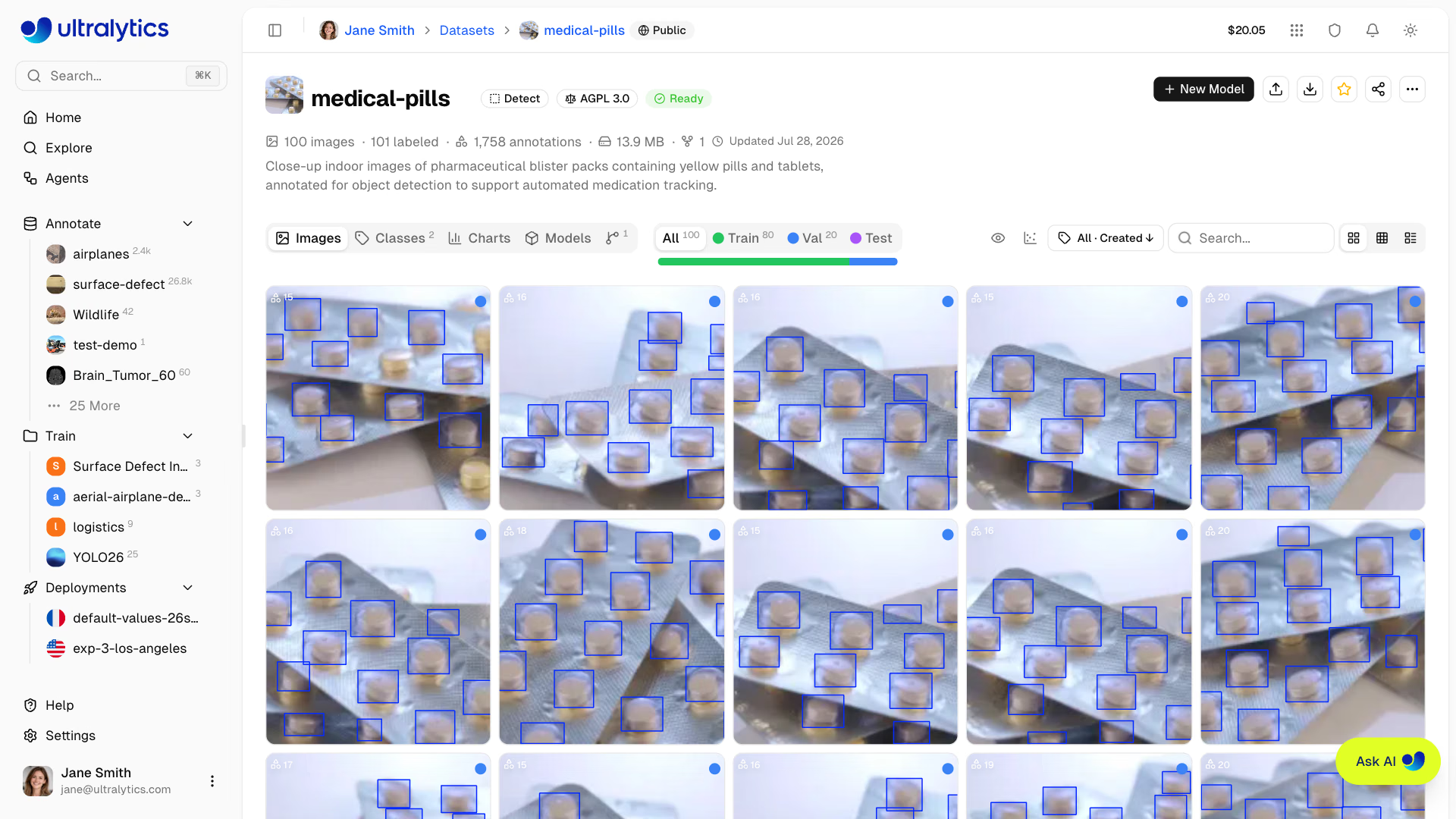
The medical-pills dataset above — close-ups of blister packs with every pill boxed — is a good subject for an audit. Ultralytics Platform shows its headline counts on the dataset page; the script below computes the numbers that reveal coverage, on the copy that ships with ultralytics:
from collections import Counter
from pathlib import Path

from PIL import Image, ImageStat
from ultralytics.data.utils import check_det_dataset

data = check_det_dataset("medical-pills.yaml")  # downloads the dataset on first use

for split in ("train", "val"):
    images = sorted(Path(data[split]).glob("*.jpg"))
    labels = [Path(str(p).replace("/images/", "/labels/")).with_suffix(".txt") for p in images]
    rows = [line.split() for f in labels if f.exists() for line in f.read_text().splitlines()]
    classes = Counter(data["names"][int(r[0])] for r in rows)
    backgrounds = sum(not f.exists() or not f.read_text().strip() for f in labels)
    areas = sorted(float(r[3]) * float(r[4]) for r in rows)  # box area as a share of the image
    sizes = Counter(Image.open(p).size for p in images)
    brightness = [ImageStat.Stat(Image.open(p).convert("L")).mean[0] for p in images]
    print(f"{split}: {len(images)} images, {backgrounds} backgrounds, {dict(classes)}, sizes {dict(sizes)}")
    print(f"  boxes: median {areas[len(areas) // 2]:.1%} of the image, {sum(a < 0.01 for a in areas)} of {len(areas)} under 1%")
    print(f"  brightness: {min(brightness):.0f} to {max(brightness):.0f} (0 = black, 255 = white)")
train: 92 images, 0 backgrounds, {'pill': 1623}, sizes {(1920, 1080): 92}
boxes: median 1.4% of the image, 320 of 1623 under 1%
brightness: 171 to 198 (0 = black, 255 = white)
val: 23 images, 0 backgrounds, {'pill': 399}, sizes {(1920, 1080): 23}
boxes: median 1.4% of the image, 79 of 399 under 1%
brightness: 171 to 198 (0 = black, 255 = white)Read it as a coverage report, one finding per line:
| Finding | What it means | Decision |
|---|---|---|
| One resolution, 1920×1080 | One camera, one setup | Collect from every camera model you will deploy on |
| Brightness only 171–198 | Bright, even studio light, nothing dim | Collect dim, backlit, and mixed-light shots before deploying to a pharmacy counter |
| 0 background images | The model never sees a scene without pills | Add empty blister packs, other tablets, and bare counters as hard negatives |
| Median box is 1.4% of the image; 1 in 5 boxes under 1% | Small objects | Keep imgsz high enough and include far-away shots on purpose |
One class, pill | No pill types | Fine for counting; add classes only if a decision needs them |
None of these show up in the validation score, because validation shares every one of them.
The four axes of coverage#
| Axis | What to collect | Typical failure if missing |
|---|---|---|
| Lighting | Dawn, noon, dusk, night, glare, backlight, flickering fluorescents | Recall collapses at shift changes or in direct sun |
| Weather and atmosphere | Rain, fog, snow, dust, condensation on the lens | False positives on droplets, misses in haze |
| Occlusion and clutter | Partly hidden targets, crowded scenes, objects cut off at the frame edge | Misses whenever the target isn't fully visible |
| Camera and viewpoint | Lens, mounting height and angle, resolution, compression, motion blur | Works on the pilot camera, fails at the next site |
Viewpoint is the axis the marina example missed: the same class from a new angle, and recall dropped to zero.
Hard negatives and background images#
A detector also has to learn what is not the target. Hard negatives look superficially similar: for a forklift detector, a pallet jack, a scissor lift, a forklift's reflection in a polished floor, a safety poster with a forklift printed on it.
In the YOLO format, a background image is simply an image with no label file — nothing to draw. The Ultralytics training tips recommend about 0–10% background images to reduce false positives; COCO itself has about 1%. Fill that share with hard negatives from your own environment rather than random empty frames. Data augmentation can vary brightness and angle, but it can't invent a pallet jack the model has never seen.
Pitfalls#
Symptom: 10,000 labeled images, all daytime, all from the pilot camera. Fix: record from the deployment cameras across the full range of conditions for a couple of weeks, audit the coverage, then pay for labels. Synthetic data can fill a known gap but doesn't replace real captures.
Symptom: high validation mAP, poor results at the first new site. Fix: remember that validation shares the dataset's blind spots. Pull ten random training images and ten production frames, and ask a teammate to tell them apart; if they can, you have a domain gap.
For a sampling plan with target counts per condition, continue with Collect High-Quality, Representative Data in Building High-Performance YOLO Datasets.
Show solution
For medical-pills deployed on a pharmacy counter under mixed shop lighting, fill the grid from the audit (brightness 171–198, one 1920×1080 source, zero backgrounds) and a quick scroll through the images, which shows the same packs on the same bright surface with no hands:
| Class | Bright studio light | Dim or warm shop light | Backlit / glare | Partly covered by a hand | Phone camera |
|---|---|---|---|---|---|
pill | 2,022 | 0 | 0 | 0 | 0 |
| background | 0 | 0 | 0 | — | 0 |
Ranked collection plan:
- Dim or warm shop light — the counter's normal condition, currently zero images.
- Partly covered by a hand — happens on nearly every real interaction.
- Phone camera — a second sensor and resolution.
- Backlit / glare — foil packs reflect windows and ceiling lights.
Hard negatives: empty blister packs (same foil, no pills) and other round objects on the counter — coins, buttons, candy. Add them as background images, around 5–10% of the dataset.