Boxes vs Masks: When You Actually Need Segmentation
Measure what a mask adds over a box on a real image, and decide from the downstream consumer whether your project needs shape at all.
Masks are what most people picture when they imagine AI vision, and they're where teams burn the most labeling budget. A mask tells you an object's exact shape; a box only tells you where it is. That difference decides some products completely — and changes nothing for most of them.
Hands-on
What a mask adds#
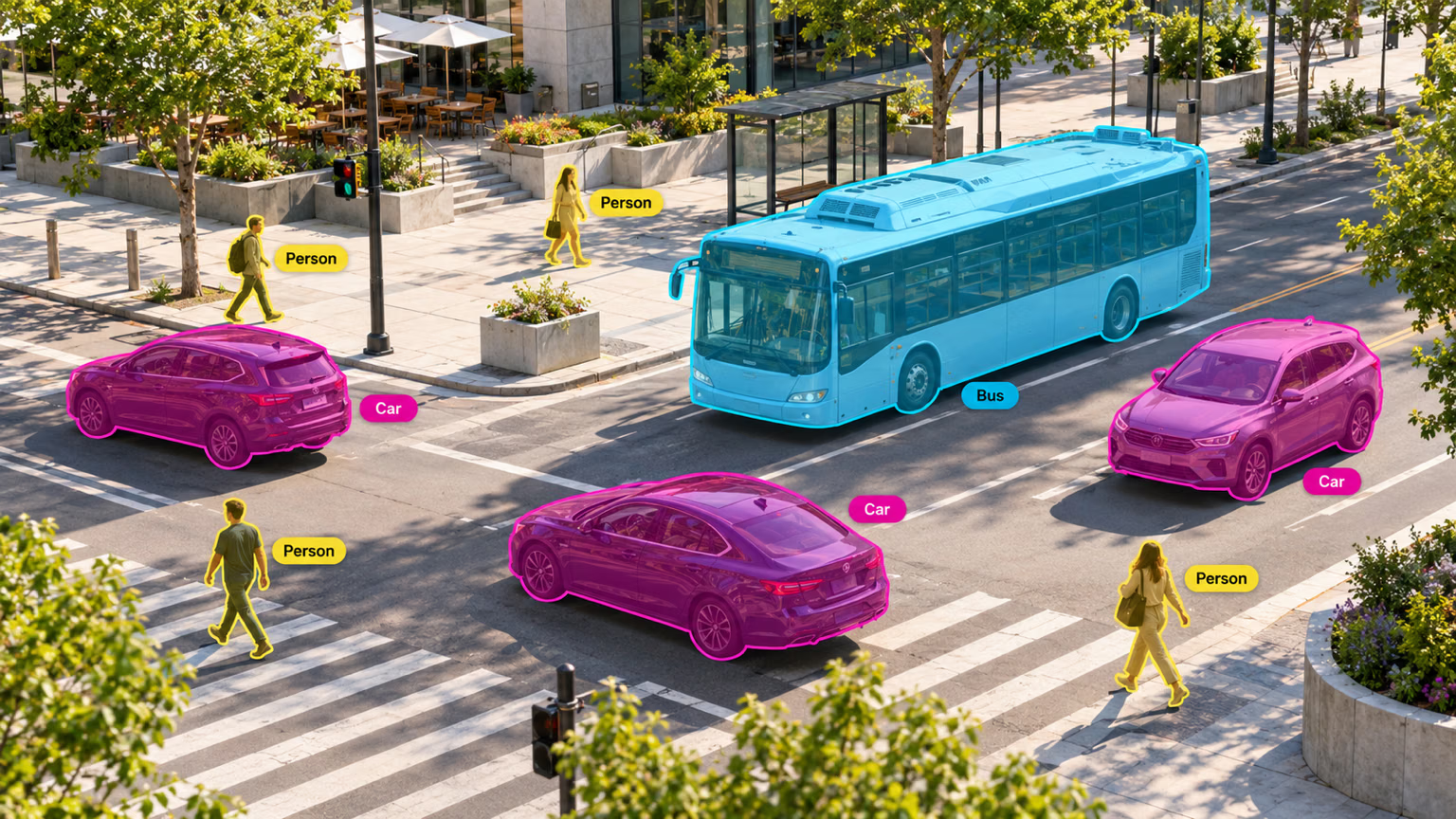
For each object, the Segment task returns everything a detector returns — class, box, confidence — plus the pixels that belong to the object, so each car above gets its own outline, separate from the bus and the people. Read the mask as a polygon (masks.xy) or as a binary image (masks.data).
How much does shape change the numbers? Compare each object's box area with its mask area:
from ultralytics import YOLO

model = YOLO("yolo26n-seg.pt")
result = model("https://ultralytics.com/images/bus.jpg", retina_masks=True, verbose=False)[0]

for box, mask in zip(result.boxes, result.masks.data):
    x1, y1, x2, y2 = box.xyxy[0].tolist()
    box_area = (x2 - x1) * (y2 - y1)
    mask_area = float(mask.sum())  # pixels inside the object's mask
    name, ratio = result.names[int(box.cls)], mask_area / box_area
    print(f"{name:7} box={box_area:7.0f} px  mask={mask_area:7.0f} px  ({ratio:.0%})")
person box= 97116 px mask= 49331 px (51%)
person box= 68102 px mask= 21316 px (31%)
bus box= 410093 px mask= 255265 px (62%)
person box= 55998 px mask= 33524 px (60%)
person box= 23690 px mask= 11109 px (47%)The bus fills only 62% of its box, and one person fills 31%. Any number computed from boxes alone — painted area, spill size, how much of a shelf is empty — would be off by that margin. If your product reports a number like that, you need masks. If it only counts or locates, the extra pixels change nothing.
Symptom: mask areas that look 3–4× too small next to box areas. Cause: by default masks.data comes back at the inference size (here 640×480), while boxes are in original-image pixels (1080×810). Fix: pass retina_masks=True, as above, or scale the counts yourself.
Decide from the consumer, not the demo#
| Downstream need | Boxes enough? | Why |
|---|---|---|
| Count objects or check presence | Yes | Location is the whole answer |
| Alert when an object enters a zone | Yes | A box crossing a line is enough |
| Track objects across frames | Yes | Trackers associate boxes |
| Crop for a second classifier | Yes | A crop only needs the box |
| Measure area or coverage (weeds, rust, spills) | No | Irregular shapes make box area meaningless |
| Cut the object out (background removal, AR) | No | You need the exact edge |
| Check clearance or contact (robot grasp, collision) | No | The box overstates the object |
| Separate touching, irregular objects | Often no | Overlapping boxes blur which pixels belong to whom |
If every row your product needs says "yes", ship a detector. Reach for YOLO26 segmentation only when shape earns its keep.
Instance vs semantic segmentation#
Instance segmentation gives every object its own mask, so three overlapping cars stay three cars. Semantic segmentation labels each pixel with a class and nothing else: all car pixels become one "car" region, and the count is gone. Count or measure individual objects — cells, fruit, defects — with instance segmentation. Measure region coverage — road versus sidewalk, crop versus soil — with semantic segmentation.
What shape costs to label#
A box takes two clicks. A good polygon can take dozens, and every edge is a place where annotators can disagree: does the bag belong to the person, is the shadow part of the car? Measure your own cost instead of trusting a rule of thumb: time an annotator on 20 objects as boxes and the same 20 as polygons, then multiply the difference by your dataset size.
AI-assisted tools close much of the gap. Smart Annotation and Batch Labeling proposes a mask from a click or a box, so annotators correct edges instead of tracing them — but someone still reviews every boundary.
Decide occlusion, transparent objects, shadows, objects cut off by the frame edge, and attached items (bags, handles, loads) before labeling starts, and give the same page to annotators and reviewers. Annotation Best Practices covers how to enforce them; the COCO-Seg dataset shows consistent masks at scale.
When you spot-check masks, look for bleed (mask spills past the edge), holes (missed regions inside the object), phantom edges (mask follows a JPEG artifact), and ambiguous parts (is the suitcase handle in the suitcase mask?).
Show solution
Suppose two products share the bus camera: a people counter and a street-occupancy report that says how much of the scene vehicles cover. Measure both answers from the same run:
from ultralytics import YOLO

model = YOLO("yolo26n-seg.pt")
result = model("https://ultralytics.com/images/bus.jpg", retina_masks=True, verbose=False)[0]
height, width = result.orig_shape

for name in sorted({result.names[int(c)] for c in result.boxes.cls}):
    rows = [i for i, c in enumerate(result.boxes.cls) if result.names[int(c)] == name]
    union = result.masks.data[rows].amax(dim=0)  # merge masks so overlaps count once
    box_union = sum(float((b[2] - b[0]) * (b[3] - b[1])) for b in result.boxes.xyxy[rows])
    print(f"{name:6} {len(rows)} objects | masks cover {float(union.sum()) / (height * width):.0%} of the image, boxes {box_union / (height * width):.0%}")
bus 1 objects | masks cover 29% of the image, boxes 47%
person 4 objects | masks cover 13% of the image, boxes 28%- People counter → boxes. The count is 4 either way; masks add labeling cost and change nothing.
- Occupancy report → masks. Boxes claim the bus covers 47% of the scene; it really covers 29%. A box-based report would be wrong by more than half.