Understand Object Detection
Read a detector's output — class, box, confidence — and set the confidence and IoU thresholds from the cost of each mistake.
Most production vision systems are detection systems with logic on top: counters, trackers, zone alerts, privacy blurs. When one of them misbehaves, the cause is usually not the model but a threshold nobody chose on purpose. Know exactly what a detector returns and which two knobs shape that list, and you can debug almost anything built on it.
Hands-on
What a detector returns#
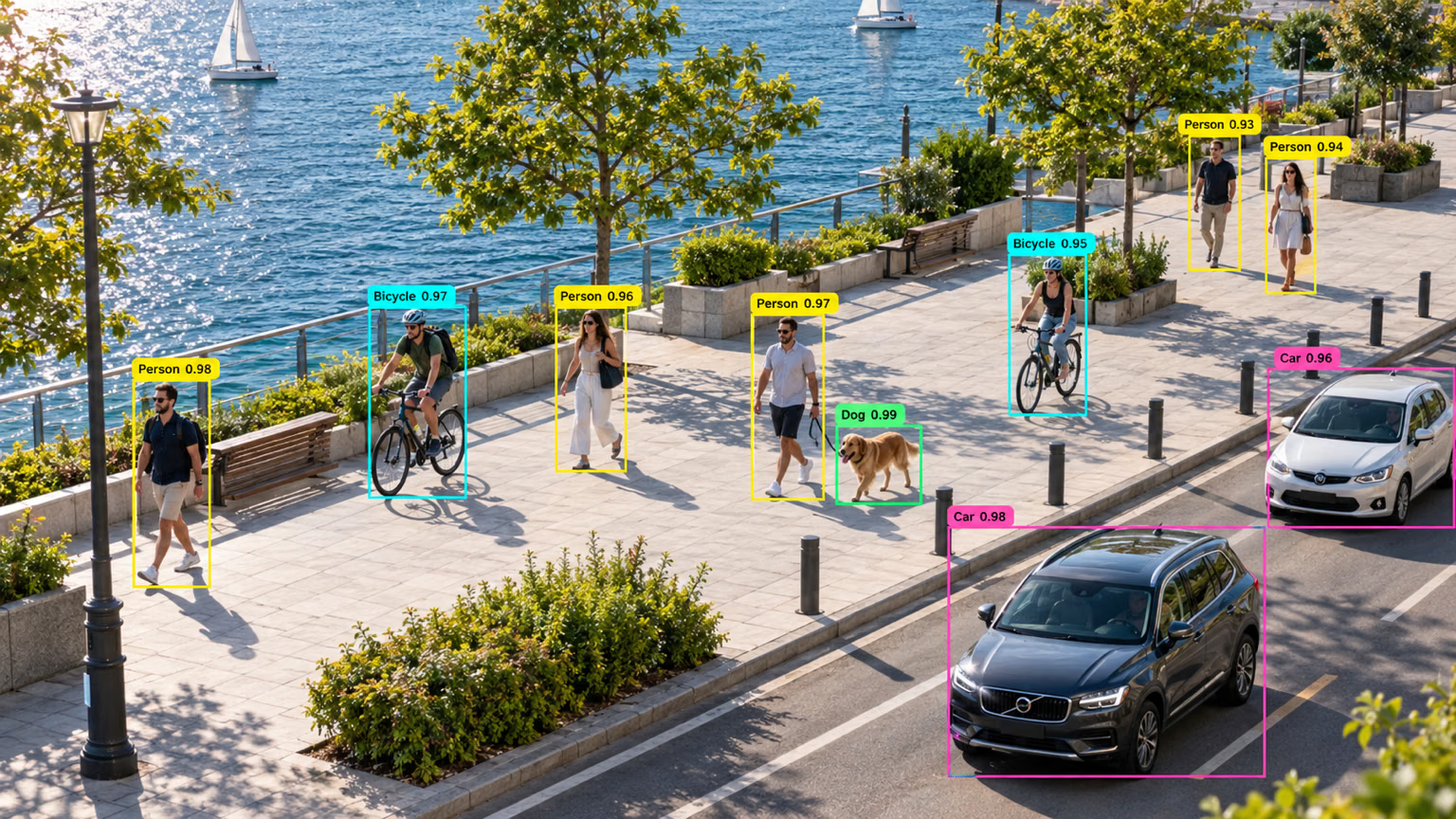
Every tag in that image is one row of output: a class name, a confidence, and the box around it. A detection model returns exactly that list:
- Class — an integer index mapped to a name through
result.names(0isperson,5isbus). - Box — four numbers locating the object;
xyxygives the top-left and bottom-right corners in pixels. - Confidence — a score from 0 to 1 used to rank and filter detections.
Counting, alerting, tracking, and blurring are code you write on top of these rows.
from ultralytics import YOLO

model = YOLO("yolo26n.pt")
result = model("https://ultralytics.com/images/bus.jpg", verbose=False)[0]

for box in result.boxes:
    name = result.names[int(box.cls)]
    x1, y1, x2, y2 = box.xyxy[0].tolist()
    print(f"{name:8} conf={float(box.conf):.2f} box=({x1:.0f}, {y1:.0f}, {x2:.0f}, {y2:.0f})")
bus conf=0.88 box=(0, 230, 803, 751)
person conf=0.87 box=(49, 398, 240, 902)
person conf=0.86 box=(223, 405, 345, 861)
person conf=0.85 box=(670, 395, 810, 880)
person conf=0.65 box=(0, 553, 60, 871)Line by line: the bus box starts at x=0 because the bus runs off the left edge; three people score 0.85–0.87; the fourth person, cut off at the left border, scores only 0.65 — the model sees half a body. Low confidence on truncated objects is normal, and it's the first place a threshold bites.
Each box comes in four formats; use the one your downstream code expects:
| Attribute | Format | Typical use |
|---|---|---|
boxes.xyxy | Corner pixels (x1, y1, x2, y2) | Cropping, drawing, overlap rules |
boxes.xywh | Center pixels plus width and height | Size filters, motion |
boxes.xyxyn | Corners normalized to 0–1 | Rules that survive resolution changes |
boxes.xywhn | Center and size normalized to 0–1 | YOLO label files |
From candidates to a final list#
Internally the model scores many candidate boxes per object. Two filters turn them into the list you see:
Confidence filter. conf drops boxes below a threshold; the prediction default is 0.25. On the bus image the count changes quickly:
conf | Boxes on bus.jpg |
|---|---|
| 0.10 | 7 |
| 0.25 | 5 |
| 0.50 | 5 |
| 0.75 | 4 |
Duplicate filter. Non-maximum suppression (NMS) keeps the highest-confidence box and drops other boxes of the same class that overlap it by more than iou (default 0.7). Overlap is measured as intersection over union: the shared area divided by the combined area.
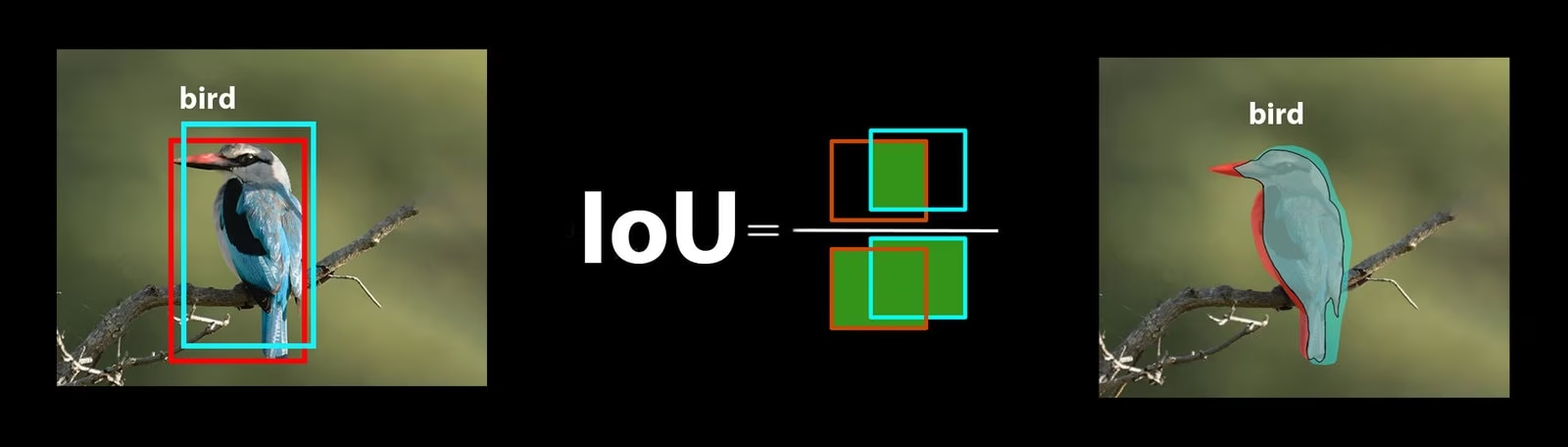
iou | Boxes on bus.jpg | Effect |
|---|---|---|
| 0.3 | 5 | Strict: overlapping boxes are merged |
| 0.7 | 5 | Default |
| 0.95 | 8 | Permissive: near-duplicates survive |
Choose thresholds from the cost of mistakes#
| If… | Then… |
|---|---|
| A miss is expensive (safety alerts, defects) | Lower conf and accept some false alarms |
| A false alarm is visible to users (search, tagging) | Raise conf |
| You report counts | Sweep conf on validation images and keep the one with the smallest count error |
| Real neighbors vanish in crowds | Raise iou, e.g. 0.7 → 0.8 |
| The same object gets two boxes | Lower iou |
| Classes differ in difficulty | Predict at the lowest conf you need, then filter per class in code |
Warehouse safety monitoring is the classic low-threshold case; Predict mode lists every inference argument.
Pitfalls#
Symptom: "the model is 88% sure this is a bus", and thresholds chosen by intuition. Fix: treat confidence as a ranking score. In YOLO26 one score covers both "there is an object" and "it is this class", and it isn't calibrated — pick the threshold from validation data, not from the number's meaning.
When two people stand shoulder to shoulder, their boxes overlap heavily and NMS can delete a real person as a "duplicate". Raise iou and the second box comes back. YOLO26 also ships an end-to-end head that needs no NMS at all; pass nms=False to use it.
Symptom: a threshold that looks perfect on the demo image fails on the real camera. Fix: sweep thresholds on a validation set from the deployment camera; one image only shows you what the knobs do.
Four ways to be wrong#
| Failure | What's broken | Typical fix |
|---|---|---|
| Right class, loose box | Localization | Tighter, consistent box rules; larger imgsz for small objects |
| Good box, wrong class | Classification | More examples of the confused pair, or merge the classes |
| No box at all | Recall | More examples of that condition: lighting, size, occlusion |
| Box on background | Precision | Hard-negative images of whatever fooled the model |
Two lists make diagnosis fast: true positives with low confidence (the model is unsure about real objects) and false positives with high confidence (it's sure about the wrong thing). They point to different fixes.
Show solution
from ultralytics import YOLO

model = YOLO("yolo26n.pt")
result = model("https://ultralytics.com/images/bus.jpg", conf=0.05, save=True, verbose=False)[0]

for box in sorted(result.boxes, key=lambda b: -float(b.conf)):
    name, conf = result.names[int(box.cls)], float(box.conf)
    x1, y1, x2, y2 = box.xyxy[0].tolist()
    print(f"{conf:.2f} {name:10} ({x1:.0f}, {y1:.0f}, {x2:.0f}, {y2:.0f})")
0.88 bus (0, 230, 803, 751)
0.87 person (49, 398, 240, 902)
0.86 person (223, 405, 345, 861)
0.85 person (670, 395, 810, 880)
0.65 person (0, 553, 60, 871)
0.18 person (0, 600, 40, 871)
0.12 stop sign (0, 252, 35, 326)
0.08 handbag (43, 732, 78, 812)
0.07 skateboard (669, 822, 808, 881)
0.06 handbag (225, 634, 291, 705)Every box below 0.5 is a false positive. The 0.18 person duplicates the 0.65 person cut off at the left edge. The 0.12 stop sign is a real road sign with the wrong class. The handbags and the skateboard sit on hands and shoes. Every real object scores above 0.6, so conf=0.5 keeps all four people and drops all the noise for a pedestrian counter — it protects against double-counting. Confirm it on a validation set from the real camera before shipping: the truncated person at 0.65 shows how close real objects can get to the line.