The Seven Vision Tasks
Map an output line to classification, detection, instance segmentation, semantic segmentation, depth estimation, pose, or OBB, and pick the YOLO26 weights to start with.
Choosing the task is the most expensive decision you make before training. Pick segmentation when boxes would do and your labeling bill multiplies; pick upright boxes for ships seen from a drone and every box is mostly water. Ultralytics YOLO supports seven tasks behind one API, so the choice is about the output you need — not the tooling.
Hands-on
The seven tasks at a glance#
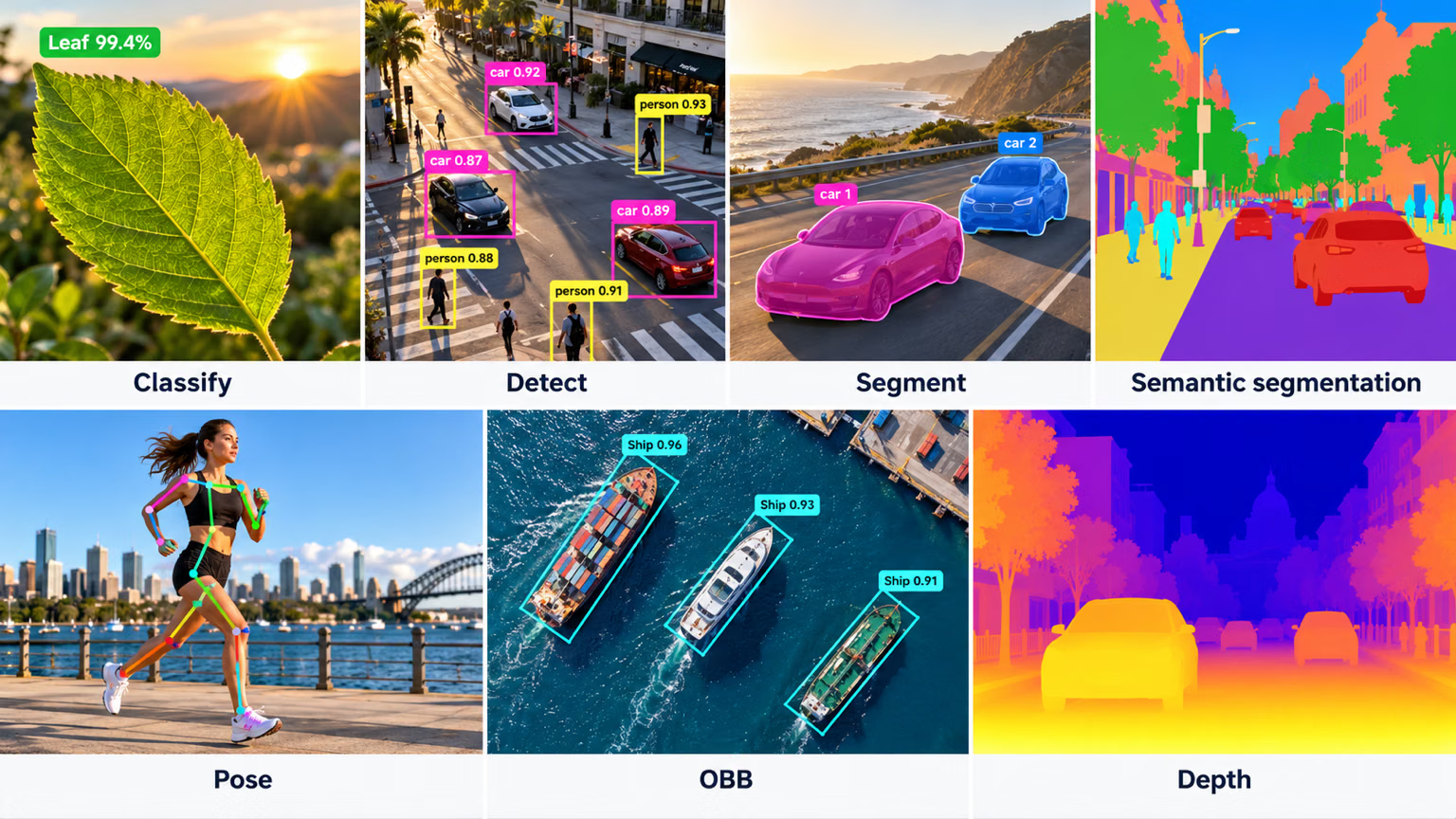
Read the table by the output column — that's what the output line of your spec must match.
| Task | Output | Answers | YOLO26 weights |
|---|---|---|---|
| Classification | One label per image, with a probability | "What is this image?" | yolo26n-cls.pt |
| Detection | Class, box, and confidence per object | "What is where?" | yolo26n.pt |
| Instance segmentation | Class and pixel mask per object | "What exact shape is each object?" | yolo26n-seg.pt |
| Semantic segmentation | One class for every pixel | "What kind of region is each pixel?" | yolo26n-sem.pt |
| Depth estimation | Distance in meters for every pixel | "How far away is each pixel?" | yolo26n-depth.pt |
| Pose estimation | Box and keypoints per person or object | "How is the body posed?" | yolo26n-pose.pt |
| Oriented bounding boxes | Rotated box per object | "What is where, at what angle?" | yolo26n-obb.pt |
Two pairs trip people up. Instance vs semantic segmentation: instance separates every object (three cars, three masks); semantic labels pixels by class only (one "car" region, no count). Detection vs OBB: both return one box per object, but an OBB rotates with the object, which matters when objects lie at angles in top-down imagery.
One API, seven outputs#
Switching tasks doesn't mean switching tools. The weights file decides what comes back, and the Results object fills the matching attribute:
from ultralytics import YOLO

image = "https://ultralytics.com/images/bus.jpg"
outputs = ["probs", "boxes", "masks", "semantic_mask", "depth", "keypoints", "obb"]

for suffix in ["-cls", "", "-seg", "-sem", "-depth", "-pose", "-obb"]:
    weights = f"yolo26n{suffix}.pt"
    model = YOLO(weights)
    result = model(image, verbose=False)[0]
    filled = [name for name in outputs if getattr(result, name) is not None]
    print(f"{weights:18} task={model.task:9} -> {', '.join(filled)}")
yolo26n-cls.pt task=classify -> probs
yolo26n.pt task=detect -> boxes
yolo26n-seg.pt task=segment -> boxes, masks
yolo26n-sem.pt task=semantic -> semantic_mask
yolo26n-depth.pt task=depth -> depth
yolo26n-pose.pt task=pose -> boxes, keypoints
yolo26n-obb.pt task=obb -> obbRead the right-hand column: segmentation and pose also return boxes, because they are detection plus one more thing. Semantic segmentation and depth return no per-object output at all — they describe every pixel instead. Your downstream code reads exactly one of these attributes, so the output line of your spec should name it.
Choosing in practice#
Start from what one prediction must describe, then take the cheapest task that answers the decision line:
- One label for the whole image → classification.
- A class for every pixel, with no need to separate objects → semantic segmentation.
- A distance for every pixel → depth estimation.
- Something about each object:
- where it is, to count, locate, or filter it → detection (add tracking for identity across frames);
- its exact shape, boundary, or area → instance segmentation;
- its posture → pose;
- its rotation in top-down imagery → OBB.
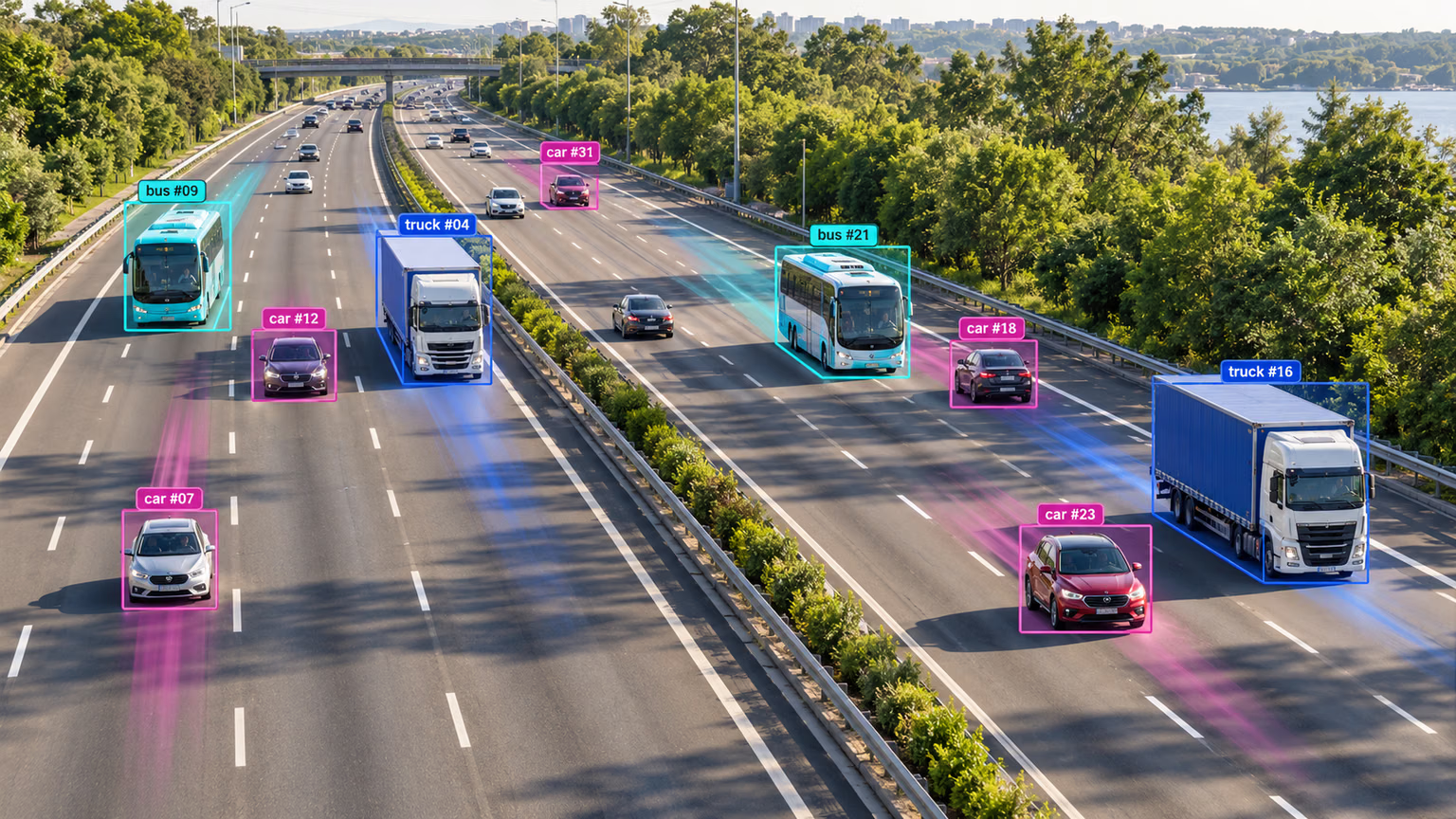
When two tasks both fit, choose the cheaper one to label and run. Detection is the default for most products: boxes are fast to draw and review, and with tracking on top they already power counting, zone alerts, and traffic analytics like this highway view:
Depth: the task that answers "how far"#
Depth estimation returns a map the size of the image with one distance, in meters, per pixel — no classes and no boxes. Use it when distance drives the decision: a robot keeping clear of obstacles, a vehicle slowing when something is close, a rough volume estimate of a pile.
from ultralytics import YOLO

model = YOLO("yolo26n-depth.pt")
result = model("https://ultralytics.com/images/bus.jpg", verbose=False)[0]

depth = result.depth.data  # meters, one value per pixel
print(f"depth map {tuple(depth.shape)}, nearest {float(depth.min()):.1f} m, farthest {float(depth.max()):.1f} m")
depth map (1080, 810), nearest 2.0 m, farthest 14.9 mA single camera infers depth from learned cues such as perspective and object size, so measure its error on your own scenes before using it for safety-critical distances. Depth pairs well with detection: detect the object, then read the depth map inside its box.
Pitfalls#
| Mix-up | Symptom | Better choice |
|---|---|---|
| Segmentation where boxes would do | No downstream code ever reads the mask | Detection |
| Upright boxes on top-down imagery | Boxes are mostly background, and neighbors suppress each other | OBB |
| Classification for a multi-object scene | The label depends on one small object | Detection plus a rule |
| Semantic segmentation when you need counts | Touching objects merge into one region | Instance segmentation |
| Box size as a distance proxy | Rules break when object sizes vary | Depth estimation, or detection plus depth |
| Pose to check presence | You never read a keypoint | Detection |
Richer outputs cost more at every stage: masks and keypoints take longer to draw, longer to review, and need stricter labeling rules. Start with the cheapest task that answers the decision line, and upgrade only when a real consumer needs the extra detail.
Show solution
For the forklift spec, the answer is detection with yolo26n.pt, read from result.boxes.
The decision line needs to know where forklifts and people are so code can test how close they are. Boxes answer that. Instance segmentation would add labeling cost without changing the alert, because a box's bottom edge already gives the ground position. Pose isn't needed because posture isn't part of the decision. Depth could help turn image positions into meters, but a calibrated fixed camera maps the floor plane without it. OBB is only worth testing if the cameras look straight down and forklifts appear at steep diagonal angles.