Pose Estimation and OBB
Read keypoints and rotated boxes from YOLO26, write a rule on top of each, and recognize when posture or angle is the real signal.
A care home needs to know when someone has fallen; a port needs to count ships packed side by side in a drone image. Plain boxes fail both: a box doesn't say whether a person is upright, and an upright box around a diagonal ship is mostly water. Pose estimation and OBB are built for exactly these two problems.
Hands-on
Pose: when posture is the signal#
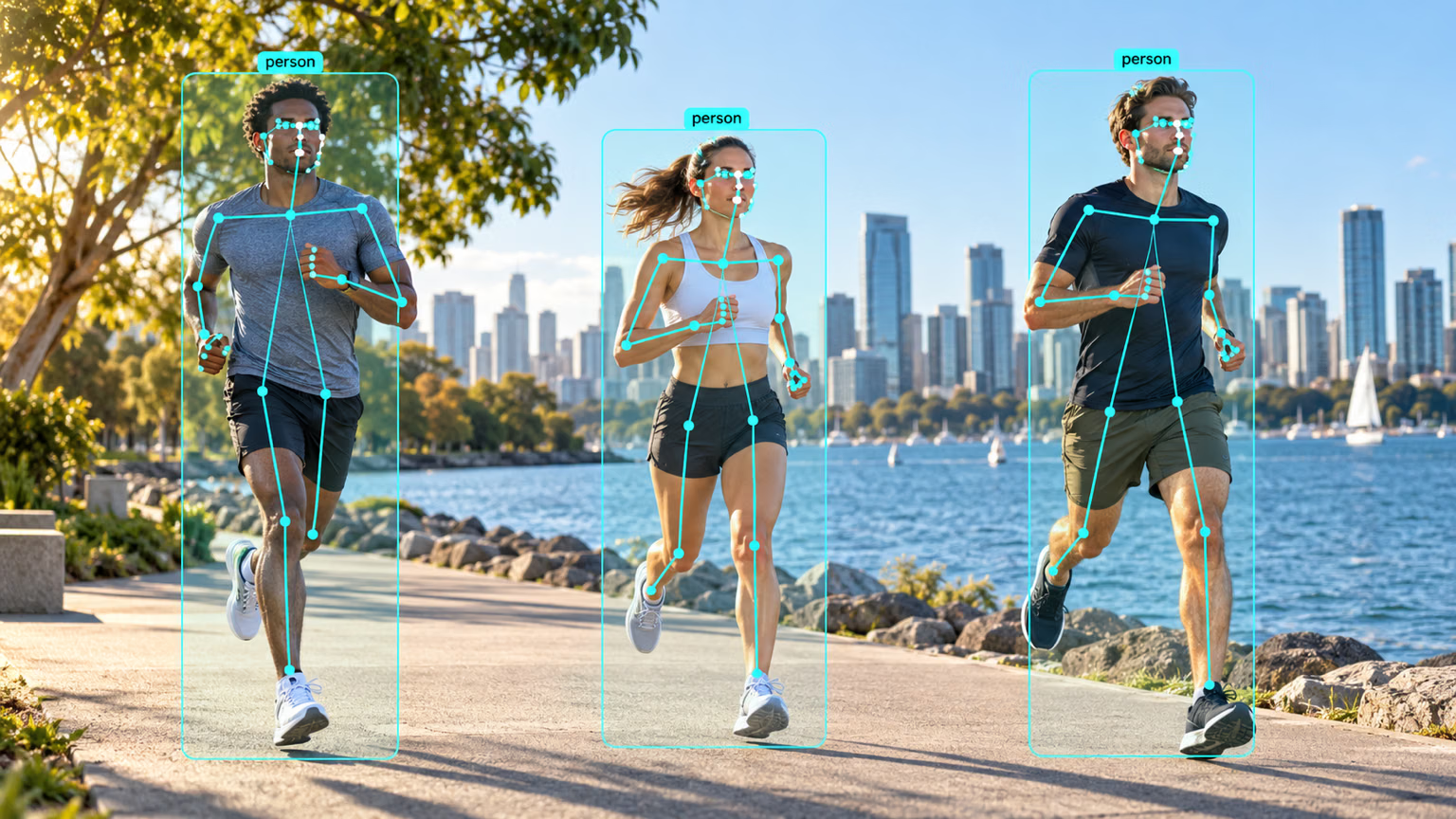
A pose model returns a box for each person plus a fixed list of keypoints. Models trained on COCO-Pose predict 17 per person — nose, eyes, ears, shoulders, elbows, wrists, hips, knees, and ankles — always in the same order, so index 0 is the nose, 11 the left hip, and 15 the left ankle. Each keypoint also has a confidence.
The simplest useful rule: a standing body is taller than it is wide; a body lying on the floor is wider than it is tall. Here it is on the bus image, using only keypoints the model is confident about:
from ultralytics import YOLO

model = YOLO("yolo26n-pose.pt")
result = model("https://ultralytics.com/images/bus.jpg", verbose=False)[0]

for xy, conf in zip(result.keypoints.xy, result.keypoints.conf):
    visible = xy[conf > 0.5]  # drop keypoints the model couldn't see
    width = float(visible[:, 0].max() - visible[:, 0].min())
    height = float(visible[:, 1].max() - visible[:, 1].min())
    posture = "unknown" if len(visible) < 5 else "lying" if width > height else "upright"
    print(f"{len(visible):2d}/17 keypoints visible, body {width:3.0f} px wide x {height:3.0f} px tall -> {posture}")
16/17 keypoints visible, body 117 px wide x 427 px tall -> upright
6/17 keypoints visible, body 80 px wide x 359 px tall -> upright
16/17 keypoints visible, body 91 px wide x 384 px tall -> upright
1/17 keypoints visible, body 0 px wide x 0 px tall -> unknown
2/17 keypoints visible, body 3 px wide x 6 px tall -> unknownThree people are clearly upright. The last two rows are the person cut off at the left edge and a low-confidence duplicate: with one or two visible keypoints there's nothing to judge, so the rule says "unknown" instead of guessing. A production fall detector adds time — lying for more than a few seconds, after a fast drop — through tracking.
Symptom: skeletons with wrists in mid-air and posture rules that fire on half-visible people. Cause: keypoints.xy returns a position for all 17 keypoints, even ones the model couldn't see. Fix: filter with keypoints.conf, as above, and require a minimum number of visible keypoints before deciding anything.
Pose earns its place when the answer depends on what the body is doing: falls or lifting with a bent back for safety, joint angles and rep counts in sport as in workouts monitoring, or posture in livestock and fixed landmarks on parts with a custom keypoint layout. To answer "is there a person here?", use plain detection.
OBB: when angle matters#
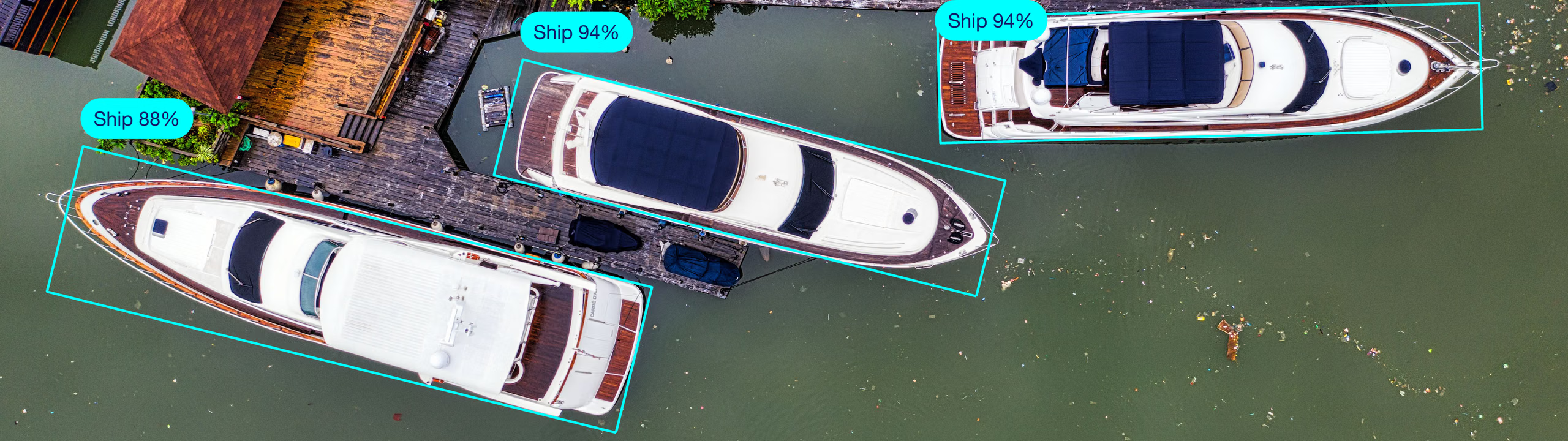
A regular box has edges parallel to the image. An oriented bounding box adds a rotation, stored as center, width, height, and angle (xywhr). In top-down imagery — satellite, drone, overhead conveyor cameras — objects lie at every angle, and an upright box around a diagonal object is mostly background, as the yachts above would be. Measure how much on a drone shot of a marina:
from ultralytics import YOLO

model = YOLO("yolo26n-obb.pt")
result = model("https://ultralytics.com/images/boats.jpg", verbose=False)[0]

obb = result.obb
rotated_area = obb.xywhr[:, 2] * obb.xywhr[:, 3]  # width x height of each rotated box
x1, y1, x2, y2 = obb.xyxy.T  # the axis-aligned box that would enclose the same object
upright_area = (x2 - x1) * (y2 - y1)

print(f"{len(obb)} objects, classes: {sorted({result.names[int(c)] for c in obb.cls})}")
cx, cy, w, h, angle = obb.xywhr[0].tolist()
print(f"first box: center=({cx:.0f}, {cy:.0f}) size={w:.0f}x{h:.0f} angle={angle:.2f} rad")
ratio = float((upright_area / rotated_area).median())
print(f"an axis-aligned box would be {ratio:.1f}x larger (median)")
173 objects, classes: ['harbor', 'ship']
first box: center=(619, 850) size=33x108 angle=-0.25 rad
an axis-aligned box would be 2.1x larger (median)An upright box covers about twice the area of the rotated box around the same boat, and the extra area is water. It hurts twice: NMS sees the upright boxes of neighboring boats overlapping and may suppress real ones, and any size estimate is inflated. OBB models trained on aerial datasets such as DOTA handle these scenes directly. Note the angle is in radians: -0.25 rad is about -14°.
Choosing between detection, pose, and OBB#
| Scenario | Best task | Why |
|---|---|---|
| Counting people on a sidewalk | Detection | Presence and location are the answer |
| Detecting a fall in a care home | Pose | Body orientation is the signal |
| Counting squats in a gym | Pose | Knee and hip angles are the signal |
| Counting docked boats from a drone | OBB | Boats sit diagonally and tightly packed |
| Packages on a conveyor, seen from above | OBB | Orientation varies and neighbors touch |
| Cars at street level | Detection | Cars appear roughly upright in the frame |
Pose adds keypoints to each box; OBB adds an angle. If your code never reads the keypoints or the angle, a plain detector is faster to label, faster to run, and easier to debug.
Show solution
from ultralytics import YOLO

image = "https://ultralytics.com/images/boats.jpg"
upright = YOLO("yolo26n.pt")(image, verbose=False)[0]
rotated = YOLO("yolo26n-obb.pt")(image, verbose=False)[0]
print(f"axis-aligned detector: {len(upright.boxes)} boxes")
print(f"OBB model: {len(rotated.obb)} rotated boxes")
axis-aligned detector: 0 boxes
OBB model: 173 rotated boxesMost of the gap is training data, not geometry. yolo26n.pt was trained on COCO, where boats are mostly photographed from the side; from above it finds nothing at the default threshold (drop conf to 0.05 and it calls a few of them bottles). The OBB model was trained on aerial imagery. Geometry still matters on top of that: even a detector trained on aerial boats would draw boxes about twice too large and fight NMS in tightly packed rows. Both the task and the training data have to match the deployment view.