From Lab to Production
Install Ultralytics, run YOLO26 on your own images, check the output against your spec, and choose your next step.
Ten minutes with a pretrained model answers the question that decides your whole plan: does an off-the-shelf model already cover your classes and your camera, or do you need your own data? Here you install Ultralytics, run YOLO26 on real images, and check the result against the spec you wrote in the first lesson.
Hands-on
Install#
pip install ultralytics
yolo checks
The first line installs the ultralytics Python package and the yolo command, plus PyTorch if it's missing. yolo checks prints your Python, PyTorch, and CUDA versions and the hardware Ultralytics will use, so you can confirm the setup before running anything. Use a fresh virtual environment; the quickstart covers conda, Docker, and GPU setups.
The ultralytics package installs on Python 3.8 and newer, but current PyTorch releases need Python 3.10 or newer. If your environment is older, create a fresh virtual environment with a recent Python first.
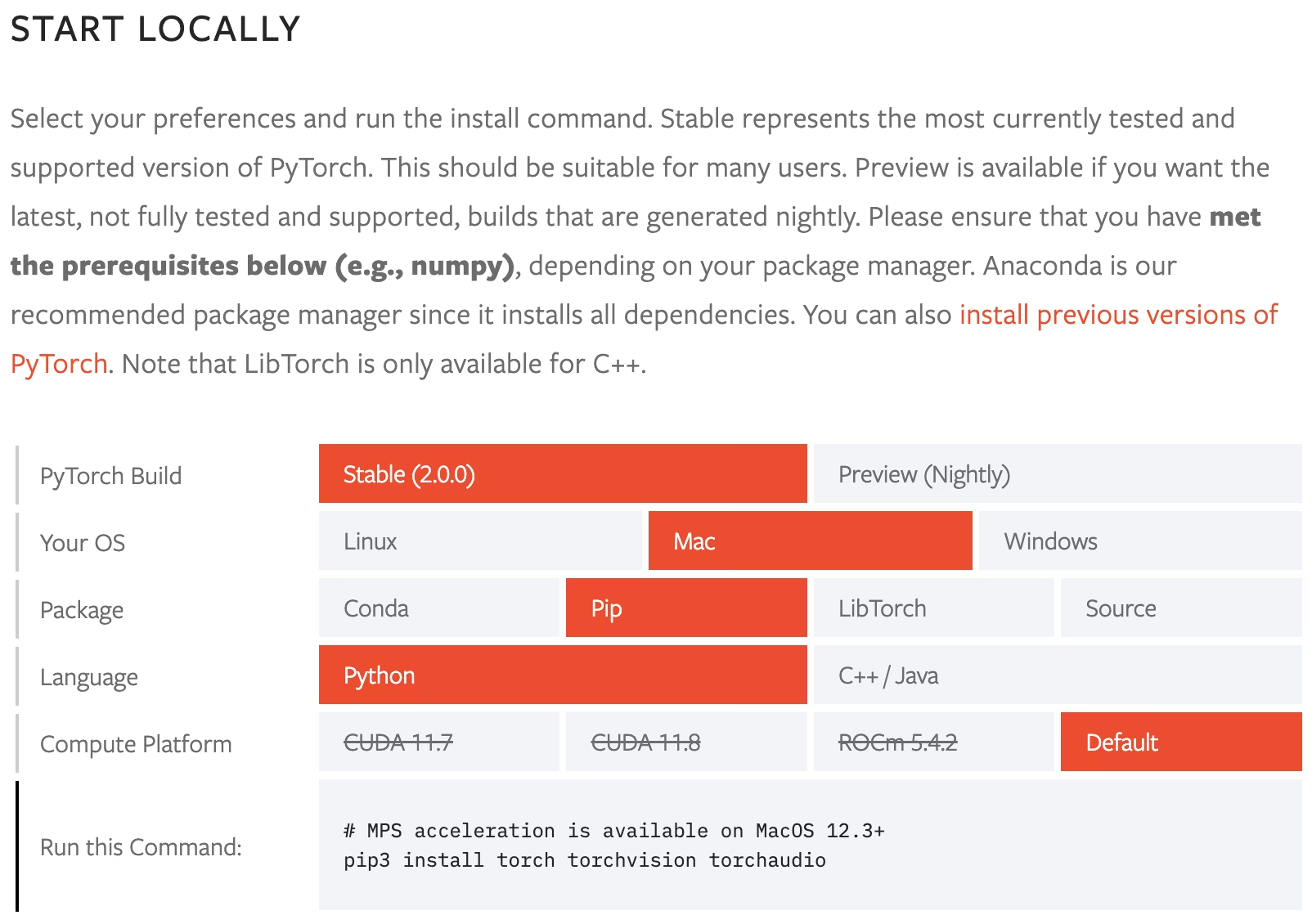
Symptom: yolo checks shows CPU on a machine with an NVIDIA GPU, and inference is slow. Cause: a CPU-only PyTorch build — the default pip wheel on Windows, for example. Fix: pick your OS, package manager, and CUDA version in the PyTorch selector above, run the command it shows, then reinstall ultralytics. On a Mac, as in the screenshot, the default build is right; Ultralytics runs on the CPU unless you pass device=mps to use the Apple GPU.
A first prediction#
from ultralytics import YOLO

model = YOLO("yolo26n.pt")  # downloads the ~5 MB nano model on first use
results = model("https://ultralytics.com/images/bus.jpg", save=True)

for box in results[0].boxes:
    print(model.names[int(box.cls)], round(float(box.conf), 2))
Both print a one-line summary per image and save the annotated image under runs/detect/predict:
image 1/1 .../bus.jpg: 640x480 4 persons, 1 bus, 19.7ms
Speed: 0.9ms preprocess, 19.7ms inference, 0.4ms postprocess per image at shape (1, 3, 640, 480)
Results saved to runs/detect/predict
Line by line: the image was resized to 640×480 for inference; the model found four people and a bus; inference took about 20 ms on a laptop CPU. The Speed line is your first latency check — compare it with the frame rate in your spec's input line. Open the saved image: every box has the class, box, and confidence from the detection lesson.
Check the output against your spec#
| Question | If yes | If no |
|---|---|---|
| Are your classes among the 80 COCO classes the model knows? | Prototype with no training at all | You need labeled data and a fine-tune (fine-tuning guide) |
| On your images, do boxes above your threshold land on the right objects? | The task and viewpoint match | Expect a domain gap: collect data from your cameras |
| Is the output type the one your decision line needs? | Keep the task | Switch weights: -seg, -sem, -depth, -pose, -obb, or -cls |
| Is it fast enough for your frame rate on the target hardware? | Move on | Try a smaller model or an optimized export format |
The first question has an exact answer: model.names lists every class the pretrained model knows. For the forklift spec, person is a COCO class and forklift isn't, so no threshold will make the pretrained model find a forklift. That's the most common first-run result — the model covers part of the spec — and the right move is to prototype the decision logic on the classes you have while you build the dataset for the rest.
What changes in production#
A deployed model meets conditions its dataset never sampled: new cameras, seasons, products, uniforms. Without retraining, accuracy erodes; with regular retraining on what production shows you, it recovers:
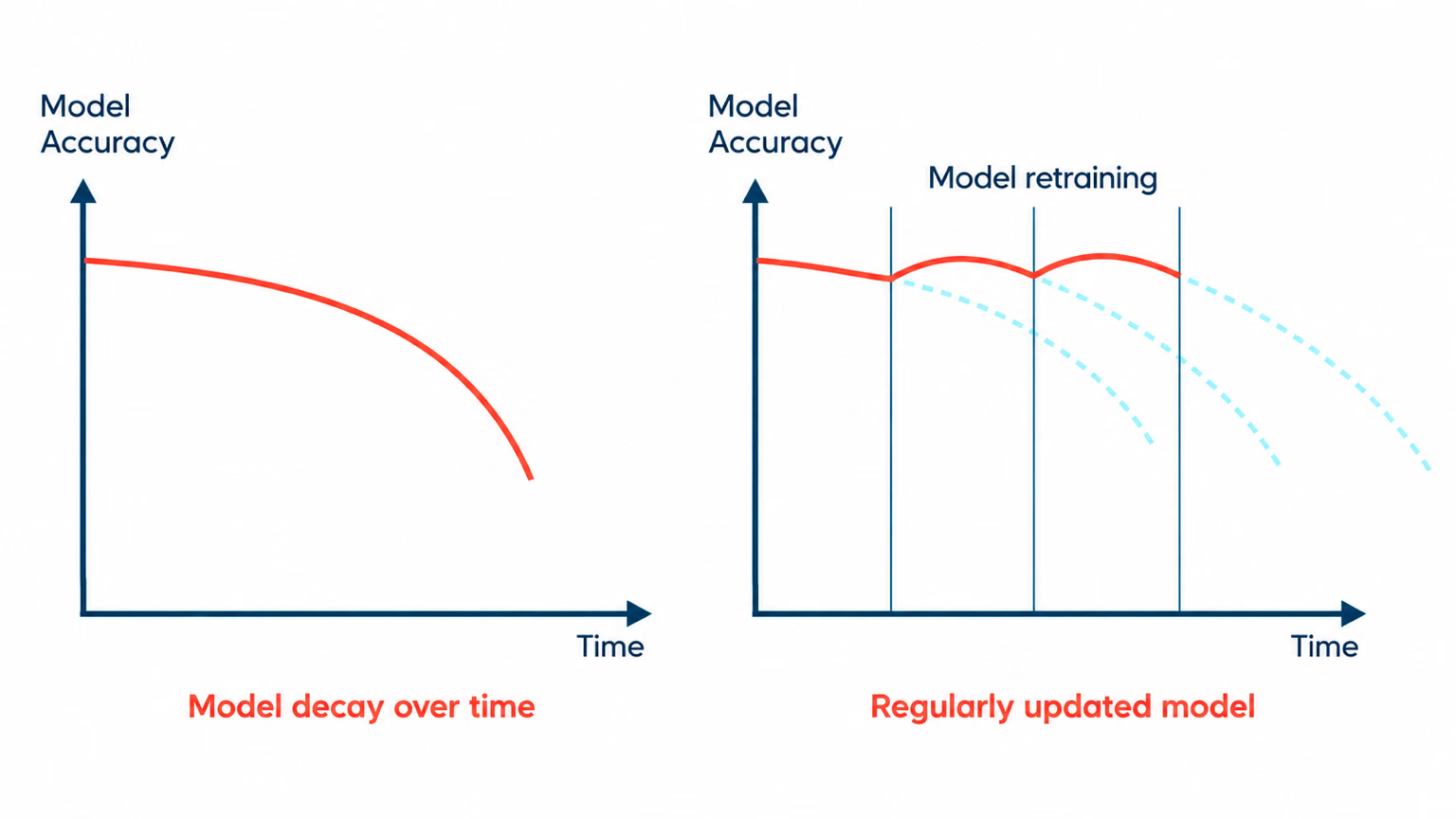
Every lesson in this course feeds that loop: the spec defines a failure, the coverage audit says where to look, the label linter and guideline make new data useful, and honest splits and metrics tell you whether the retrained model is actually better. Two habits make it work from day one: log a sample of inputs and predictions, including low-confidence ones, and keep the frozen test set so every model is compared on the same images. Observability and Drift covers data drift monitoring in depth.
Where to go next#
| Course | Take it when |
|---|---|
| Building High-Performance YOLO Datasets | Your classes aren't pretrained, or your scenes differ from COCO |
| Train your first YOLO model | You have a labeled dataset and want to fine-tune |
| Ultralytics YOLO in Production | You have a model and need export, tracking, and monitoring |
| Build with Ultralytics Platform | You want data, labeling, training, and deployment in one place |
Prefer a browser-based workflow? Ultralytics Platform runs the same loop — upload, annotate, train, deploy — without a local install:
Show solution
from pathlib import Path

from ultralytics import YOLO

model = YOLO("yolo26n.pt")

# 1. Which classes in your output line does the pretrained model already know?
spec_classes = {"person", "forklift"}
known = set(model.names.values())
print(f"pretrained: {sorted(spec_classes & known)}  needs your own data: {sorted(spec_classes - known)}")

# 2. What does it find on your images?
sources = [
    "https://ultralytics.com/images/bus.jpg",  # replace with your own images
    "https://ultralytics.com/images/zidane.jpg",
]
for source, result in zip(sources, model.predict(sources, conf=0.25, save=True, verbose=False)):
    names = [result.names[int(c)] for c in result.boxes.cls]
    print(f"{Path(source).name}: {len(names)} detections -> {sorted(set(names))}")
pretrained: ['person'] needs your own data: ['forklift']
bus.jpg: 5 detections -> ['bus', 'person']
zidane.jpg: 3 detections -> ['person', 'tie']For the forklift spec: person is covered, forklift isn't. Next step: prototype the zone rule on people with the pretrained model now, and start Building High-Performance YOLO Datasets to collect and label forklifts from the warehouse cameras.