Annotation Best Practices
Write a labeling guide, choose a tool, avoid the ten mistakes that quietly cost accuracy, and measure annotator agreement with a script before scaling.
Label quality caps model quality. Ten annotators who each interpret "pallet" slightly differently produce a dataset that teaches all ten interpretations at once, and no amount of training resolves the contradiction. A written guide, a measured calibration round, and a short list of known mistakes keep labels consistent whether one person labels 500 images or a team labels 50,000.
Hands-on
Choose the annotation tool#
The right tool depends on the task, the team, and where training happens:
| Tool | Best for | Notes |
|---|---|---|
| Ultralytics Platform | All seven YOLO tasks: an editor for boxes, polygons, semantic masks, keypoints, rotated boxes, and image classes, plus uploaded depth maps; SAM smart annotation | Labels, dataset charts, and training in one place; no export step |
| CVAT | Large teams, video, complex review workflows | Self-hosted or cloud |
| Label Studio | Multi-modal projects (image + text + audio) | Flexible configuration, steeper learning curve |
| Labelme | Polygon labeling for small teams | Simple desktop app |
| LabelImg | Quick box-only prototypes | Lightweight; the repository is archived |
On Ultralytics Platform, SAM 2.1, SAM 3, and SAM 3.1 smart annotation works on detect, segment, semantic, and OBB datasets. Whatever you choose, confirm it exports the YOLO format your task needs; Prepare a Custom Dataset covers the label format and conversion.
The seven label types#
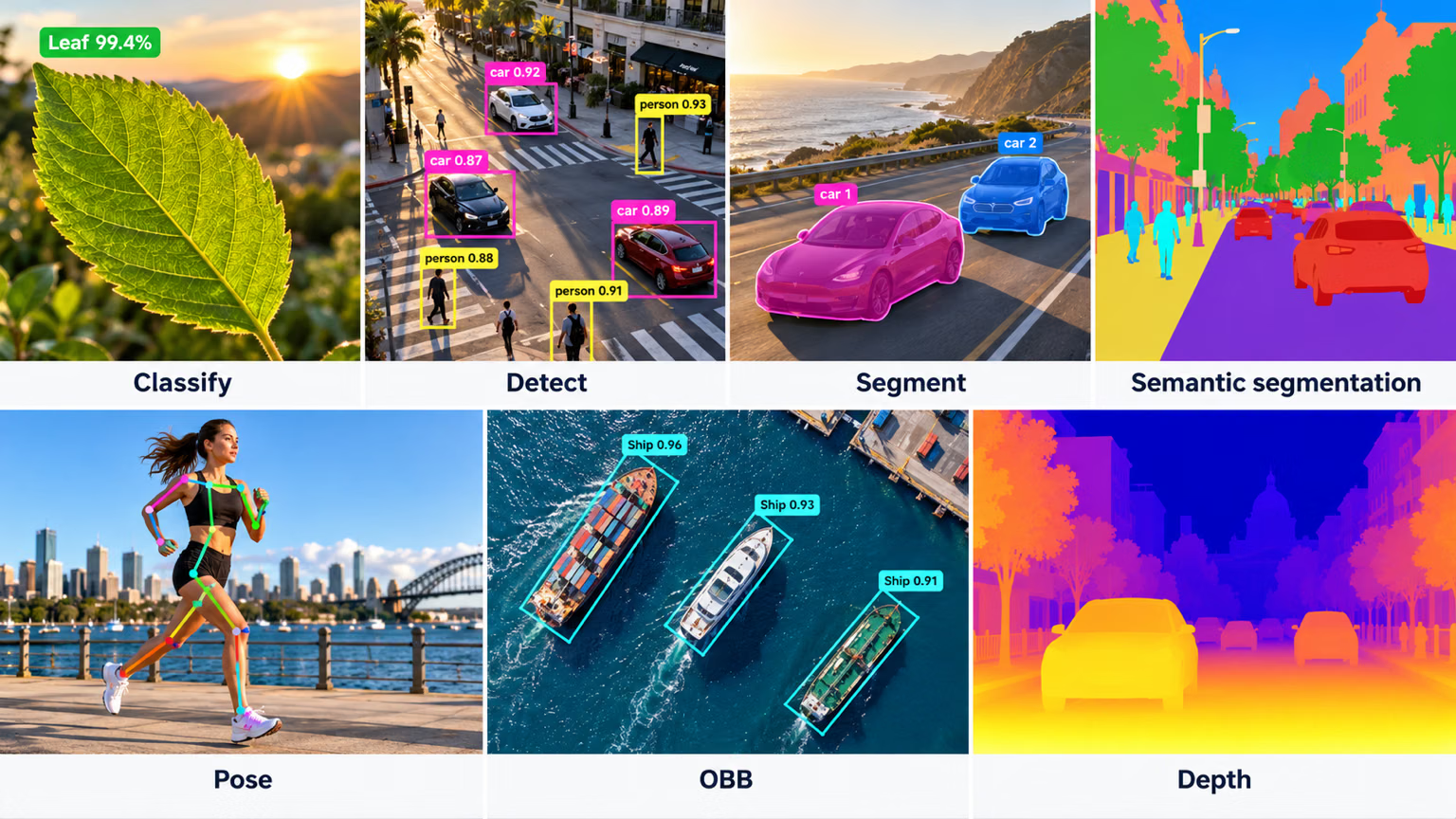
| Label type | What you draw | Task |
|---|---|---|
| Class label | One label per image | Classification |
| Bounding box | Axis-aligned rectangle per object | Detection |
| Polygon | Outline of each object instance | Instance segmentation |
| Dense mask | A class for every pixel | Semantic segmentation |
| Keypoints | Named points such as joints | Pose |
| Oriented box | Rotated rectangle per object | OBB |
| Depth map | Nothing: a per-pixel distance map from a depth sensor, paired with each image | Depth estimation |
Write the labeling guide first#
Before anyone draws a box, write a guide with five sections:
- Class definitions: one paragraph per class with positive examples, look-alikes that are not the class, and edge cases.
- Drawing rules: tight boxes around the visible object; polygons that follow the visible outline.
- Occlusion and size rules: one threshold for partial objects ("label if you can identify the class") and one for tiny ones ("label people taller than 10 pixels"), applied everywhere.
- Ambiguous-case log: every "what about this one?" question with the agreed answer and a screenshot.
- What to skip: anything not worth labeling for this task.
A page or two with screenshots is plenty. The guide then drives a short loop that runs before labeling scales:
Label every relevant object in every image. An unlabeled forklift teaches the model that forklifts are sometimes background, so it learns to miss them. A partly labeled dataset looks identical to a fully labeled smaller one until you train. Finish each image before moving to the next.
Ten mistakes that cost accuracy#
The errors the Ultralytics annotation team sees most often, illustrated on forklift, person, and pallet images (adapted from a deck by Alexis Schutzger). Use them as the first entries in your guide.
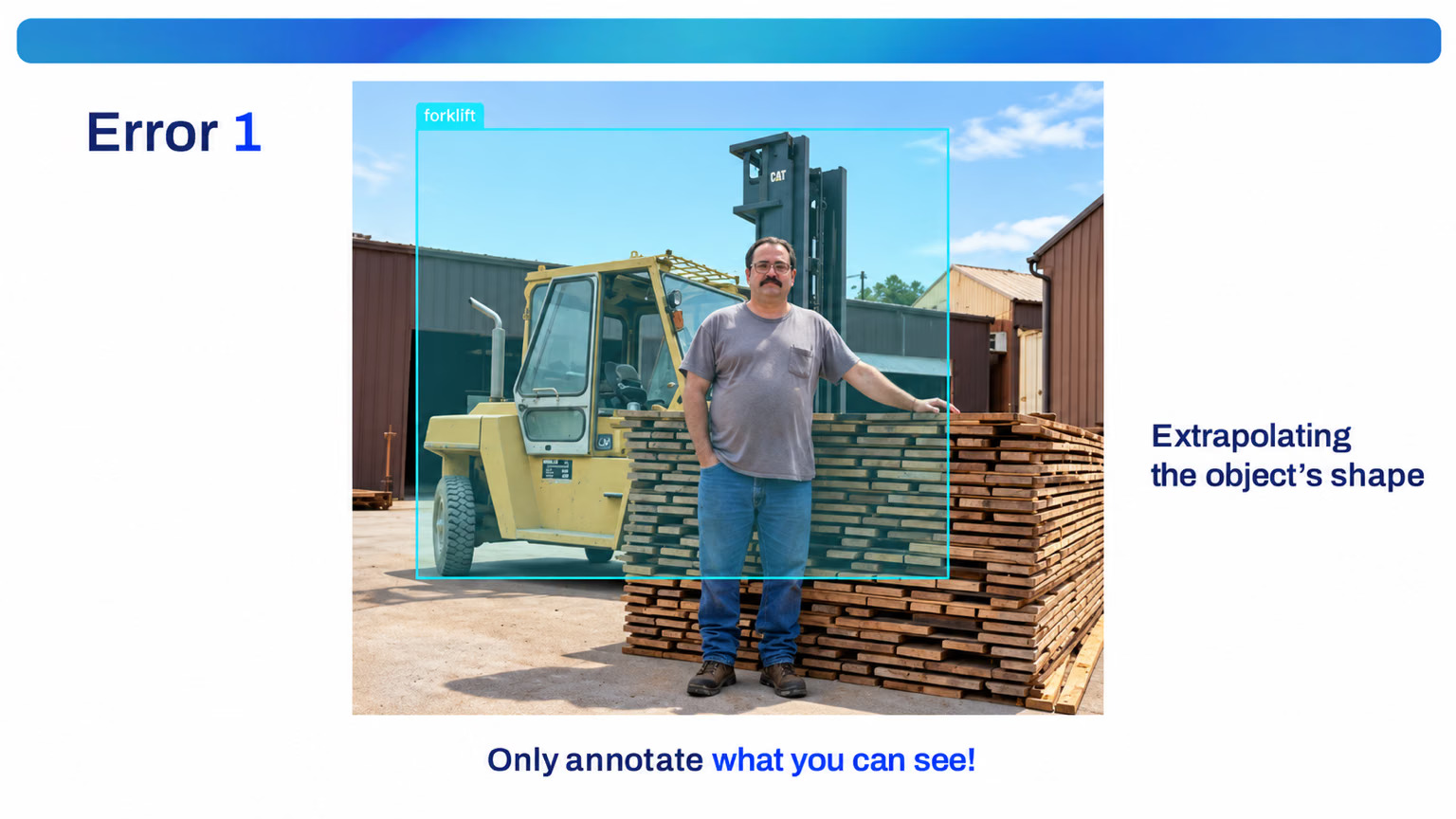
1. Extrapolating the object's shape. Annotate only what you can see. Here the forklift stands behind a person and a lumber stack, yet its box runs across both to where the annotator imagined the rest of the truck. Box the visible part.
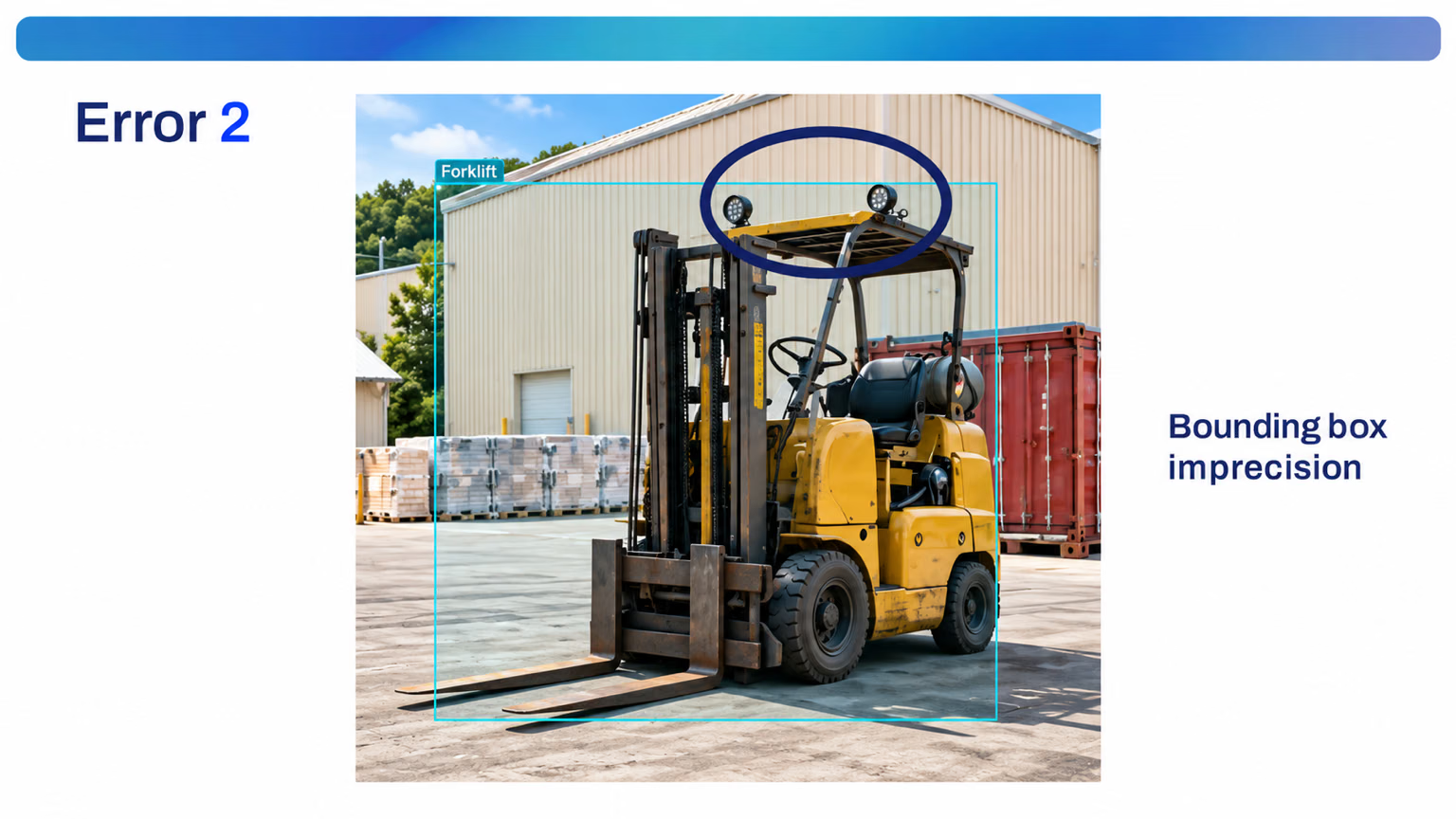
2. Imprecise boxes. Boxes must hug the object. This one cuts through the lights on the overhead guard; a box that clips part of the object, or leaves a margin of floor, teaches the wrong extent.
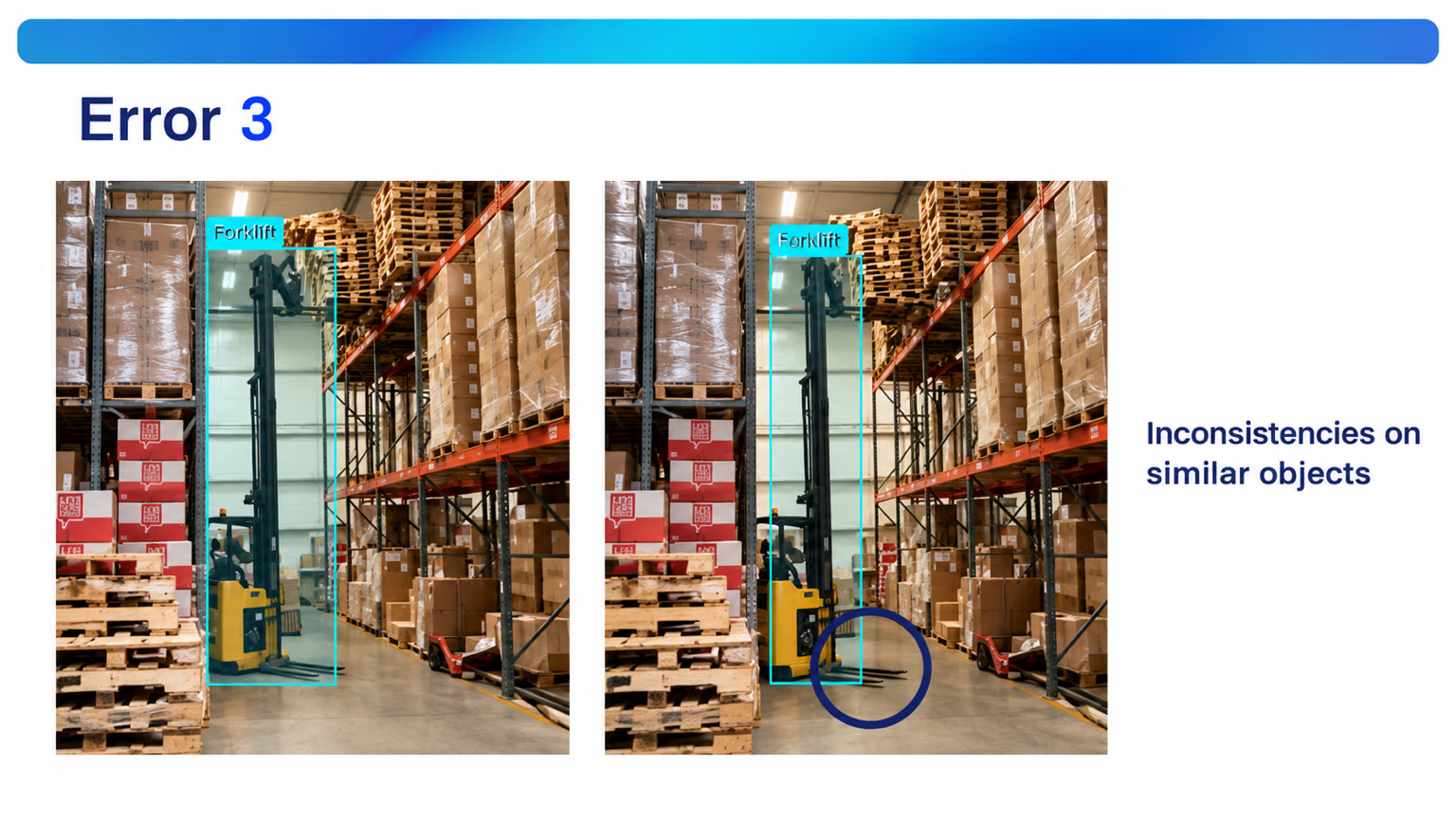
3. Inconsistent conventions on similar objects. The left box includes the forks; the right one leaves them out. The model gets two answers to the same question, so write the convention down: forks in, or forks out.
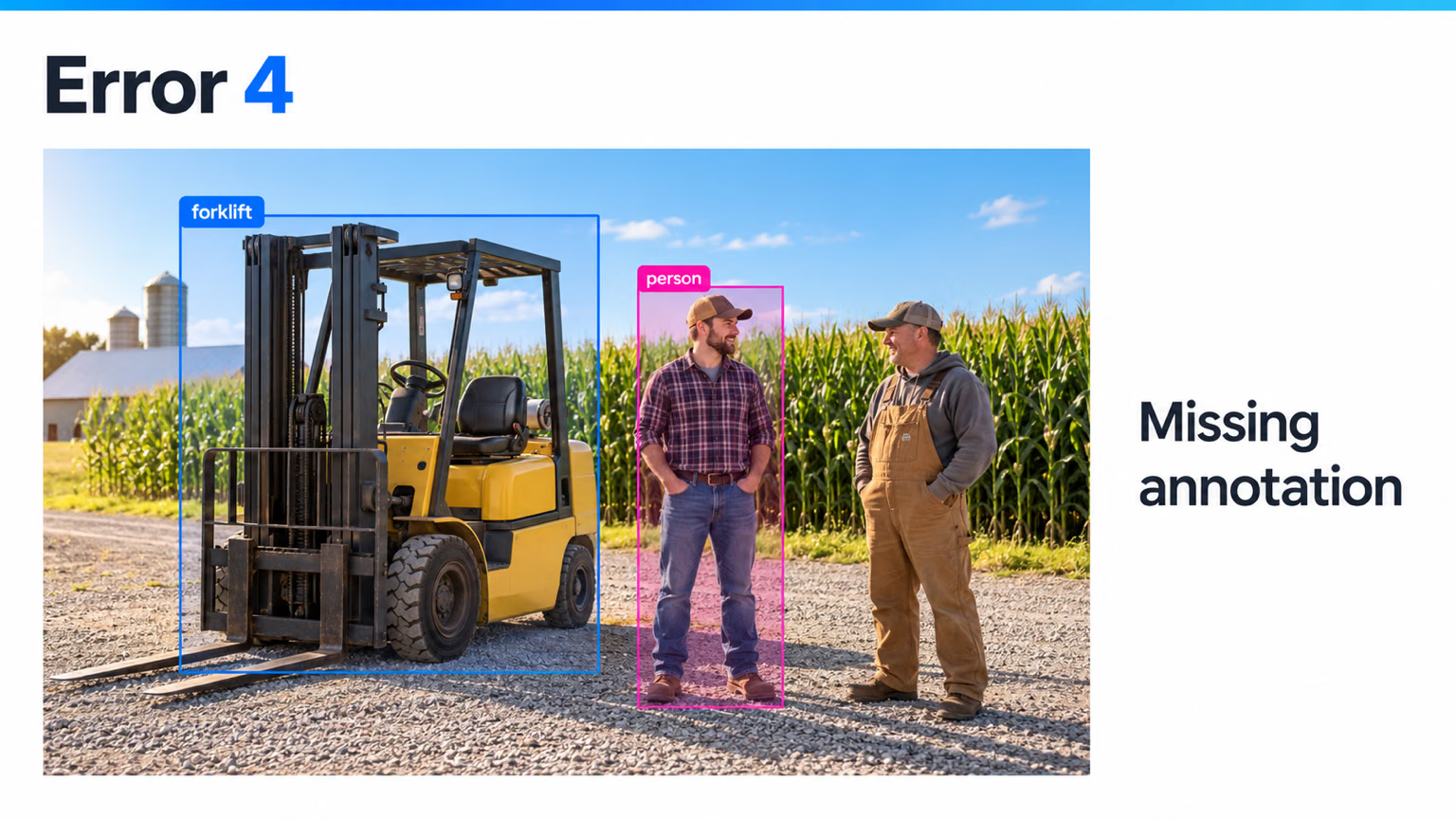
4. Missing annotations. Two people stand beside the forklift, but only one is boxed. The unlabeled one becomes a lesson in "people are background".
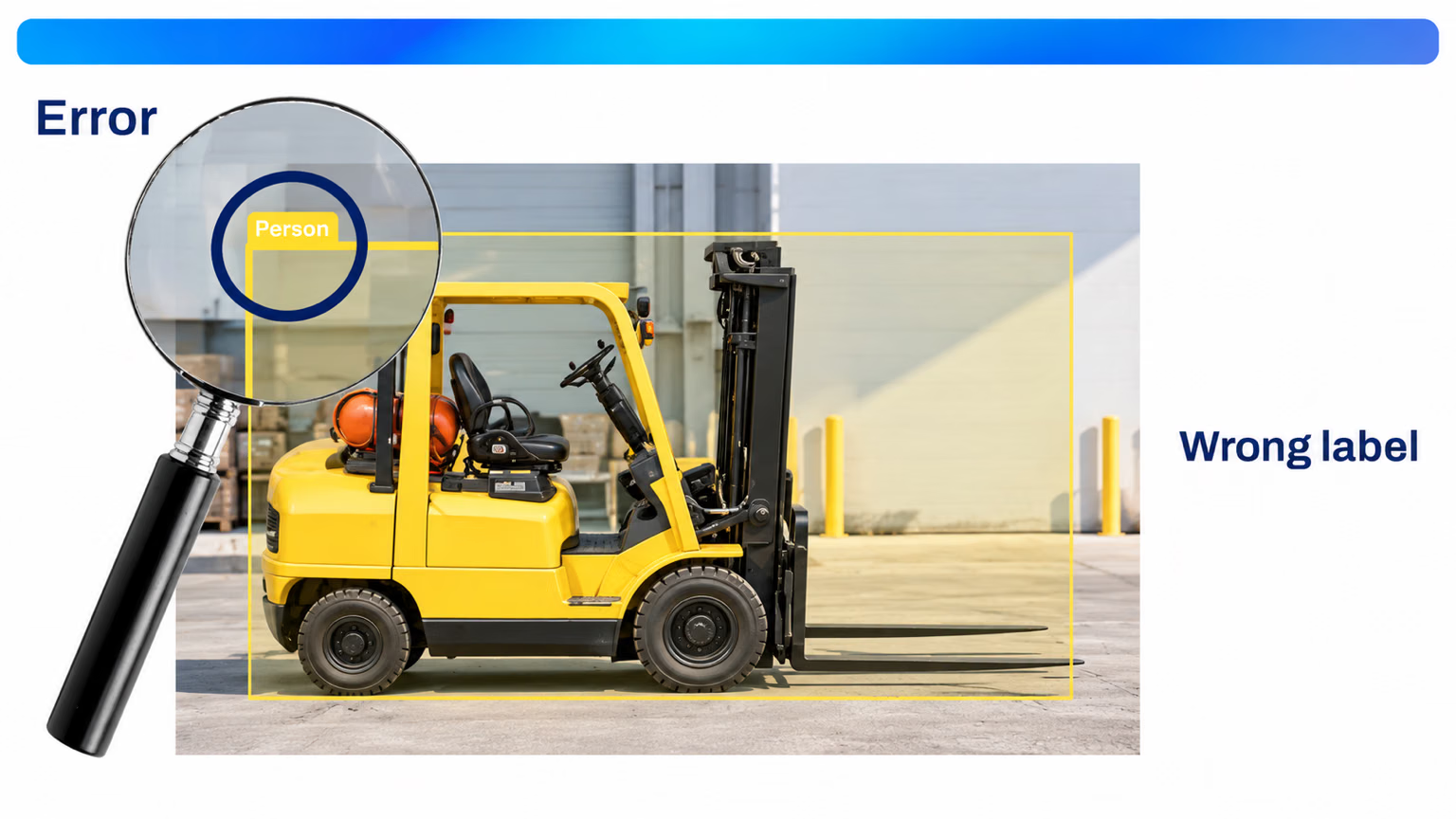
5. Wrong class. Check the class, not just the box. A correct box around a forklift tagged person corrupts both classes, and it is usually a keyboard-shortcut slip.
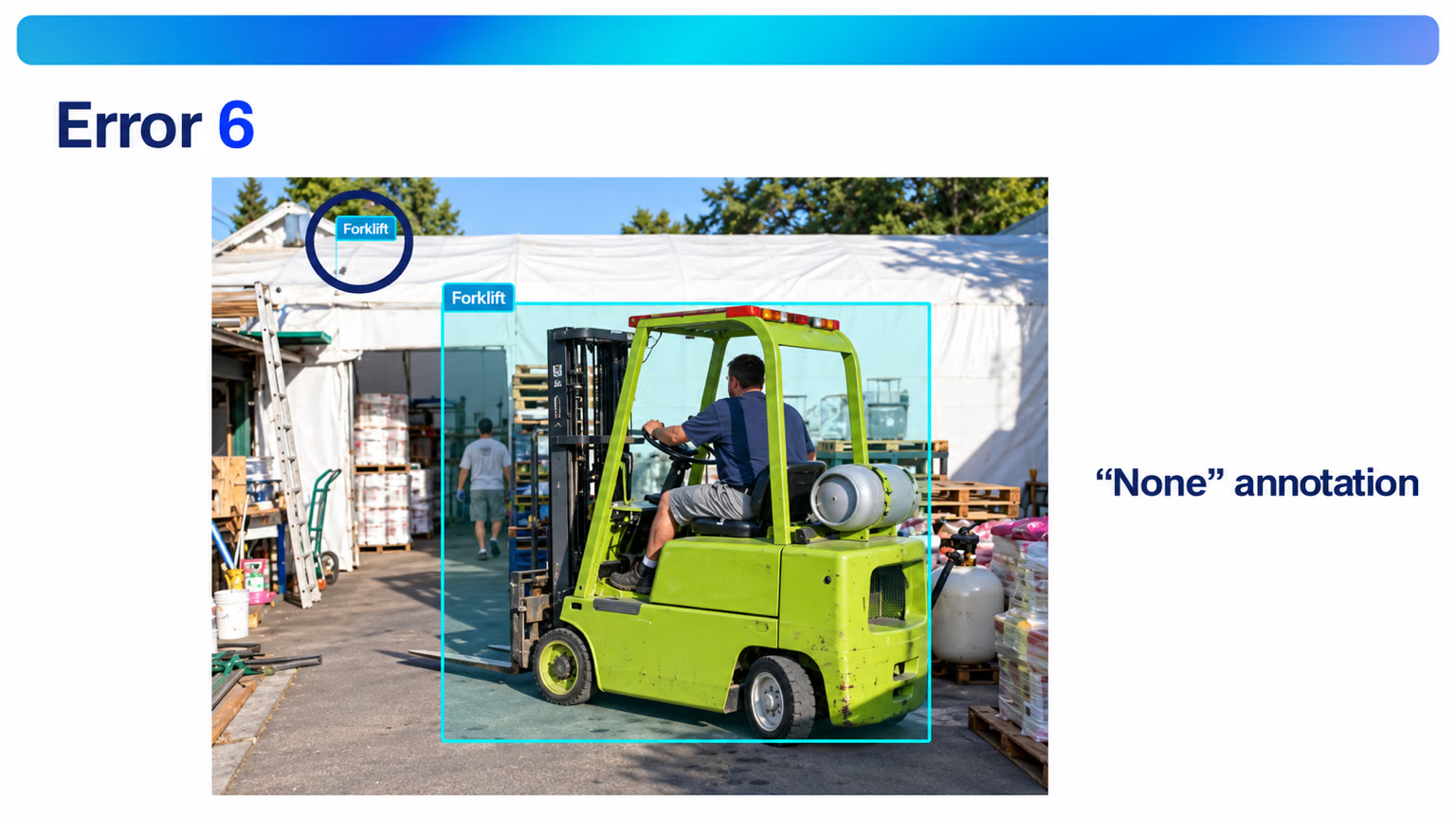
6. Empty or stray annotations. Every annotation needs a real object and a real class. A stray click leaves a near-empty box like the one in the corner here, and a box saved without a class can export as None or class 0. Fix them or delete them.
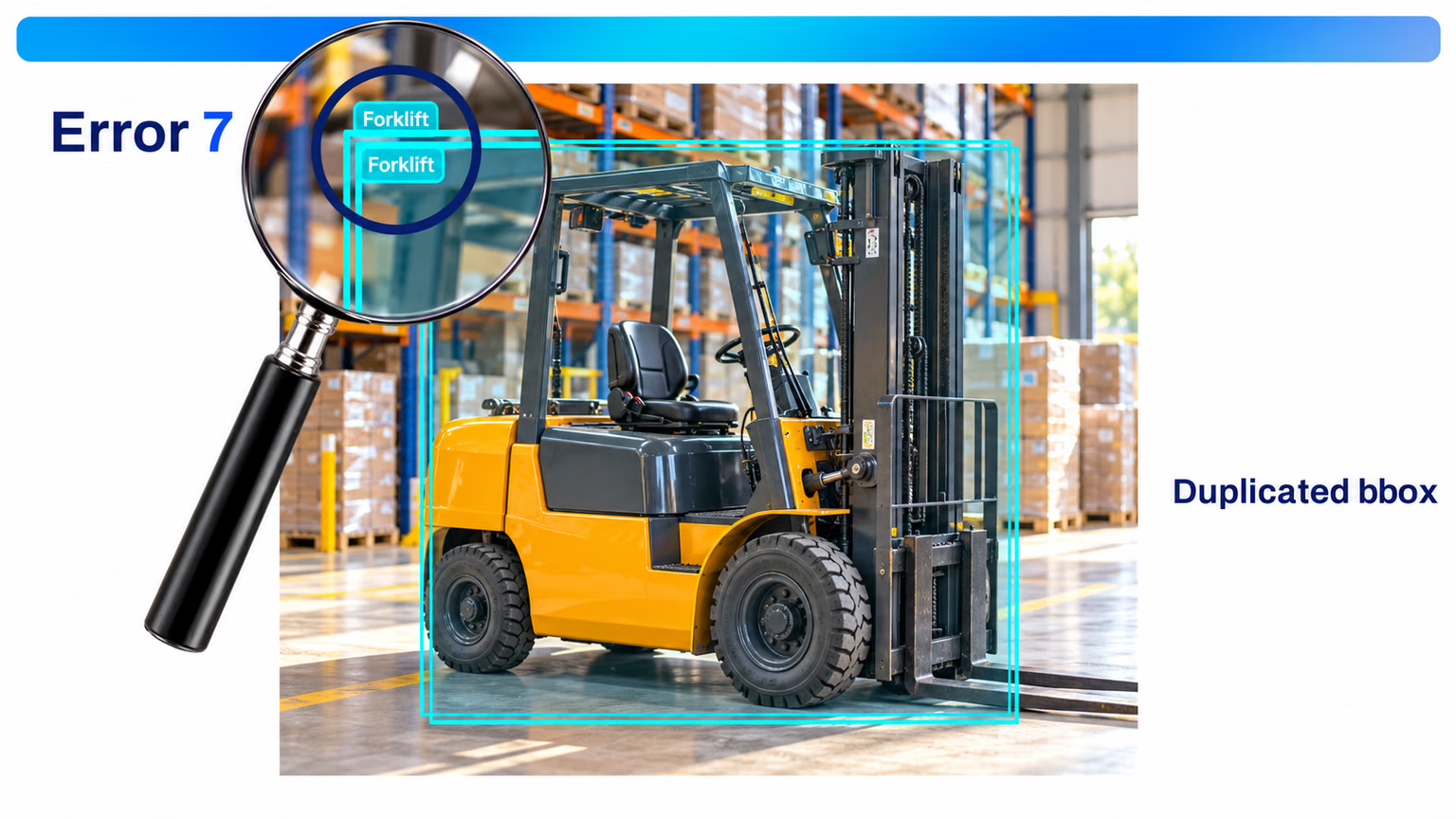
7. Duplicated boxes. One object, one box. Two overlapping boxes on the same forklift inflate instance counts and teach the model to predict duplicates.
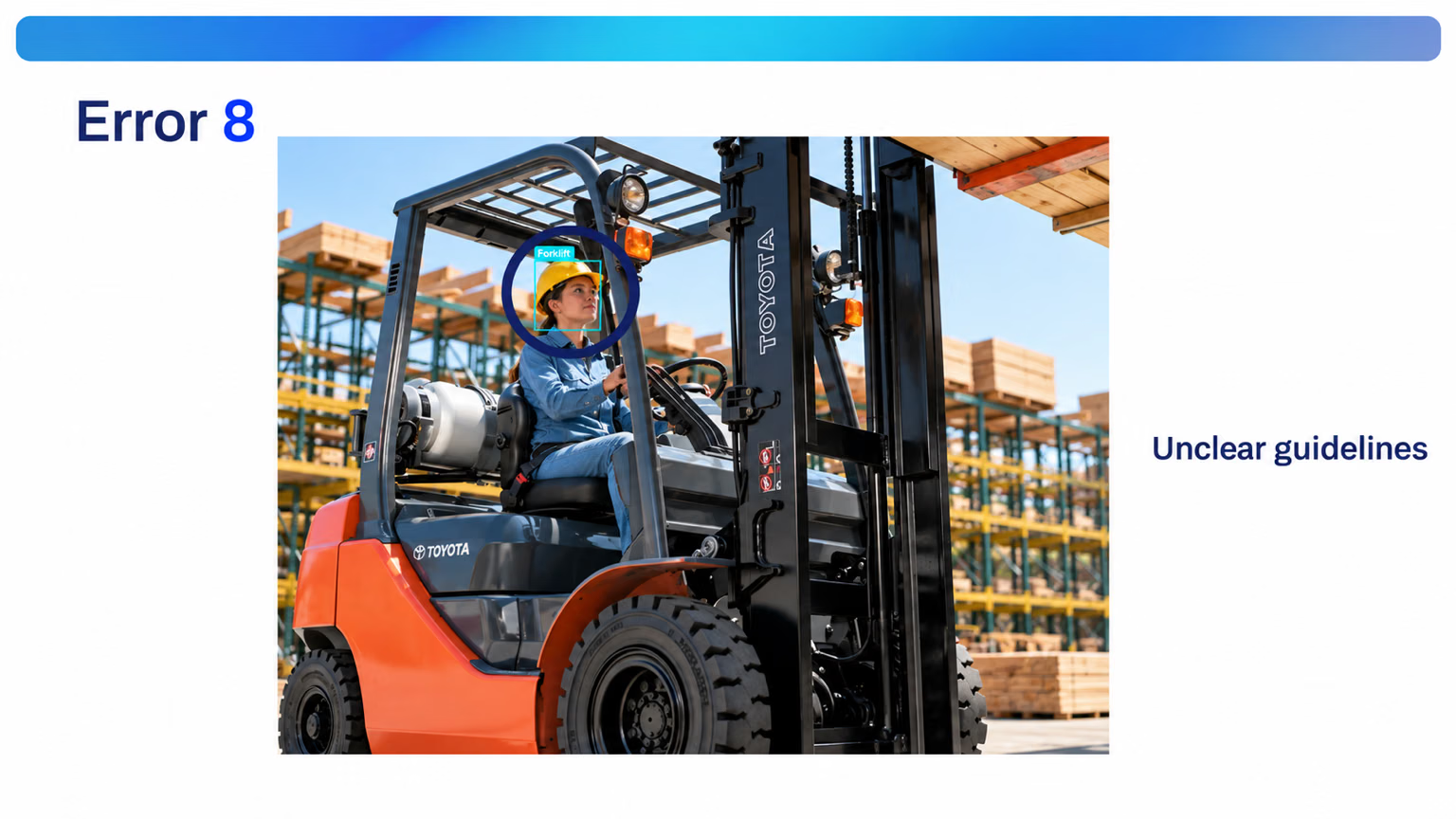
8. Unclear guidelines. Without a written rule, annotators improvise: here one boxed only the driver's head and gave it the forklift class. Is the driver part of the forklift, or a separate person? Answer it once, in the guide.
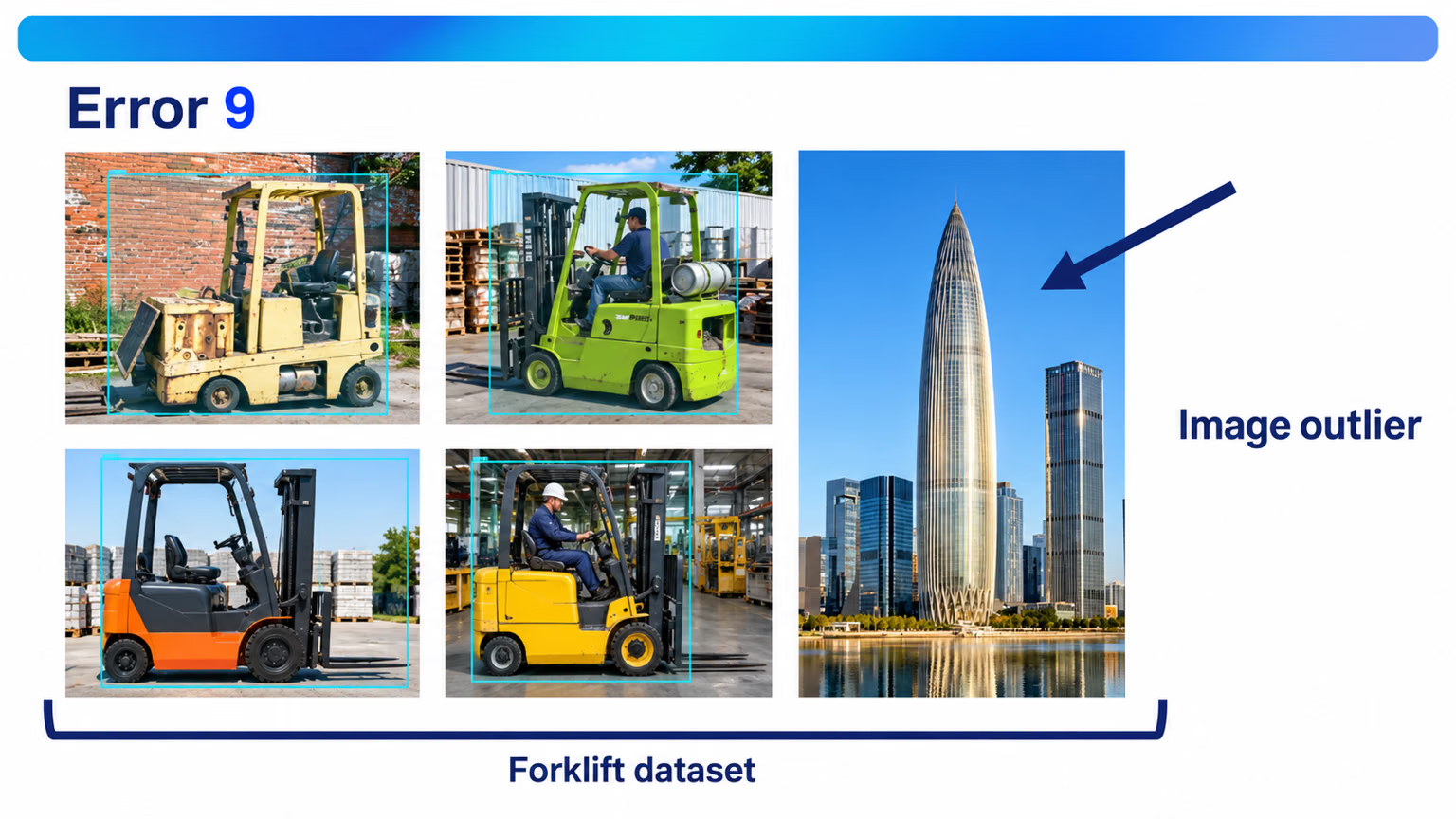
9. Outlier images. Drop images that don't match deployment. A city-skyline photo in a forklift dataset teaches nothing useful and dilutes everything else.
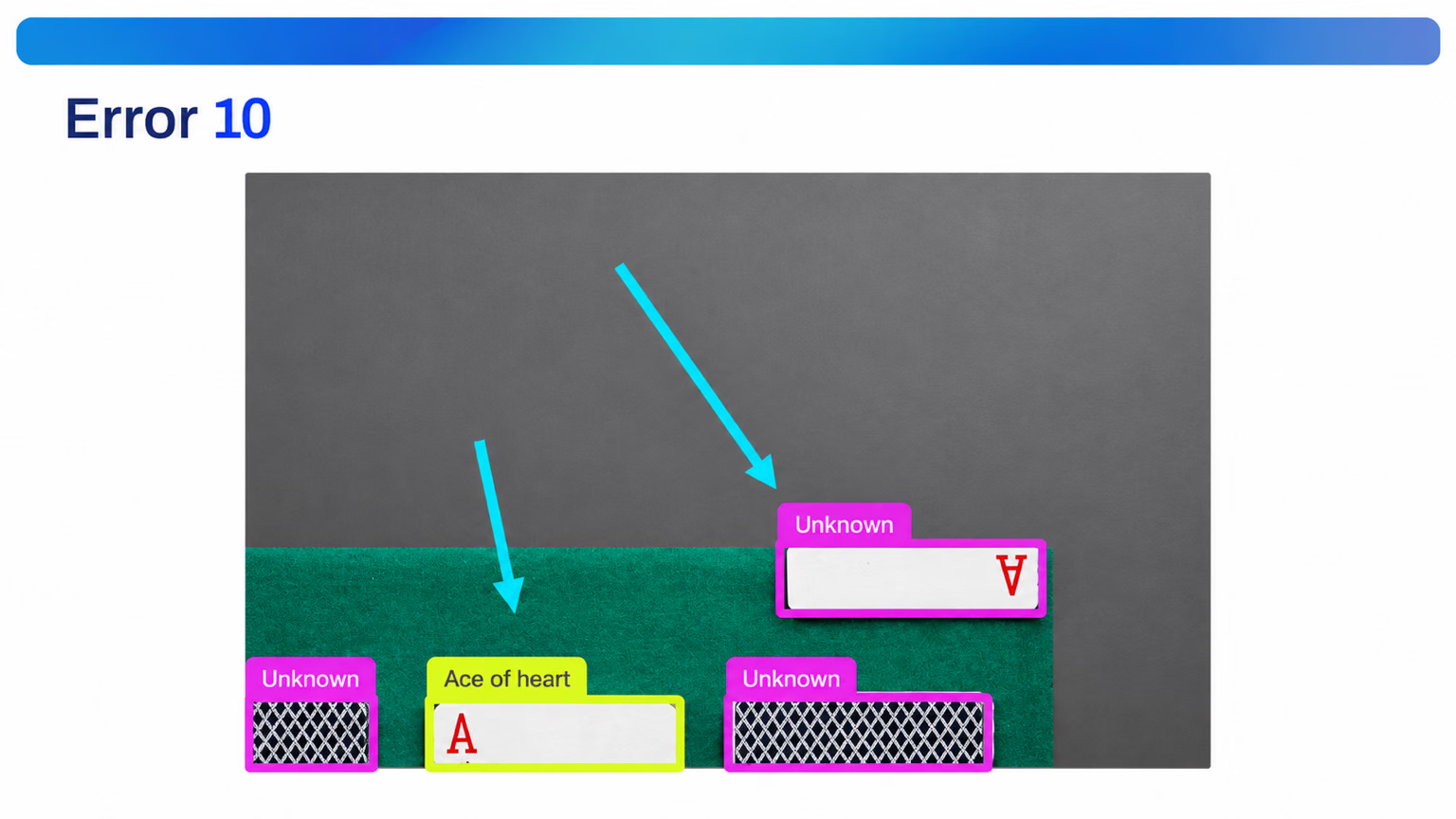
10. Augmentation-induced ambiguity. When a crop can remove the feature that defines a class, two classes become identical. Cut the corner symbol off an ace of hearts and it looks like the cards labeled unknown. Use Augmentation Carefully covers the fix.
Measure agreement, don't guess it#
A calibration round gives two annotators the same images and compares their labels object by object. Two labels agree when they have the same class and overlap with an IoU of at least 0.5. This script computes the score on COCO8's val images. To make it runnable without a second person, a pretrained model plays annotator B; with a real team, read B's boxes from their label files instead:
from pathlib import Path

import torch

from ultralytics import YOLO
from ultralytics.data.utils import check_det_dataset, img2label_paths
from ultralytics.utils.metrics import box_iou
from ultralytics.utils.ops import xywh2xyxy

data = check_det_dataset("coco8.yaml")
model = YOLO("yolo26n.pt")  # stands in for a second annotator; compare two label folders the same way
names = data["names"]

matched = total = 0
for image in sorted(Path(data["val"]).glob("*.jpg")):
    rows = [r.split() for r in Path(img2label_paths([str(image)])[0]).read_text().splitlines() if r.strip()]
    a_cls = torch.tensor([int(r[0]) for r in rows])  # annotator A: the dataset labels
    a_box = xywh2xyxy(torch.tensor([[float(v) for v in r[1:]] for r in rows]))
    b = model(image, conf=0.5, verbose=False)[0].boxes  # annotator B: confident model proposals
    iou = box_iou(a_box, b.xyxyn)
    used = set()
    for i in range(len(rows)):  # pair each A object with the best unused same-class B box at IoU >= 0.5
        ok = [j for j in range(len(b)) if j not in used and b.cls[j] == a_cls[i] and iou[i, j] >= 0.5]
        if ok:
            used.add(max(ok, key=lambda j: iou[i, j]))
        else:
            print(f"{image.name}: {names[int(a_cls[i])]} labeled by A only")
    for j in set(range(len(b))) - used:
        print(f"{image.name}: {names[int(b.cls[j])]} labeled by B only")
    matched += len(used)
    total += len(rows) + len(b) - len(used)

print(f"agreement: {matched}/{total} objects = {matched / total:.0%}")
000000000049.jpg: person labeled by A only
000000000049.jpg: person labeled by A only
000000000049.jpg: potted plant labeled by A only
000000000049.jpg: person labeled by A only
000000000049.jpg: person labeled by A only
000000000049.jpg: person labeled by A only
000000000061.jpg: person labeled by A only
000000000061.jpg: elephant labeled by A only
000000000061.jpg: person labeled by A only
agreement: 8/17 objects = 47%How to read it:
- The score is matched objects divided by every object either annotator drew: 8 of 17.
- The disagreements cluster. All nine are in two images, and most are people covering well under 1% of the frame. That's not nine random errors; it's one missing rule: do we label distant people?
- The fix is a guide entry, such as "label every person at least 10 pixels tall at 640 pixels". Both annotators relabel those two images and the score is measured again.
The decision rule: scale up labeling only when agreement reaches 90%. Below that, every new annotator multiplies the inconsistency.
Use smart annotation as an accelerator#
Smart annotation lets a YOLO model or SAM propose labels that a person accepts or corrects, which can multiply throughput several times over. Bootstrap in rounds: train on a reviewed batch, use that model to propose the next one, review, retrain. That's the active learning loop, and Smart Annotation and Batch Labeling walks through it on Ultralytics Platform.
A model that misses small people proposes no boxes for small people, and a reviewer clicking "accept all" never adds them. The next model, trained on those labels, misses them more confidently. Review every image, and add what the model missed as well as fixing what it drew.
Verify by eye#
Every Ultralytics training run writes labels.jpg and train_batch*.jpg to its run folder. The first plots class counts and box positions and sizes; the others show real training images with their labels drawn on. Open them before the first epoch finishes. Eyes catch what metrics never will: boxes drawn around shadows, swapped class IDs, and polygons that don't close.
Show solution
The COCO8 disagreements turn into guide entries like these:
| Disagreement | Rule added to the guide |
|---|---|
Distant people in 000000000049.jpg labeled by A only | Label every person at least 10 pixels tall at 640 pixels; skip smaller ones in every image. |
| Potted plant at the frame edge labeled by A only | Label an object cut by the frame edge if at least half of it is visible. |
Elephant partly hidden by another elephant in 000000000061.jpg | Label occluded animals if the head or half the body is visible; box only the visible part. |
To compare two people instead of a person and a model, read annotator B's rows from the second label folder exactly the way the script reads A's (Path("labels_b", image.stem + ".txt")), build b_cls and b_box from them with the same two lines, and use those wherever the script reads b.cls and b.xyxyn. Rerun after relabeling; the round is done when the score clears 90%.