Define the Dataset Specification
Plan scenarios, quotas, variance, edge cases, and background images before collection, and size the plan against Ultralytics' volume targets.
Teams without a spec end up with 5,000 well-lit daytime photos from one camera and a model that fails at dusk on its first day in production. A dataset specification is a shopping list for images: every scenario the model must handle, how many images each needs, and which rare cases to over-sample. Writing it takes an hour, and it decides where collection effort goes.
Hands-on
Where the spec sits#
The spec is the bridge between the objective and the camera. It drives collection, and it is the page you return to when the first model misses its target:
The loop goes back to the spec, not to the training settings: a missed target usually means a scenario the spec didn't cover. The steps of a CV project guide describes the same lifecycle.
Write scenarios as rows#
A scenario is one combination of capture conditions the model must handle. Rows with quotas make gaps visible before anyone picks up a camera:
| Scenario | Cameras | Locations | Time of day | Condition | Quota | Notes |
|---|---|---|---|---|---|---|
| dock-day | cam-1 to cam-4 | bays A–C | 08:00–17:00 | any | 1,200 | busiest hours |
| dock-night | cam-1 to cam-4 | bays A–C | 22:00–04:00 | any | 400 | sodium lighting, fewer people |
| loading-rain | cam-2, cam-3 | bay B | any | rain only | 200 | rare but critical |
| stacked | any | any | any | pallets > 2 high | 150 | hides people behind them |
| background | any | any | any | empty dock | 150 | no objects, no labels |
A scenario you can't write down is one the model won't see in training, and it will be the one that fails in production.
Size the spec against the volume targets#
The Ultralytics tips for best training results give production rules of thumb:
| Target | Recommendation |
|---|---|
| Images per class | ≥ 1,500 |
| Labeled instances per class | ≥ 10,000 |
| Background images (no labels) | 0–10% of the dataset; COCO has about 1% |
| Variety | Different times, seasons, weather, lighting, angles, sources, and cameras |
These are the bar for a production model. A few hundred labeled objects per class is enough to start experimenting, and that first model is the fastest way to learn which scenarios need more data. To see how far a dataset is from the bar, count it. This script runs on COCO128, a 128-image slice of COCO that downloads automatically:
from collections import Counter
from pathlib import Path

from ultralytics.data.utils import IMG_FORMATS, check_det_dataset, img2label_paths

IMAGES_PER_CLASS, INSTANCES_PER_CLASS = 1500, 10_000  # Ultralytics production targets

data = check_det_dataset("coco128.yaml")  # downloads COCO128 (~7 MB) on first run; swap in your data YAML
images = [p for p in Path(data["train"]).rglob("*.*") if p.suffix[1:].lower() in IMG_FORMATS]
image_count, instance_count, background = Counter(), Counter(), 0
for label in map(Path, img2label_paths([str(p) for p in images])):
    classes = [int(r.split()[0]) for r in label.read_text().splitlines() if r.strip()] if label.exists() else []
    instance_count.update(classes)
    image_count.update(set(classes))
    background += not classes

print(f"{len(images)} images, {background} background ({background / len(images):.0%}, target 0-10%)")
print(f"{'class':>12} {'images':>7} {'instances':>10} {'of target':>10}")
ranked = instance_count.most_common()
for cls, n in ranked[:3] + ranked[-3:]:  # best and worst covered classes
    coverage = min(image_count[cls] / IMAGES_PER_CLASS, n / INSTANCES_PER_CLASS)
    print(f"{data['names'][cls]:>12} {image_count[cls]:>7} {n:>10} {coverage:>10.1%}")

never_labeled = [name for i, name in data["names"].items() if i not in instance_count]
print(f"{len(never_labeled)} classes in names with zero labels: {never_labeled[:4]} ...")
128 images, 2 background (2%, target 0-10%)
class images instances of target
person 61 254 2.5%
car 12 46 0.5%
cup 10 36 0.4%
bear 1 1 0.0%
banana 1 1 0.0%
skis 1 1 0.0%
9 classes in names with zero labels: ['fire hydrant', 'parking meter', 'sheep', 'cow'] ...How to read it:
- Coverage is the smaller of the image ratio and the instance ratio, because a class needs both. Even
person, the best-covered class, sits at 2.5% of the production bar. - One-instance classes (
bear,banana,skis) cannot be learned or measured. In your dataset, either collect them or drop them from v1. - Classes with zero labels are listed in the YAML but never drawn. The model still spends capacity predicting them. Remove them from
names, or collect them before training.
Cover the variance dimensions#
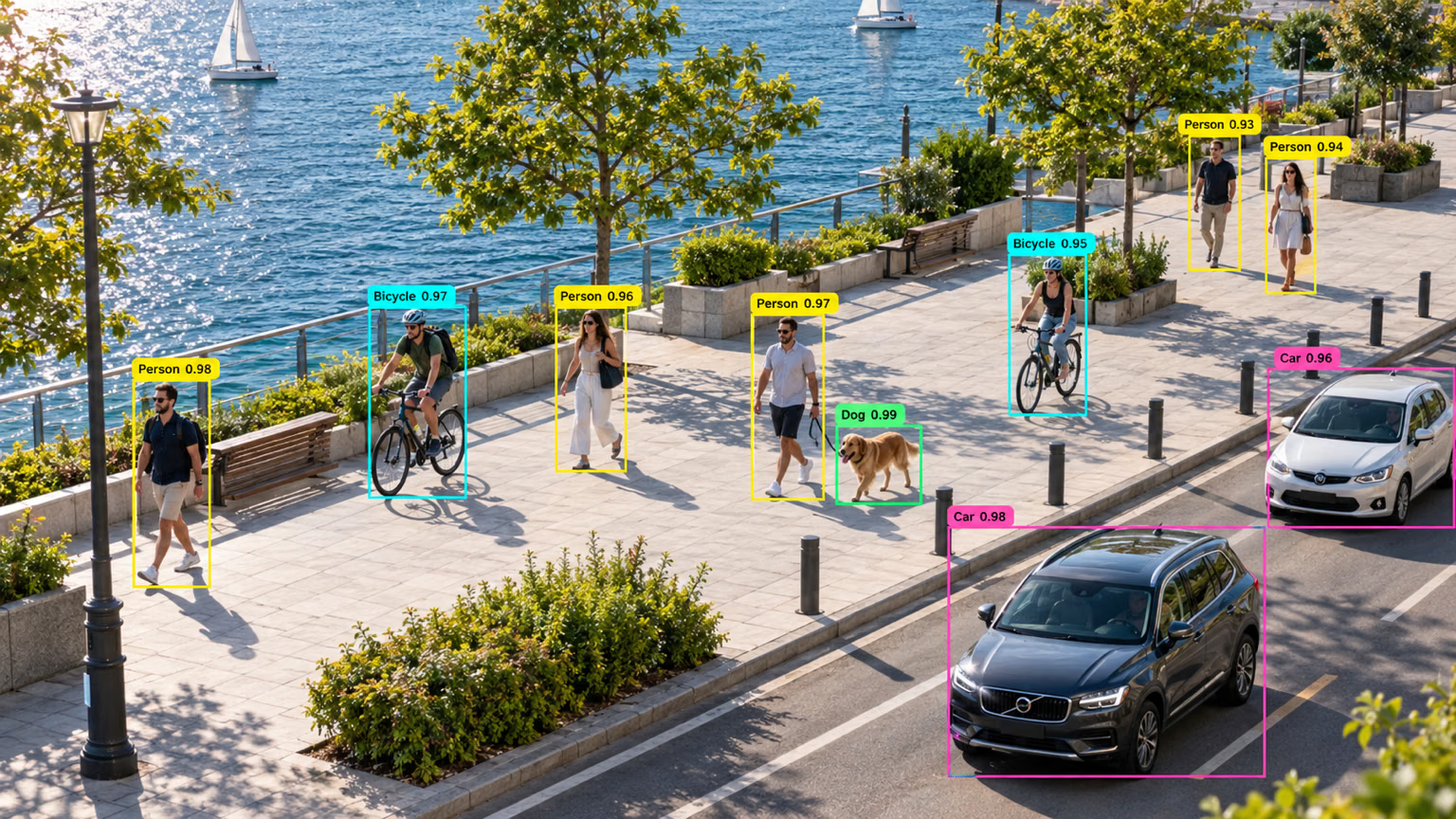
One frame already mixes near and far people, bicycles, a dog, and cars. A real spec has to plan for that range on purpose. For each dimension, write down whether the spec covers it or why it doesn't apply; empty rows are scenarios you'll discover in production instead:
| Dimension | Examples |
|---|---|
| Time | Day, night, dawn, dusk |
| Weather | Sun, overcast, rain, fog, snow |
| Lighting | Bright, dim, glare, hard shadows, mixed sources |
| Camera | Model, lens, mounting height, field of view |
| Geography | Sites, cities, countries |
| People and operators | Shifts, teams, uniforms, protective gear |
| Product variants | SKUs, packaging revisions, colors |
| Object size | Near and large, mid-range, far and small |
| Occlusion | Clear, partial, heavy, behind glass |
| Equipment condition | Dirty or fogged lenses, damaged pallets, worn floor markings |
Variance matters more than volume: 1,500 images spread across these rows are worth more than 5,000 from one camera at noon.
Plan background images and edge cases#
Background images are frames with no labeled objects, such as an empty dock. They teach the model that nothing is there and reduce false positives.
In the Ultralytics YOLO format, a background image is simply an image with an empty label file, or none at all. Training counts both in its scan line (… 1200 images, 90 backgrounds, 0 corrupt). Check that number against your 0–10% target before the first epoch.
Edge cases are heavy occlusion, objects cut off at the frame edge, unusual orientations, stacked objects, and look-alikes such as a forklift mast next to a steel column. Give each one its own quota row.
If 1 frame in 200 shows a person behind stacked pallets, a dataset collected at natural frequency holds about 7 such frames out of 1,500, which is far too few to learn from. Over-sample edge cases on purpose: their quota rows should be much larger than their share of real footage.
You won't think of every scenario on paper. Get the spec mostly right, train a first model quickly, and let its mistakes reveal the scenarios you missed.
Show solution
Quotas come from the instance target, not just the image target. Suppose a parking-lot counter has two classes and pilot footage averages 3 cars and 0.5 trucks per image:
| Class | Instances per image | Images needed for 10,000 instances | Images needed for the 1,500-image floor | Plan |
|---|---|---|---|---|
car | 3.0 | ≈ 3,300 | 1,500 | 3,300 images |
truck | 0.5 | ≈ 20,000 | 1,500 | Targeted capture at the loading entrance, where trucks are 10× more common |
Cars are covered by ordinary footage. Trucks would need 20,000 random images, so the spec adds a dedicated scenario row (loading entrance, weekdays 06:00–10:00) instead of collecting six times more of everything. Add a background row of about 5% (empty lot at night) and edge-case rows for snow cover and trucks partly outside the frame.