Collect High-Quality, Representative Data
Source images from real deployment conditions, keep capture metadata in every filename, track coverage against the spec, and sample video without flooding the dataset.
Most dataset failures are collection failures. A team captures clean examples from one camera in one week, validation looks great, and the model falls apart at the second site. Collection sets the ceiling: no label quality, augmentation, or hyperparameter can teach a scene the dataset never contained.
Hands-on
Variance beats volume#
Compare two datasets aimed at the same deployment:
| Dataset | Validation result | In production |
|---|---|---|
| 10,000 nearly identical frames, one camera, noon only | High: val frames look like train frames | Drops on a different camera and at dusk |
| 1,500 frames spread across 12 spec scenarios | More modest | Holds up, because production looks like the data |
The first dataset's validation score is high only because validation measures the one condition it covers. In production, a model is only as good as the worst-covered scenario it meets. Optimize collection for coverage of the spec first and volume second.
Choose sources in the right order#
Most of the dataset should come from the real production setup. The data collection and annotation guide covers each source in more detail:
| Source | When it helps | When it hurts |
|---|---|---|
| Production cameras, live | Closest to deployment | Slow; may need data agreements |
| Production cameras, archived | Lots of variance quickly | Old footage may not match the current setup |
| Public datasets (COCO, Open Images, VOC) | Bootstrapping common classes | Domain shift from your scenes |
| Staged captures | Specific edge cases on demand | Too clean; easy to over-rely on |
| Synthetic or generated images | Rare hazards and faults you can't wait for | The model can learn the generator's style |
| Web scraping | Cheap variety | Inconsistent quality and licensing risk |
Use staged, public, and synthetic images to fill specific, named gaps in the spec, and track their share of the dataset so you can measure whether they help. On Ultralytics Platform, Generate similar images adds generated variations of an existing image to a dataset, unlabeled and ready for annotation.
Put the metadata in the filename#
Every image needs at least a camera ID, a capture day, and a frame or clip number. Without them you can't split by group later, trace a regression to its source, or collect more of an under-represented scenario. The most durable carrier is the filename: cam2_2026-05-01_000124.jpg survives every tool, export, and upload. Ultralytics Platform dataset search matches filenames and custom metadata, so these keys stay searchable after upload.
This script builds the practice dataset the rest of the course uses. It copies COCO128's labeled images and renames them as if four cameras captured them over four days, with cam1 over-collected the way a convenient camera usually is:
import shutil
from pathlib import Path

from ultralytics.data.utils import check_det_dataset, img2label_paths

data = check_det_dataset("coco128.yaml")  # 128 COCO images stand in for your camera captures
out = Path("datasets/practice")
(out / "images").mkdir(parents=True, exist_ok=True)
(out / "labels").mkdir(parents=True, exist_ok=True)

for i, image in enumerate(sorted(Path(data["train"]).glob("*.jpg"))):
    camera = ("cam1", "cam1", "cam2", "cam3", "cam4")[i % 5]  # cam1 over-collected, like a real site
    name = f"{camera}_2026-05-0{i // 32 + 1}_{i:06d}"  # camera, capture day, frame number
    shutil.copy(image, out / "images" / f"{name}.jpg")
    label = Path(img2label_paths([str(image)])[0])
    if label.exists():
        shutil.copy(label, out / "labels" / f"{name}.txt")

print(len(list((out / "images").glob("*.jpg"))), "images written to", out)
128 images written to datasets/practice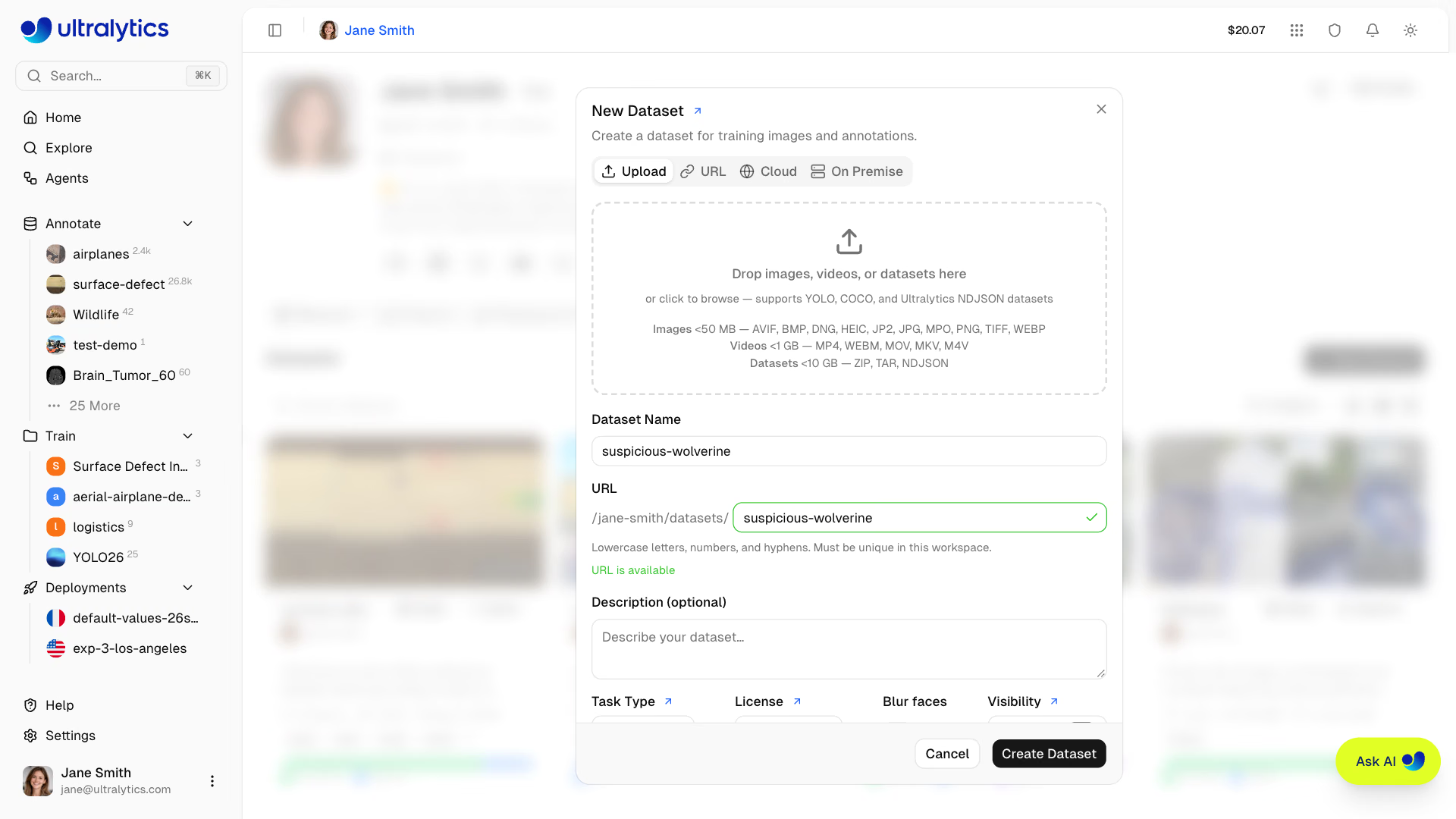
Uploading to Ultralytics Platform keeps those filenames. The upload dialog also accepts videos and whole datasets, and its settings include face blurring for privacy.
Track coverage against the spec#
With metadata in filenames, coverage is a count. Set the quotas from your spec and let the script say what to collect next:
from collections import Counter
from pathlib import Path

QUOTA = {"cam1": 30, "cam2": 30, "cam3": 30, "cam4": 30}  # images per camera, from your spec

images = sorted(Path("datasets/practice/images").glob("*.jpg"))
cameras = Counter(p.stem.split("_")[0] for p in images)
days = Counter(p.stem.split("_")[1] for p in images)

for camera, quota in QUOTA.items():
    gap = quota - cameras[camera]
    print(f"{camera}: {cameras[camera]:3d} / {quota}  {'ok' if gap <= 0 else f'collect {gap} more'}")
print("days:", dict(sorted(days.items())))
cam1: 52 / 30 ok
cam2: 26 / 30 collect 4 more
cam3: 25 / 30 collect 5 more
cam4: 25 / 30 collect 5 more
days: {'2026-05-01': 32, '2026-05-02': 32, '2026-05-03': 32, '2026-05-04': 32}The decision rule: stop collecting from any source that is over quota, and spend the effort on the gaps. Here, cam1 already holds 40% of the images. Another week of its footage would add volume but no new coverage.
Sample video without flooding the dataset#
Video is the cheapest source and the easiest one to misuse. At 30 frames per second, one minute yields 1,800 nearly identical frames, and labeling the same moment twice costs money and inflates metrics. Keep a frame only when the scene has changed since the last frame you kept:
from pathlib import Path

import cv2

from ultralytics.utils.downloads import safe_download

video = "solutions_ci_demo.mp4"  # a short public demo clip; swap in your own footage
safe_download(f"https://github.com/ultralytics/assets/releases/download/v0.0.0/{video}")
Path("frames").mkdir(exist_ok=True)

cap = cv2.VideoCapture(video)
fps = cap.get(cv2.CAP_PROP_FPS)
read = kept = 0
last = None
while True:
    ok, frame = cap.read()
    if not ok:
        break
    thumb = cv2.cvtColor(cv2.resize(frame, (64, 64)), cv2.COLOR_BGR2GRAY).astype(float)
    if last is None or abs(thumb - last).mean() > 10:  # keep a frame only when the scene has changed
        cv2.imwrite(f"frames/clip01_{read:06d}.jpg", frame)  # the clip ID stays in the filename
        kept, last = kept + 1, thumb
    read += 1

print(f"{read} frames at {fps:.0f} FPS -> {kept} kept")
62 frames at 30 FPS -> 6 keptThe two-second clip holds 62 frames but only 6 visually distinct moments. The script compares tiny grayscale thumbnails, so it is fast on hours of footage. Raise the threshold of 10 to keep fewer frames from static cameras; lower it for fast-moving scenes. Spread the budget across clips as well: 20 frames from each of 50 clips beat 1,000 frames from one.
Two frames a second apart share lighting, background, and usually the same objects. If they land in both train and val, val is graded on images the model has effectively seen. Keep the clip ID in every filename so Split the Dataset Correctly can keep a clip together.
Avoid the collection pitfalls#
| Pitfall | Symptom | Fix |
|---|---|---|
| Single-week collection | High val mAP, misses in other seasons or shifts | Spread capture across weeks or months |
| One camera | Fails on the second camera | Capture from every camera type you deploy to |
| Staged-only data | Fails on real clutter | Keep staged images a small, tracked minority |
| Duplicate frames | Inflated metrics, wasted labeling | Sample by scene change; Ultralytics Platform also skips exact copies at upload |
| One operator or shift | Unplanned appearance and class imbalance | Sample across shifts, sites, and people |
| Missing rare cases | Misses the safety events that matter most | Targeted capture, staging, or synthetic top-up |
Bias and consent#
Bias is a collection problem, not a modeling problem: no hyperparameter fixes a group the data never contained. The data collection guide lists four levers: diverse sources, balanced representation, regular re-audits of coverage, and mitigation such as over-sampling under-represented groups.
If images contain faces, license plates, or other personal data, you need consent and a retention policy before collection starts. The data privacy glossary entry is a good starting point, and Privacy, Regions, and Compliance covers keeping data in the right jurisdiction with dataRegion.
Show solution
For the practice set, the coverage report gives a direct plan:
| Source | Count / quota | Action |
|---|---|---|
cam1 | 52 / 30 | Stop collecting; already 40% of all images |
cam2 | 26 / 30 | Collect 4 more |
cam3 | 25 / 30 | Collect 5 more |
cam4 | 25 / 30 | Collect 5 more |
Each camera covers all four days, so the gaps are per camera, not per day. Spread the 14 new images across at least two new days so they add a new condition rather than more of the same afternoon. For a camera that can't supply its gap (a camera that only ever sees night), add a spec row for the missing condition and record whether staged or generated images fill it, so its effect can be measured later.