Split the Dataset Correctly
Measure how random splits leak, split whole groups such as clips, cameras, or days with a script, check class coverage, and lock the test set.
A careless split produces a metric you trust that isn't true. When adjacent video frames land in both train and val, val mAP measures memory instead of generalization, and the gap only shows up in production. Every number you report about the model is tied to this split, so choose it deliberately once and keep it fixed.
Hands-on
Three splits, three jobs#
| Split | Typical share | Job |
|---|---|---|
| Train | 70% | The model learns its weights from it |
| Val | 15% | Pick the best epoch, compare runs, tune settings |
| Test | 15% | One final go/no-go against the acceptance test |
Ultralytics guides put the range at 70–80% train with 10–20% each for val and test: steps of a CV project suggests 10–15% each, and the preprocessing guide uses 70/20/10. Count the shares in objects as well as images, since one crowded image can hold more labels than ten sparse ones. The exact percentages matter far less than what each split is used for.
Random splits leak on correlated data#
Frames 124 and 125 of the same clip are nearly identical. If one lands in train and the other in val, val is graded on images the model has effectively already seen. Measure it on the practice set from Collect High-Quality, Representative Data, whose filenames start with a camera-day group key:
import random
from pathlib import Path

images = sorted(Path("datasets/practice/images").glob("*.jpg"))
random.Random(0).shuffle(images)
train, val = images[:90], images[90:109]  # a random per-image 70/15 split

def group(image):
    return image.stem.rsplit("_", 1)[0]

shared = {group(p) for p in train} & {group(p) for p in val}
print(f"{len(shared)} of {len({group(p) for p in val})} val groups also appear in train")
13 of 13 val groups also appear in trainEvery camera-day in val also appears in train. On real footage, that means val frames share lighting, background, and often the very same objects with training frames, so val mAP looks great and production mAP doesn't.
Choose the split unit#
Pick the group that matches the generalization the deployment needs:
When in doubt, split by the most general unit you can afford: it gives the most honest number. Random per-image splits are only safe when every image is an independent capture, such as product photos taken weeks apart.
Split by group in code#
This script assigns whole groups to splits until each reaches its 70/15/15 share, writes the file lists a data YAML accepts, and reports class coverage:
import random
from collections import Counter, defaultdict
from pathlib import Path

root = Path("datasets/practice")  # contains images/ and labels/

def group(image):
    return image.stem.rsplit("_", 1)[0]  # "cam2_2026-05-01_000124" -> "cam2_2026-05-01"

groups = defaultdict(list)
for image in sorted((root / "images").glob("*.jpg")):
    groups[group(image)].append(image)

keys = sorted(groups)
random.Random(0).shuffle(keys)  # fixed seed: the same split on every run
total, assigned = sum(len(v) for v in groups.values()), 0
splits = {"train": [], "val": [], "test": []}
for key in keys:  # assign whole groups until each split reaches its 70/15/15 share
    share = assigned / total
    splits["train" if share < 0.70 else "val" if share < 0.85 else "test"] += groups[key]
    assigned += len(groups[key])

counts = {}
for split, images in splits.items():
    (root / f"{split}.txt").write_text("".join(f"./images/{p.name}\n" for p in images))
    labels = [root / "labels" / f"{p.stem}.txt" for p in images]
    counts[split] = Counter(int(r.split()[0]) for f in labels if f.exists() for r in f.read_text().splitlines() if r.strip())

all_classes = set().union(*counts.values())
for split, images in splits.items():
    missing = len(all_classes - set(counts[split]))
    print(f"{split:>5}: {len(images):3d} images, {len({group(p) for p in images}):2d} groups, {missing} of {len(all_classes)} classes missing")
train: 90 images, 11 groups, 5 of 71 classes missing
val: 20 images, 2 groups, 36 of 71 classes missing
test: 18 images, 3 groups, 41 of 71 classes missingHow to read it:
- No group crosses a split, by construction. That's the leak fixed.
- Val holds 2 groups and misses 36 classes, so their AP can't be measured. With 71 classes in 128 images, no seed fixes that; the real fix is more groups (more cameras or days), which is what a production dataset of 1,500+ images per class provides.
- Train misses 5 classes that appear only in val or test. The model can never learn them from this split.
The decision rule: when a class is missing from a split, add or move whole groups that contain it, never single frames, which would reintroduce the leak. Point the data YAML's train, val, and test keys at the three .txt files; Write a Dataset YAML covers the rest of the file.
Balance classes across splits#
For classification, scikit-learn's train_test_split(..., stratify=labels) keeps class proportions equal across splits in one argument. Detection images hold several classes at once, so balance at the group level instead: after group_split.py, compare per-class counts across splits and swap whole groups until every class sits within about ±20% of its expected share.
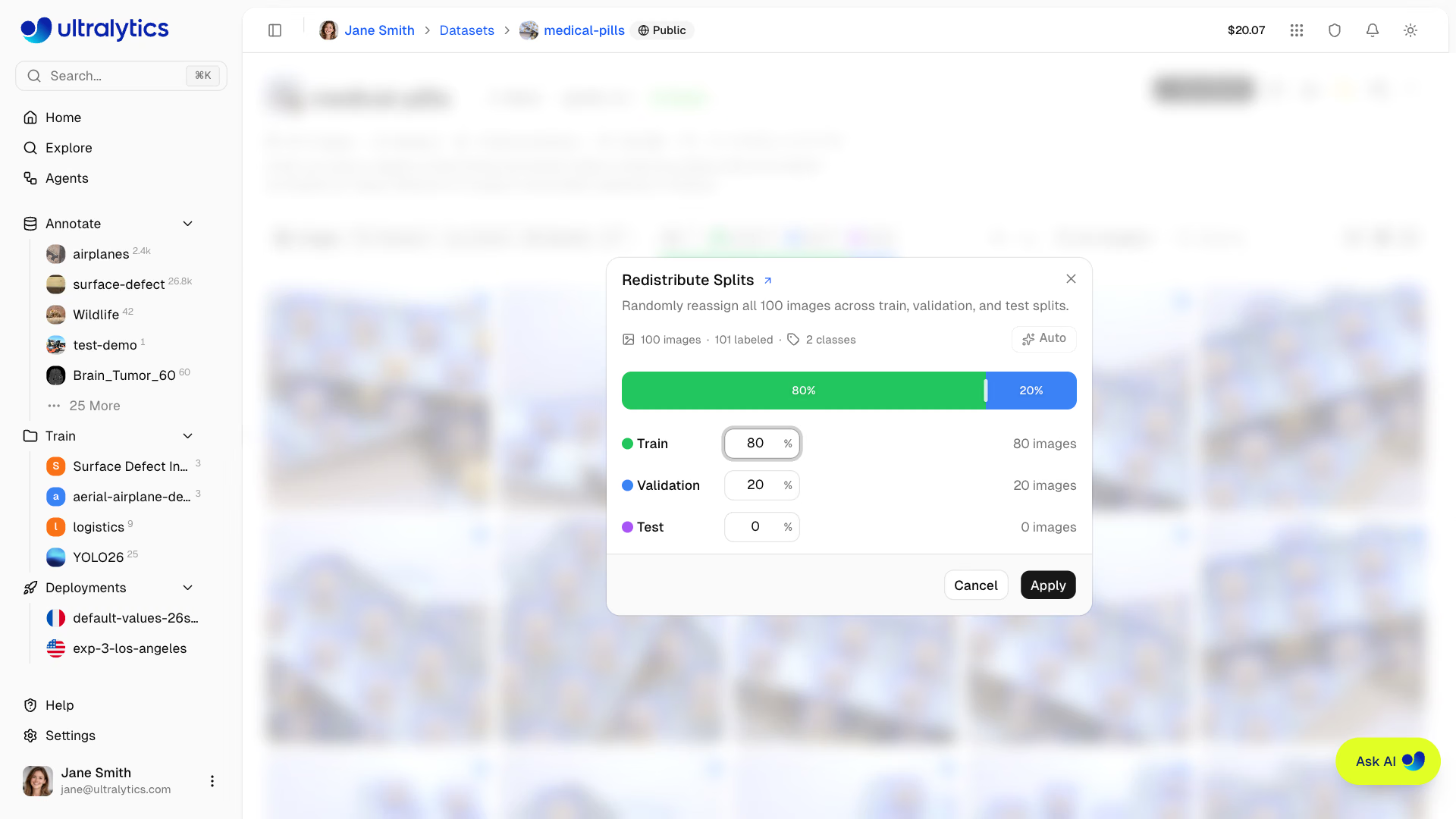
On Ultralytics Platform, Redistribute Splits reassigns images randomly, and Auto sets the recommended 80/20 train/val split (split docs). It removes exact duplicate images on the way but doesn't know your groups, so use it for independent captures, and upload grouped splits for video or multi-camera data.
Track two val sets separately#
You often want two val sets: a stable, curated regression suite and a production-realistic set that rotates with newly collected frames. The data YAML accepts a list of val folders, but it merges them into one val set with one score:
path: ./datasets/forklift
train: images/train
val:
  - images/val_curated      # stable, your regression suite
  - images/val_production   # rotates with newly collected frames
test: images/test
To see each score, keep one data YAML per val set (same train and names, different val) and validate the trained weights against each:
from ultralytics import YOLO

model = YOLO("runs/detect/train/weights/best.pt")  # your fine-tuned checkpoint
for data in ("val_curated.yaml", "val_production.yaml"):
    metrics = model.val(data=data)
    print(f"{data:<20} mAP50-95={metrics.box.map:.3f}")
A drop on the curated set is a regression; a drop on the production set is domain shift.
Lock the test set#
The most expensive splitting mistake is comparing ten model variants on the test set. Once test has influenced any decision, the final number is optimistic. Do all tuning and run comparison on val, and run the acceptance test on test once, at the end.
Every metric you publish is tied to this split. Re-shuffling later changes every number and makes old and new runs incomparable. Keep the split unit, the seed, and the three file lists with the dataset.
K-fold cross-validation for small datasets#
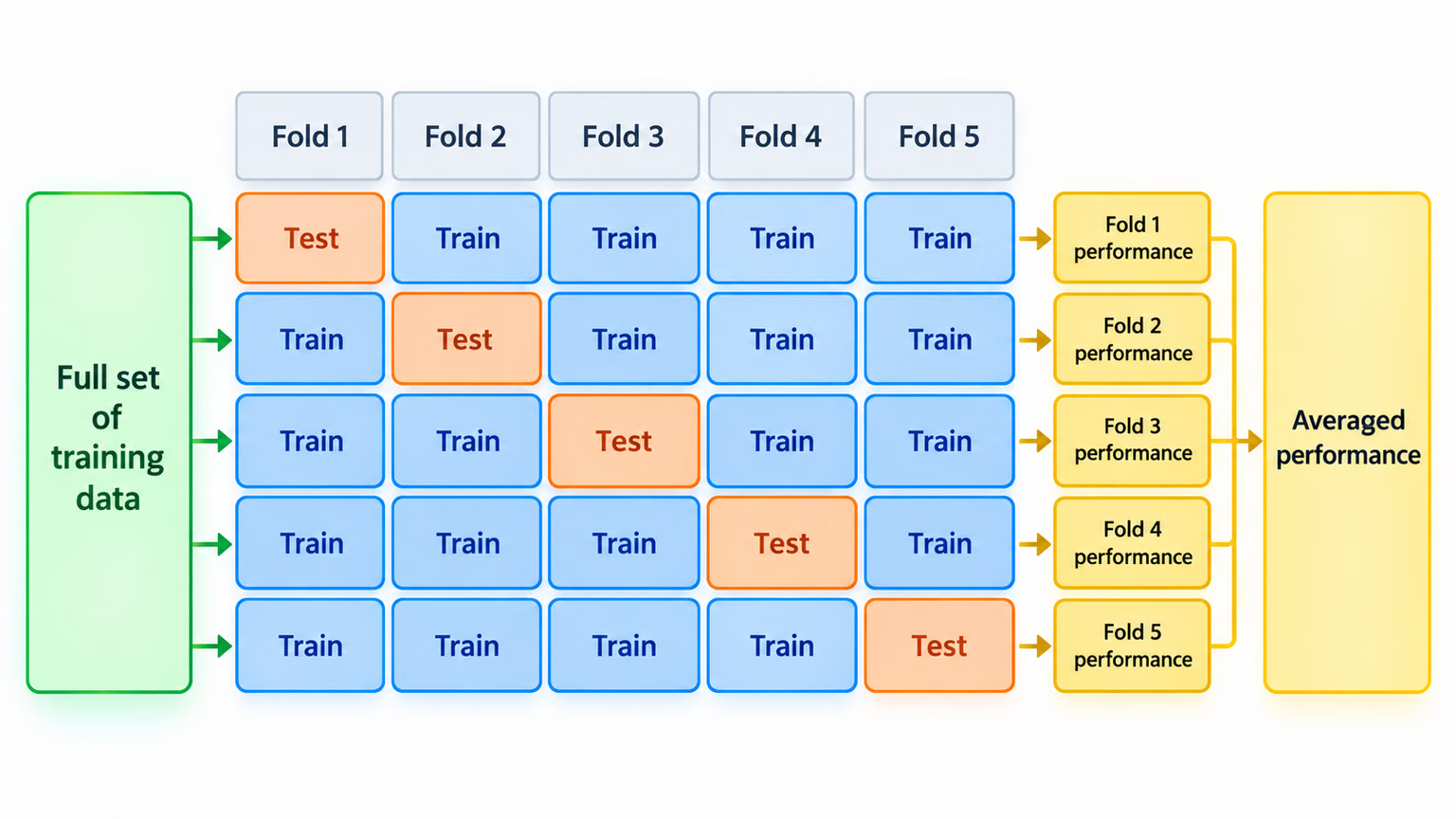
When the dataset is small (under about 500 images per class) and a single split feels statistically flimsy, K-fold cross-validation trains k models on rotating splits and averages the result: k times the compute for a much steadier estimate. Build the folds from groups the same way, or every fold leaks.
Show solution
For fixed warehouse cameras that must keep working on new days, split by camera-day: cam2_2026-05-01. After group_split.py, verify that no group crosses a split boundary:
from pathlib import Path

root = Path("datasets/practice")
groups = {s: {Path(p).stem.rsplit("_", 1)[0] for p in (root / f"{s}.txt").read_text().split()} for s in ("train", "val", "test")}
print("train & val: ", groups["train"] & groups["val"] or "none")
print("train & test:", groups["train"] & groups["test"] or "none")
print("val & test:  ", groups["val"] & groups["test"] or "none")
train & val: none
train & test: none
val & test: noneThe practice split passes the leakage check but fails the coverage check: val misses 36 of 71 classes. The fix is a collection plan, not a reshuffle. Capture at least two more camera-days for val and test, each covering the classes the spec cares about most, and rerun both scripts.